Choose a gaming monitor that suits your gaming PC, desk and, if applicable, work computer. For voice chat with your team, you’ll also need a separate microphone or headset as an input device. An adjustable QHD LCD screen may be a good fit if you also read a lot of text, while a higher refresh rate or OLED is mainly worth considering if fast-moving game visuals or OLED picture quality matter more to you. Check that each model has the connections and audio features you need.
Who is this relevant to?
Team gamer who uses voice chat
You practise call-outs and want to keep an eye on both your game and chat. To speak, you’ll also need to set up a suitable microphone as an input device. Discord Support explains how to select your input and output devices in the app.
Home worker who also games
You use the same screen for text, meeting windows and games. So consider readability, screen height and how it connects to your work computer. Arboportaal recommends a well-adjusted workstation.
Competitive team player
You prioritise smooth motion in fast-paced team games, provided your PC and connection support the screen refresh rate you want. Check the stated refresh rate and operating mode for the exact model.
What should you look for?
First, decide how you’ll connect voice chat and how the screen will fit your workspace. Then compare its refresh rate and other features with your computer and how you’ll use it.
| What to consider |
What should you look for? |
Who is this important to? |
| Hearing your teammates and being heard |
Check that you have a microphone or headset, then select your input and output devices separately in your chat software. |
If I want to practise call-outs, my microphone needs to work as an input device; around 36% of consumers rank spoken team communication as their top buying priority. |
| Readability and screen set-up |
Consider the resolution in relation to the screen size and viewing distance. Also check the height adjustment and connection for your work computer. |
If I want to use the same screen for work documents and games, I look for good readability and a suitable set-up. Around 29% of consumers prioritise this combination. |
| Smooth visuals in fast-paced team games |
Check the refresh rate at your chosen resolution and input, and distinguish between standard use and overclocking. |
If fast movement in team games matters most to me, I check that my system can handle the refresh rate I want. Around 21% of consumers prioritise fast-moving game visuals. |
| Total purchase and running costs |
Check whether you’ll also need a microphone, headset, cable or separate laptop charger for your set-up. |
If I want to keep the complete set-up affordable, I factor in any extra peripherals I need. Around 14% of consumers say total costs are their main priority. |
Things to consider before buying
-
Assuming built-in speakers include a microphone
Monitor speakers provide audio output, but they don’t replace a microphone you can speak into.
Check audio input and output separately in your chat software, and test your microphone before practising with your team. Discord Support also explains how to test a microphone.
You may still need a separate microphone or headset.
-
Comparing the highest Hz figure without checking the port or mode
A stated overclocked figure or maximum for one input doesn’t mean the same refresh rate is available through every connection.
Check the resolution, input and standard or overclocked mode in the specifications for the exact model.
-
Choosing an OLED gaming screen without considering fixed work windows
Image retention can be a concern if the same static elements are displayed for long periods. Tweakers also mentions text fringing on the Gigabyte MO27Q2A.
Weigh the time you spend with static work windows against your preference for OLED picture quality, and check the information for the specific panel.
-
Assuming a manufacturer’s warranty covers all your statutory rights
A manufacturer’s warranty and your statutory rights when a product is faulty are not the same thing.
Keep your purchase and product information, and contact the seller if something is wrong. ACM ConsuWijzer explains that your statutory warranty exists alongside a seller’s or manufacturer’s warranty.
Brands to consider
ASUS
The ROG Strix XG27ACS is a QHD IPS model for a shared gaming and work set-up.
- ASUS lists a maximum refresh rate of 180 Hz and 120 mm of height adjustment for this model.
- USB-C supports video; ASUS specifies 7,5 W power delivery through this connection.
- According to ASUS, this model has no speakers. ASUS lists a maximum of 144 Hz over HDMI.
AOC
The Q27G4ZR is a QHD Fast IPS model for anyone looking for a high refresh rate.
- AOC lists 240 Hz as standard and up to 260 Hz when overclocked.
- The 260 Hz figure applies when overclocked. Check that your system and chosen connection support the mode you want.
Gigabyte
According to Gigabyte, the MO27Q2A combines a QD-OLED panel with KVM and USB-C.
- Gigabyte specifies QHD resolution and a maximum refresh rate of 280 Hz for this model.
- Gigabyte lists up to 18 W of USB-C power delivery. Tweakers notes text fringing on this model, so bear that in mind if you read a lot of text.
LG
The UltraGear 27GS75Q-B is a QHD IPS model with height adjustment.
- LG lists a maximum refresh rate of 180 Hz and height adjustment for this model.
- LG doesn’t specify a microphone input and marks this model as discontinued.
MSI
According to MSI, the MAG 274QRF QD E2 is a QHD Rapid IPS model.
- MSI lists a refresh rate of 180 Hz for this model.
- A stated refresh rate doesn’t tell you whether a built-in microphone is included; check the audio features separately.
Gaming monitors at Joybuy
These models are suited to gaming and combining work and gaming on one screen. Check that the specifications of each model suit your computer, workspace and audio set-up.
 No image available
MSI MAG 272QPF E20 27-inch QHD 200 Hz Rapid IPS
Worth considering if you’re looking for QHD and a higher refresh rate for gaming and work windows.
Specifications in the product name: 27 inch, QHD, 200 Hz and Rapid IPS.
For spoken call-outs, you’ll also need a working microphone input device.
View at Joybuy
 No image available
LG UltraWide 34U640B-B 34-inch WQHD 144 Hz curved VA
Worth considering if you want to use one screen for both work and gaming.
Specifications in the product name: 34 inch, WQHD, 144 Hz, curved and VA.
For spoken call-outs, you’ll also need a working microphone input device.
View at Joybuy
 No image available
Philips Evnia 27M2N3500NF 27-inch QHD IPS 144 Hz
An option if you’re looking for a QHD gaming monitor that’s also suited to everyday productivity.
Specifications in the product name: 27 inch, QHD, IPS and 144 Hz.
For spoken call-outs, you’ll also need a working microphone input device.
View at Joybuy
 No image available
INNOCN 2751S PLUS 27-inch Mini LED QHD IPS 275 Hz
Worth considering if you’re looking for a high stated refresh rate for gaming and office work.
Specifications in the product name: 27 inch, Mini LED, QHD, IPS and 275 Hz.
For spoken call-outs, you’ll also need a working microphone input device.
View at Joybuy
 No image available
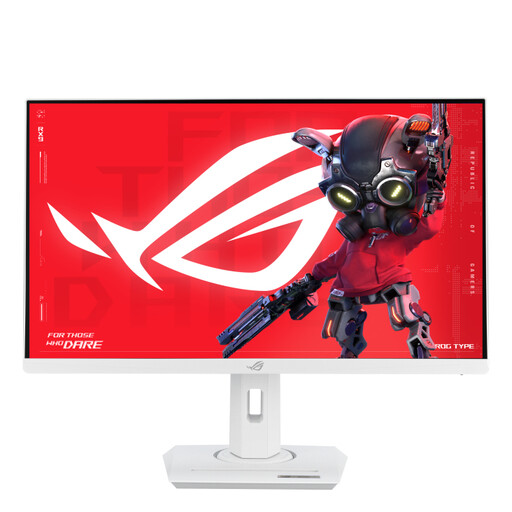
ASUS ROG Strix XG27ACS-W 27-inch Quad HD LCD, white
Worth considering if you’re looking for a 27-inch Quad HD screen for gaming and work.
Specifications in the product name: 27 inch, 2560 × 1440 pixels, Quad HD, LCD and white.
For spoken call-outs, you’ll also need a working microphone input device.
View at Joybuy
Frequently asked questions
Can I practise spoken team communication with just a gaming monitor?
No. For team voice chat, you’ll need a working microphone input device. In Discord, select the correct audio input and output separately, and use the microphone test if needed.
How should I set up the screen if I also work from home?
Adjust your workspace to suit you and check that you can set the screen to your preferred height. Arboportaal states that for employees who work at a screen for more than 2 hours a day, the screen and keyboard must not be attached to each other; this is not a general buying requirement for every gamer.
Will every USB-C gaming monitor charge my work laptop?
No, the power delivery specified varies by model and may be limited. ASUS lists 7,5 W for the XG27ACS and Gigabyte lists up to 18 W for the MO27Q2A. Also check whether your laptop supports video through that connection and how much power it needs.
What are my rights if a monitor I bought online isn’t suitable or develops a fault?
For online purchases, you generally have a statutory 14-day cooling-off period from delivery; check whether a legal exception applies. A fault is a separate matter: ACM ConsuWijzer explains that your statutory warranty exists alongside a manufacturer’s or seller’s warranty, and that you can contact the seller if something is wrong.
Which product rules apply to a monitor in the Netherlands?
The European Commission lists electrical and electronic equipment among the product categories that may be subject to EU CE marking rules. The requirements depend on the product; this general information doesn’t confirm that an individual item has been checked separately.


