
Frame-by-frame analyst
Wants to assess details, text and movement in footage, so looks beyond the stated refresh rate. RTINGS distinguishes between a monitor’s refresh rate and the number of frames in the source.


Start by thinking about what you want to assess in the footage, who will be watching with you and how much space the screen can take up. IPS may suit you if wide viewing angles matter, while VA can be appealing if contrast is your priority and you sit directly in front of the screen. With OLED, give extra consideration to analysis elements that stay on screen for long periods. A high refresh rate won’t make the frames in existing footage more detailed.
Wants to assess details, text and movement in footage, so looks beyond the stated refresh rate. RTINGS distinguishes between a monitor’s refresh rate and the number of frames in the source.
Watches matches with someone sitting beside them and considers how consistent the picture remains when viewers aren’t sitting directly in front of the screen. RTINGS generally describes IPS as having wider viewing angles than VA.
Needs to fit the screen on a desk in a shared room and wants to consider viewing position, reflections and sound. Arboportaal identifies factors such as glare and light sources in your field of vision as things that can affect readability.
A good fit if: you regularly watch with someone who isn’t sitting directly in front of the screen.
Trade-off: RTINGS generally describes wider viewing angles than VA, but typically lower contrast.
A good fit if: you mostly sit directly in front of the monitor and contrast matters for dark images.
Trade-off: RTINGS generally describes narrower viewing angles than IPS, which can make watching together from the side less convenient.
A good fit if: contrast and fast pixel response matter, and you also take analysis elements that remain visible for long periods into account.
Trade-off: RTINGS notes that earlier accelerated burn-in tests did not accurately reflect normal monitor use; they don’t provide an exact risk estimate for your usage.
| Concern | What to look for when buying | Who is this important to? |
|---|---|---|
| Details in footage | Match the screen size and resolution to your desk space and viewing distance; check that text and the timeline are easy to read. | If I want to assess small visual details and text in footage, I look at both the resolution and how readable the screen is from where I sit. Around 33% of consumers say details in footage are their main buying concern. |
| Watching together | Check how the picture looks from the seats you’ll use; compare specific models, not just panel types. | When we want to watch matches together from different places, a consistent picture matters to me. Around 27% of consumers give watching together their highest priority. |
| Bedroom space | Measure the available desk space and depth, including the stand; check the height adjustment and where the light sources are. | If I need to fit the screen on a shared desk and take light and sound into account, I look at the setup first. Around 20% of consumers say how well the monitor fits in the room is their main buying concern. |
| Playing fast-paced games yourself | Check the refresh rate your PC or console can actually deliver; compare response-time and overshoot measurements at that refresh rate. | If I also play at high refresh rates as well as watching replays, I want to know what my system can really deliver. Around 20% of consumers put fast-paced gaming above their other buying concerns. |
RTINGS distinguishes between a monitor’s refresh rate and the number of frames in the source. A monitor with a higher Hz figure doesn’t add frames to existing footage.
Check the refresh rate of your source and compare monitors based on how you’ll use them: watching replays doesn’t automatically call for the same things as playing fast-paced games yourself.
A response-time figure on its own doesn’t tell you how the monitor handles blur or overshoot at the refresh rate you use.
Look for measurements at the refresh rates you use for gaming and watching footage; adjust the overdrive settings if you notice visible artefacts.
If analysis elements remain visible for long periods, it’s worth considering the OLED trade-offs and the lighting in your room. Accelerated tests don’t provide an exact prediction for normal use.
Consider how long static interface elements stay on screen and check the terms for the specific model.
The Q27G4ZR is a 27-inch QHD IPS option for anyone looking for a high refresh rate. These details apply to this model only, not automatically to other AOC monitors.
The MO27Q2A is a QD-OLED model for anyone who also considers contrast and their own gaming when watching replays.
The AW2725D is a QHD QD-OLED model for anyone who wants a high refresh rate for gaming as well as a monitor for assessing footage.
The UltraGear 27GS75Q-B is an example of a 27-inch QHD IPS model with an adjustable stand.
This Joybuy selection includes portable IPS monitors and gaming monitors with IPS or OLED screens, in a range of sizes and resolutions.
 No image available
A portable IPS option for anyone who also values the stated 2.5K resolution when watching replays.
According to the product name: 144 Hz, 16:10 aspect ratio, 2 USB-C ports, Mini HDMI and a kickstand. Check that the connections are compatible with your source device.
 No image available
A 27-inch option for anyone who wants to use a gaming monitor for office work too.
The product name lists a 2K resolution and a 200 Hz refresh rate. Check which refresh rate your PC or console can deliver at the resolution you choose.
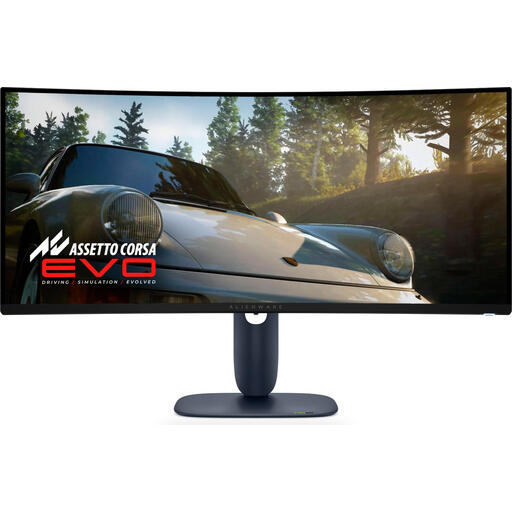 No image available
A 34-inch QD-OLED option for anyone who wants to consider a large screen and OLED when watching replays.
The product name lists a resolution of 3440 × 1440 pixels. If static analysis elements remain visible for long periods, also consider the points to bear in mind with OLED; accelerated tests don’t directly predict normal use.
 No image available
A 34-inch option for anyone considering a QD-OLED screen for assessing footage.
The product name lists a resolution of 3440 × 1440 pixels, 175 Hz via DisplayPort and 100 Hz via HDMI. Check which connection you’re using; the stated refresh rate varies by connection.
 No image available
A 27-inch QHD option for anyone who wants to examine details and also play fast-paced games themselves.
The product name lists a resolution of 2560 × 1440 pixels, 240 Hz via DisplayPort and 144 Hz via HDMI. Check which connection you’re using and the refresh rate your source device supports.
No. A monitor’s refresh rate doesn’t determine how many different frames the recording contains. For analysis, focus on the source quality and readability; a higher refresh rate is mainly relevant if you also play games at high refresh rates yourself.
First, measure the space for the screen and stand, then choose a viewing position that works for everyone watching. Bear reflections in mind and check for a headphone socket if monitor audio could disturb others.
Not necessarily, but consider static elements that remain visible for long periods and the terms for the specific model. RTINGS notes that earlier accelerated burn-in tests didn’t accurately replicate normal monitor use; they can’t be used to determine an exact risk for your usage.
According to ACM ConsuWijzer, online purchases generally come with a statutory cooling-off period of up to 14 days after delivery; check whether any exceptions apply. The legal guarantee is separate from any manufacturer’s warranty: if a product doesn’t perform as you could reasonably expect under normal use, contact the seller.