What should you look for when buying?
If you’re choosing a monitor for survival horror in a shared bedroom, it helps to start by deciding which factor matters most: dark-scene performance, quiet audio, desk space or compatible display settings.
OLED
Best for playing in a dark room when deep blacks and bright details alongside dark areas matter.
Consider game interfaces or desktop images that stay static for long periods; also check the terms for the exact model.
VA LCD
Best for anyone who values contrast in a dark room but doesn’t want OLED.
Consider dark movement can look smeared on some models; a quoted minimum response time doesn’t show how all dark transitions look.
IPS LCD
Best for anyone who may view the screen from another angle or values motion handling.
Consider IPS generally offers less contrast in a dark room than VA; check the black uniformity of the exact model.
| What to consider |
What should you check? |
Who is this especially important for? |
| Dark scenes |
Compare the contrast and black uniformity of the exact model. With VA, also look out for dark smearing, and with OLED, bear in mind the effect of static images left on screen for long periods. RTINGS discusses these panel trade-offs. |
If I want to distinguish dark details from bright highlights in horror scenes, I put picture quality first. Consumers whose top priority is dark-scene performance account for around 33% of this comparison. |
| Quiet audio |
Check whether you can connect your headphones to the monitor or directly to your PC or console. If you want to route audio through the monitor, check which outputs are available. |
If I share a bedroom, I want to listen to game audio through headphones. Consumers who prioritise a quiet audio solution account for around 27% of this comparison. |
| Desk space and viewing position |
Measure the available width and depth, then compare them with the monitor’s dimensions including the stand. Check which adjustments the exact model offers. |
On a shared or small desk, I want to position the monitor without losing sight of how much workspace I have available. Space and viewing position are the top priority for around 20% of consumers. |
| Smooth, compatible display |
Check which combination of resolution, refresh rate and input your PC or console supports. Assess motion handling separately from any quoted minimum response time. |
If I want my chosen display settings to work with my gaming device, I check the connections and supported signals. Compatibility and smooth display are the top priority for around 20% of consumers. |
Joybuy products
The Joybuy options below are OLED gaming monitors for anyone who values dark-scene performance and a high quoted refresh rate. For each model, check the audio connection, the required input signal and the space needed for the stand.
 No image available
Samsung LS27FG500SUXEN, 27-inch QHD OLED, 180 Hz
An OLED option to consider if dark scenes and audio through headphones matter to you; bear in mind the effect of static images left on screen for long periods.
The product description lists 180 Hz, FreeSync, G-SYNC Compatible and a headphone output. Check that your gaming device supports the display settings you want.
Joybuy
 No image available
MSI MAG 271QP X28, QD-OLED WQHD, 280 Hz
An option to compare if dark-scene performance and a headphone output matter to you; with OLED, bear in mind the effect of static images left on screen for long periods.
The product description lists QD-OLED, WQHD, 280 Hz and a headphone output. It also states that the stand offers height, tilt, swivel and pivot adjustment.
Joybuy
 No image available
LG Ultragear 27GX704A-B.AEU, OLED QHD, 240 Hz
An OLED model to compare for dark scenes; also bear in mind the effect of static images left on screen for long periods and check that its connections work with your gaming device.
The product description lists QHD (2560 × 1440), 240 Hz, two HDMI 2.1 inputs and one DisplayPort 1.4 input.
Joybuy
 No image available
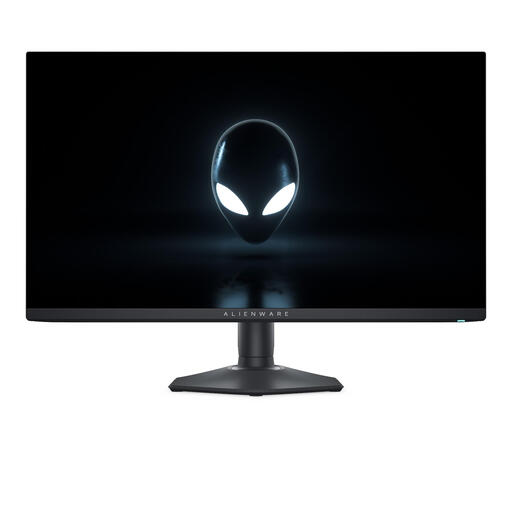
Alienware AW2725DF, 27-inch QHD QD-OLED, 360 Hz
A QD-OLED model to compare if dark scenes and a high quoted refresh rate are priorities; bear in mind the effect of static images left on screen for long periods.
The product description lists QHD, 360 Hz, adaptive sync and an adjustable stand. Dell doesn’t list built-in audio for the AW2725DF, so decide in advance how you’ll connect your headphones.
Joybuy
 No image available
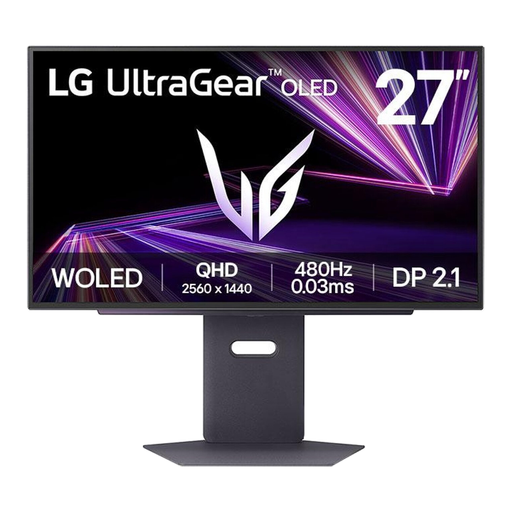
LG 27GX790A-B, 27-inch QHD OLED, 480 Hz
An OLED option to compare for dark scenes and fast display; check that your gaming device supports the display settings you want, and bear in mind the effect of static images left on screen for long periods.
The product description lists a resolution of 2560 × 1440 and DisplayPort 2.1.
Joybuy
Frequently asked questions
Is OLED always the best choice for horror in a dark room?
No, OLED isn’t automatically the right choice for every shared bedroom. It can be appealing for its black levels and fast pixel transitions, but static elements left on screen for long periods need consideration. VA can also deliver deep blacks, though motion handling should be checked for each model.
How can I connect audio without disturbing my room-mate?
Decide whether to connect your headphones to your PC or console, or route audio through the monitor. If you need the latter, check the connections on the exact model; BenQ lists a headphone jack on the EX2710Q.
What should I measure before putting a monitor on my desk?
Measure the available desk width and depth, then compare them with the monitor’s dimensions including the stand. Next, check whether its height adjustment suits your viewing position.
What can I do if my monitor turns out to be faulty after purchase?
If a product turns out to be faulty in the Netherlands, contact the seller. The Dutch Government lists a free repair or replacement as a possible solution; check any additional warranty terms for the exact model separately.
What energy label does a monitor have in the Netherlands?
According to the European Commission, computer monitors are covered by European energy labelling and ecodesign rules. The energy label runs from A to G and provides information to help compare screens, including energy consumption in HDR mode.


