What to look for in a gaming monitor for survival games
First, decide where you’ll connect your headset, then check which display mode your PC or console supports through the port you plan to use. Finally, choose a panel and consider screen care in light of how you play.
| What to consider |
What to look for when buying |
Who is this important for? |
| Audio connection and headphone output |
Decide whether you’ll connect your headset to your PC, console or monitor. If you’re connecting it to the monitor, check which audio features the output on the exact model supports. |
If I want to connect my headphones to the monitor, I want to be sure that connection will work with my headset. Around 25% of consumers prioritise having a working headphone connection. |
| Dark scenes and image detail |
Compare the resolution, panel type and substantiated contrast or HDR specifications for the exact model. Also check whether fixed game menus stay on screen for long periods. |
When dark game worlds are full of fine details, I want to know which picture features the model actually specifies. Around 25% of consumers give visibility in dark scenes top priority. |
| Smooth motion |
Check the maximum refresh rate for the input and resolution you’ll use. Only compare response times if the measurement method, such as GtG or MPRT, is clearly stated. |
If smooth-looking motion matters to me, I want to know what refresh rate my source device can actually deliver. Around 19% of consumers put smooth visuals at the top of their list. |
| PC or console compatibility |
Check which display mode is supported by your device, input and cable. For a PS5 and QHD monitor, also check which modes are available in the video settings and the game in question. |
When I switch between PC and console, I want the chosen resolution and refresh rate to work with my device. Around 19% of consumers make compatibility their main concern. |
| Long-term use and care |
Check the adjustment options and care instructions for the specific model. Compare the energy labels and stated power consumption of the models you’re considering, including the usage mode the figures apply to. |
If I play for long sessions, I want to consider care and everyday use as well as picture settings. Around 12% of consumers prioritise long-term use and screen care. |
Joybuy products for QHD gaming
This selection features QHD gaming monitors with IPS and VA panels, chosen for image detail and refresh rate. If you want to connect your headphones to the monitor, check that the exact version has the output you need.
 Image unavailable
Samsung Odyssey G5 G50F 32-inch IPS 180Hz LS32FG502EUXEN
A QHD option to consider if you’re looking for an IPS panel and a headphone output on the monitor; check that the display mode suits your source device.
32 inch; IPS; 2560 × 1440; up to 180 Hz; headphone output.
View at Joybuy
 Image unavailable
MSI MAG 272QPF E20 27-inch WQHD 200Hz
An option to consider if you’re looking for a WQHD IPS screen with a high stated refresh rate for PC gaming; check which mode your connection supports.
27 inch; WQHD 2560 × 1440; IPS; 200 Hz.
View at Joybuy
 Image unavailable
AOC Gaming Q27G42XNE 27-inch QHD 180Hz
A QHD VA-panel option to compare if resolution and refresh rate matter to you; choose a mode that suits your PC or console.
27 inch; QHD 2560 × 1440; VA; 180 Hz; FreeSync Premium.
Inputs according to the product title: 2 × HDMI 2.0 and 1 × DisplayPort 1.4.
View at Joybuy
 Image unavailable
KTC H32S17 32-inch QHD 180Hz 1500R HVA
A curved QHD option to consider if you’re looking for a 1500R curve; check that the size and display mode suit your gaming space and source device.
32 inch; 2560 × 1440; 180 Hz; 1500R; HVA panel.
View at Joybuy
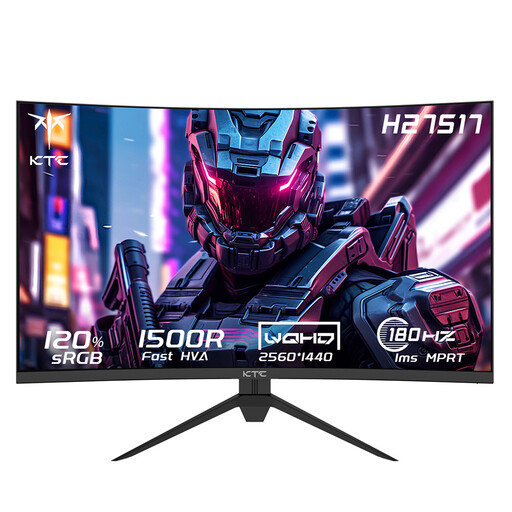 Image unavailable
KTC H27S17 27-inch QHD 180Hz HVA 1500R
A more compact curved QHD model to compare if you’re looking for a 1500R screen with a stated refresh rate of 180 Hz.
27 inch; 2560 × 1440; 180 Hz; HVA panel; 1500R.
View at Joybuy
Frequently asked questions
Does my monitor need a headphone output?
No, not if your headphones connect directly to your PC or console. For compatible wireless PlayStation headsets, PlayStation describes using a USB adapter connected to the console. If you want to plug your headphones into the monitor, check the output and the audio and microphone features supported by the exact model.
Will a standard Bluetooth headset connect directly to the PS5?
No. According to Sony Netherlands, the PS5 doesn’t support a direct Bluetooth audio connection with a standard Bluetooth headset. Depending on the headset model, Sony suggests using an audio cable connected to the DualSense controller’s 3.5mm jack or a separate adapter. Sony doesn’t guarantee the performance of third-party adapters.
How do I check whether my PS5 outputs 1440p and 120 Hz to my monitor?
On your PS5, go to Screen and Video and select ‘Test 1440p Output’. PlayStation describes tests for 60 Hz, 120 Hz and VRR, among other modes. The display and game must also support 120 Hz output.
How should I care for an OLED monitor during long gaming sessions?
Follow the screen care instructions for the exact model. LG says that static elements left on screen for a long time, such as game menus, can cause temporary image retention. The menu structure may vary by model.
What information helps me compare monitor power consumption?
The European Commission describes an A to G energy label for computer monitors, with information that includes HDR use. Also compare screen size and the stated power consumption of the specific models; the letter alone won’t tell you what your electricity costs will be.
What are my rights if a monitor bought online disappoints or breaks down too soon?
ACM ConsuWijzer says you generally have a statutory 14-day cooling-off period after delivery for a standard online product purchase, although exceptions apply. If a product is faulty, the seller must resolve the issue under the Dutch statutory guarantee; there isn’t automatically a fixed two-year deadline.


