Joybuy monitors for this type of setup
This selection includes compact Full HD models for a small setup and larger QHD models that combine gaming with studying. For each model, check that the dimensions, connection and viewing position you want will suit your desk and PC.
 No image available
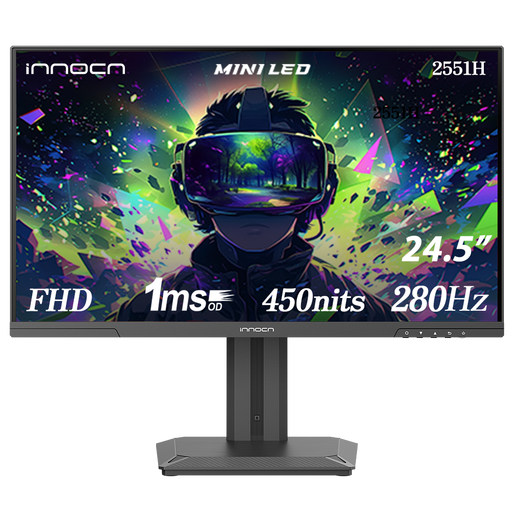
INNOCN 2551H 24.5-inch gaming monitor
The 24.5-inch screen and quoted 280 Hz refresh rate may suit anyone looking for a relatively compact display with a fast refresh rate; be sure to measure the space needed, including the stand.
Full HD 1080p, IPS and Mini LED are listed in the product name. The product information lists 280 Hz and 300 Hz with overclocking; the maximum quoted refresh rate via HDMI is 240 Hz. Check which mode is available through your connection.
The product information lists a height-adjustable stand.
View at Joybuy
 No image available
AOC GAMING Q27G4ZDR 26.5-inch QHD QD-OLED
The QHD resolution may suit anyone who also uses the screen for reading and studying; bear in mind that the larger screen size may take up more room on a small desk.
The product name lists 26.5 inches, 2560 × 1440, QD-OLED and 240 Hz. G-SYNC Compatible, VESA Adaptive-Sync and a height-adjustable stand are also listed.
View at Joybuy
 No image available
MSI MAG 272QP QD-OLED X24 26.5-inch
This larger QHD model may be a good option if you’ll use the same screen for studying and gaming; check that its size will fit your desk before you decide.
The product name lists QD-OLED, WQHD, 240 Hz, 2× HDMI, DisplayPort and USB Type-C. The product information lists a stand with height, tilt, swivel and pivot adjustment.
View at Joybuy
 No image available
AOC AGON PRO AG276QZD2 27-inch QHD
At 27 inches, this is a larger option for gaming and studying; measure your desk and viewing distance before you buy.
The product name lists QHD 2560 × 1440 and 240 Hz via DisplayPort or 144 Hz via HDMI. Height, pivot, swivel and tilt adjustment are also listed.
View at Joybuy
 No image available
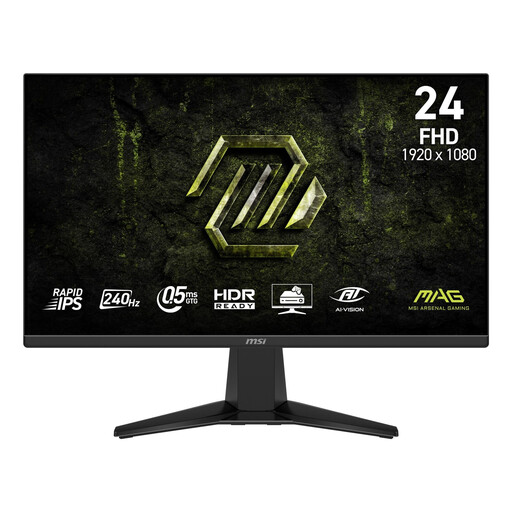
MSI MAG 245F X24 23.8-inch Full HD
The 23.8-inch screen and quoted 240 Hz refresh rate may suit anyone playing fast-paced competitive games at a desk with limited space; check whether tilt adjustment is enough for your viewing position.
Full HD and Rapid IPS are listed in the product name. According to the product information, the stand tilts but isn’t height-adjustable or swivel-adjustable.
View at Joybuy
Frequently asked questions
Does your PC need to reach 240 frames per second for a 240Hz monitor?
No. You can use a 240Hz monitor even if a game delivers fewer frames per second. Check how many frames your PC achieves in the game in question and whether the connection supports the screen mode you want; a 240 Hz specification doesn’t guarantee 240 game frames per second.
How do you position a gaming monitor on a small desk?
Measure the available space, including the stand, and check how it can be adjusted. According to Dell, the SE2426HG only tilts, while ASUS lists height adjustment for the VG249QML5A; always check the specifications for the exact model.
Does a 1 ms response time tell you everything about motion clarity?
No. A single response time figure doesn’t describe every pixel transition or how the picture looks in every mode. In its 2023 review of the AOC Q24G2A/BK, PC Monitors cautions against putting too much weight on individual GtG and MPRT figures; don’t assume that review’s conclusion applies to a different model.
What are your rights when buying online or if a product is faulty in the Netherlands?
For eligible distance purchases by consumers, you generally have 14 days to change your mind. Products must also be of satisfactory quality; according to the Dutch government, the retailer is your point of contact if there’s a problem, even if the manufacturer’s warranty has expired. Check who you’re buying from and what any additional warranty covers.
How do you compare monitor energy consumption?
Use the EU energy label as a point of comparison: according to the European Commission, the scale for electronic displays runs from A to G. To calculate costs, you’ll also need the monitor’s energy consumption, how long you use it for and your own electricity tariff.


