What should you look for when buying?
First check whether a monitor can power your laptop, then compare readability, how games are displayed and the space available on your desk.
| What to consider |
What to look for |
Who is this important for? |
| Fewer separate power supplies |
Check that your laptop supports USB-C video and that the monitor’s Power Delivery output is sufficient to power it while in use. The monitor still needs its own mains power supply. |
When I play on a laptop, I want to know whether one cable can provide both the picture and enough power. Around 36% of consumers prioritise avoiding a separate laptop power supply. |
| Sharp maps and text |
Compare 27-inch QHD with 27-inch 4K and view the interface at the resolution and scaling setting you actually want to use. 4K places a greater demand on your computer than QHD. |
When place names and menus matter most to me, I want to be able to read the interface from my usual viewing distance. Around 29% of consumers prioritise sharp maps and text. |
| Horizontal space |
Measure the space available on your desk and check that your game displays the preferred 21:9 format properly; a wide screen doesn’t guarantee extra usable game interface space. |
If I want to see the map and windows side by side, extra width matters to me, as long as my desk and game can accommodate it. Around 21% of consumers choose primarily for a wider view of the map. |
| Sound without separate speakers |
Check whether the exact model has built-in speakers and whether the sound is good enough for how you plan to use it. Having speakers doesn’t in itself say anything about sound quality. |
I’d rather not connect a separate speaker set if the built-in sound meets my needs. Around 14% of consumers prioritise sound without separate speakers. |
Joybuy products
These models include 27-inch and 34-inch options to help you compare map and menu text, horizontal space and connectivity for your own setup.
 Image unavailable
LG UltraWide 34U640B-B 34-inch WQHD curved monitor
A 34-inch 21:9 option if you’re looking for extra horizontal space and your game displays this aspect ratio properly.
3440 × 1440; 144 Hz; USB-C Power Delivery up to 65 W. Your laptop must support USB-C video and be compatible with up to 65 W; the monitor itself needs mains power.
View at Joybuy
 Image unavailable
KTC M27P6 27-inch 4K MiniLED gaming monitor, white
A 27-inch 4K option if fine map details are a priority and your computer can handle your preferred gaming display settings.
The product name lists 4K 160 Hz or FHD 320 Hz and Type-C with 65 W Power Delivery. Check your laptop’s requirements before expecting it to replace your laptop charger.
View at Joybuy
 Image unavailable
Philips 6000 Series 34B2U6603CH/00 34-inch monitor
An ultrawide option to compare if you want more horizontal space and your game supports the preferred display format.
34 inches; 3440 × 1440. Check the exact video connection and power specifications for your laptop.
View at Joybuy
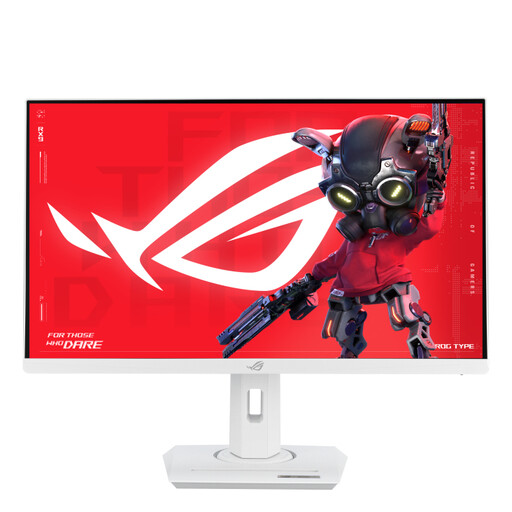 Image unavailable
ASUS ROG Strix XG27ACS-W 27-inch Quad HD monitor, white
A 27-inch QHD option to consider if you’re looking for a 16:9 screen for map and menu text.
2560 × 1440; specified USB-C Power Delivery is up to 7.5 W. Don’t expect it to replace your laptop charger.
View at Joybuy
 Image unavailable
MSI MAG 341CQP QD-OLED 34-inch ultrawide monitor
A 34-inch ultrawide option if you’re looking for extra horizontal space and your game displays this layout properly.
3440 × 1440; specified USB-C Power Delivery is 15 W. Don’t assume it will replace your laptop charger; the monitor also needs its own mains power supply.
View at Joybuy
Frequently asked questions
Can a USB-C monitor power both your laptop and itself through one connection?
With a compatible laptop, a suitable monitor may replace a separate laptop charger, but the monitor itself still needs mains power. LG lists up to 65 W Power Delivery for the 34U640B-B. Also check that your laptop supports video over USB-C and can work with that power output.
How can you compare monitor power consumption?
Compare the EU energy label and model-specific information in EPREL, paying attention to standard display and HDR. The European Commission explains energy labels for electronic displays; a monitor’s label doesn’t show the power consumption of your entire gaming setup, including your computer.
Can you connect extension leads together if you have limited plug sockets?
The Dutch fire service advises using undamaged extension leads and not connecting them together. It recommends plugging high-power appliances directly into a socket. This is general safety advice, not a calculation for a specific setup.
What are your rights if a monitor bought online disappoints or develops a fault?
For a standard online purchase, you generally have 14 days from delivery to change your mind; ACM ConsuWijzer notes that exceptions may apply. If a product is faulty, the retailer must provide a solution under guidance from the Dutch government. Statutory rights are separate from any additional service plan.
Are monitors covered by energy labelling rules in the Netherlands?
The European Commission includes computer monitors among the electronic displays that require an A–G energy label. This is information about EU rules for electronic displays, not a requirement for consumers to choose a particular energy class.


