
FPS player practising reaction times
Wants to track fast-moving action with as little screen delay and motion blur as possible. RTINGS.com distinguishes between input lag and pixel response time, so look beyond the Hz figure alone.


Start by checking the space available for both the screen and the stand. Then compare independent measurements of input lag and motion clarity at the settings your PC can handle. A higher refresh rate can help, but it doesn’t prove lower latency or a sharper image in motion. Also check which refresh rate is available through your connection.
Wants to track fast-moving action with as little screen delay and motion blur as possible. RTINGS.com distinguishes between input lag and pixel response time, so look beyond the Hz figure alone.
Wants to leave room for a keyboard and mouse, so compares not just screen size but also the stand and its adjustability. RTINGS.com suggests screens of around 24–25 inches as a possible size range for limited desk space.
Wants to know before buying what refresh rate their PC, connection and chosen monitor can support together. Manufacturers such as Dell and ASUS list different requirements for each model and input.
First choose a screen and stand that fit your desk. Then find out what refresh rate your PC can deliver through your preferred connection, and only then compare the relevant measurements.
Best for: a small workspace and a PC that doesn’t deliver exceptionally high frame rates. Philips lists the 23.8-inch 24M2N3201P/00 as supporting up to 260 Hz when overclocked.
Bear in mind: the maximum refresh rate won’t necessarily be available through every connection. Philips’ 0.3 ms Smart MBR is not an input lag measurement.
Best for: a setup where speed comes first and the PC can deliver the intended frame rate. Dell specifies up to 320 Hz via DisplayPort for the 24.5-inch AW2525HM.
Bear in mind: for the same model, Dell lists a maximum of 255 Hz at Full HD via HDMI. Check the stand dimensions too.
Best for: anyone who wants to consider specialist esports features and independent motion-clarity measurements. BenQ lists the XL2546K as a 24.5-inch, 240 Hz monitor with DyAc+; ASUS lists the PG248QP as supporting up to 540 Hz when overclocked.
Bear in mind: these are different models, and this isn’t a proven ranking of response times. ASUS lists PC requirements for the 540 Hz mode.
The percentages below relate to the first buying priority for a gaming monitor for reaction-time training on a small desk; they don’t represent measured market share.
| What to consider | What should you check? | Who might prioritise this? |
|---|---|---|
| Low screen latency | Compare independent input lag measurements at the resolution and refresh rate you use. RTINGS.com distinguishes between input lag and pixel response time. | I want my actions to appear on screen as directly as possible; around 29% of consumers put low screen latency first. |
| Space for the screen and stand | Measure the available width and depth, and check the dimensions and adjustability of the stand on the exact version. | I want to leave enough room for my mouse and keyboard; physical fit comes first for around 29% of consumers. |
| Motion clarity | Look at pixel response time and overshoot measurements at the refresh rate and overdrive setting you use. RTINGS.com describes motion blur and inverse ghosting as possible effects of pixel transitions. | I want to track fast-moving targets clearly; around 24% of consumers choose visibility of moving targets as their top priority. |
| Usable refresh rate | Check the maximum resolution and refresh rate for each input, as well as any PC and overclocking requirements for the exact model. | I want to use my chosen Hz setting with my own PC and cable; around 18% of consumers put connection compatibility first. |
Pixel response time, a motion-blur reduction feature and input lag describe different things. So a figure such as 0.3 or 0.5 ms doesn’t tell you directly how much delay there is before an image appears on screen.
Compare independent measurements of input lag and pixel response time with overshoot separately, using the settings you’ll actually use.
The stand also takes up space, while your keyboard and mouse need room to move freely. A screen of around 24–25 inches won’t automatically fit every small workspace.
Measure the available width and depth, then compare them with the dimensions of the stand on the exact version.
A different stand or monitor arm may involve extra costs and installation; also check that your chosen monitor is compatible.
The maximum refresh rate can vary by input and PC. Dell specifies up to 320 Hz via DisplayPort and up to 255 Hz via HDMI at Full HD for the AW2525HM. ASUS makes the PG248QP’s 540 Hz overclocked mode subject to PC requirements.
Before buying, check the input table and overclocking requirements for the exact model, then compare them with your PC’s connections and settings.
Dell positions the AW2525HM as a 24.5-inch Full HD Fast IPS monitor with up to 320 Hz via DisplayPort.
The Philips 24M2N3201P/00 is a 23.8-inch Full HD Fast IPS model with a Philips-listed overclockable refresh rate of 260 Hz.
According to BenQ, the XL2546K is a 24.5-inch TN monitor with 240 Hz, DyAc+ and a stand designed to take up less desk space. The XQ2566X is a different model: 24.1 inches, QHD, Fast TN and 360 Hz.
For the Dutch PG248QP, ASUS lists a 24.1-inch Full HD esports TN panel and up to 540 Hz when overclocked.
The LG 24GS60F-B is an example of a 23.8-inch Full HD IPS model listed at 180 Hz, with HDMI and DisplayPort.
This Joybuy selection includes gaming monitors with high listed refresh rates. Screen sizes vary, so compare the space required for both the screen and stand for each model.
 Image unavailable
A 25-inch Full HD model to consider if you’re looking for a high listed refresh rate for a limited workspace.
Fast IPS; up to 300 Hz via DisplayPort and up to 240 Hz via HDMI. The listed refresh rate alone doesn’t prove low input lag.
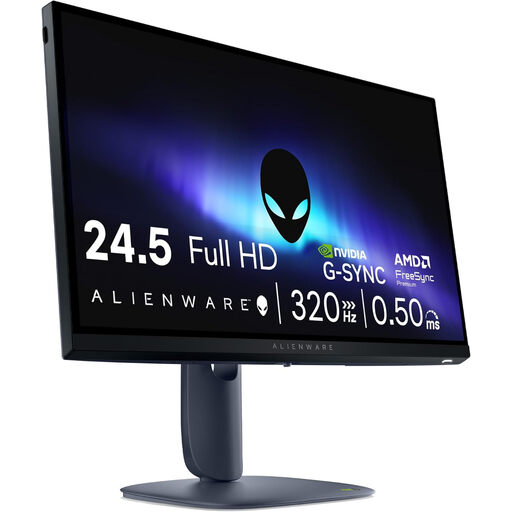 Image unavailable
A compact size to consider if you want to combine a high refresh rate with reaction-time training; check the space needed for the stand first.
Dell specifies up to 320 Hz via DisplayPort and up to 255 Hz via HDMI at Full HD for this model. These maximums aren’t independent input lag measurements.
 Image unavailable
The listed 24.5-inch size may suit a small workspace, but measure the stand and available desk depth too.
The product name lists 320 Hz and height and swivel adjustment.
 Image unavailable
An option to compare if you’re looking for a high listed refresh rate; check the exact screen size and stand dimensions before placing it on your desk.
The product name lists a VA panel, Full HD and 240 Hz. HDMI and DisplayPort are listed for this model.
 Image unavailable
This model has a larger screen than the roughly 24–25-inch size range often considered for limited desk space, so measure the available room carefully.
The product name lists QD-OLED, WQHD and 240 Hz, with HDMI, DisplayPort and USB Type-C.
No. A higher refresh rate doesn’t guarantee that a monitor has less input lag or displays moving pixels more clearly. Compare measurements at the settings you use, and check that your PC can deliver enough frames.
First check your PC’s output and choose a suitable connection: Dell specifies up to 320 Hz via DisplayPort and up to 255 Hz via HDMI at Full HD for the AW2525HM. Then select a supported refresh rate on your PC; HDMI alone doesn’t mean that 320 Hz is available.
Before buying, measure the space needed for both the screen and stand, and leave room for mouse movements. Place the monitor securely, keep ventilation openings clear, and follow the manufacturer’s cleaning instructions for your chosen model.
No. You don’t need an additional warranty to have statutory protection if a product is faulty. ACM ConsuWijzer states that if a product breaks sooner than expected during normal use, the seller is responsible for providing an appropriate solution free of charge; a commercial extended warranty has its own terms. For online purchases, there is generally a statutory 14-day cooling-off period after delivery, with some exceptions.
Computer monitors come under EU energy-labelling rules for electronic displays, which use a scale from A to G. The European Commission provides information about these labels for electronic displays. Compare the label for the exact model and, if necessary, consult the information behind the QR code or in EPREL. The label provides product information; it isn’t a requirement for using a monitor.