
Builder with limited desk space
Wants to leave room for a keyboard and mouse, so compares screen width and stand depth before prioritising refresh rate. Coolblue Netherlands points out that a 24-inch screen takes up less desk space.


Start with the space available on your desk: measure both the width and depth of the stand. AOC specifies a compact 23.8-inch Full HD screen for the 24G4X. If a 27-inch model will fit, QHD gives you more pixels for construction details, as with the LG 27GS75Q-B at 2560 × 1440 pixels. Choose 4K or a higher refresh rate only if your PC and connection support the mode you want, and you’ll also make use of that feature in other games.
Wants to leave room for a keyboard and mouse, so compares screen width and stand depth before prioritising refresh rate. Coolblue Netherlands points out that a 24-inch screen takes up less desk space.
Wants to see building elements and the game interface clearly, and weighs the benefit of extra pixels against the space taken up by a larger screen. Planet Coaster 2 describes building a park piece by piece.
Designs parks but also plays fast-paced games, so checks that the resolution, refresh rate, PC and connection all work together. AOC, GIGABYTE and MSI specify different resolution and refresh rate modes for their models.
First, measure the available space with your keyboard and mouse in place. Then compare the resolution and refresh rate mode your PC can actually support.
| What to consider | What should you check? | Who is this important for? |
|---|---|---|
| Desk space | Measure the usable width and depth, then compare them with the monitor’s dimensions, including the stand. LG lists a stand depth of 253.7 mm for the 27GS75Q-B; GIGABYTE lists 192 mm for the G27U. | I want to leave enough room for my mouse and keyboard, so I look beyond the screen size alone. Around 36% of consumers prioritise how well a monitor fits on their desk. |
| Visibility of construction details | Compare the screen size and resolution with the game interface and your viewing distance. AOC specifies a 23.8-inch screen with 1920 × 1080 pixels for the 24G4X; LG lists 2560 × 1440 pixels for the 27GS75Q-B. | If I want to make out small building elements and controls clearly, I weigh the benefit of extra pixels against the space needed for a larger screen. Around 29% of consumers prioritise construction details. |
| PC and connection compatibility | Check your PC’s video output, the cable and the monitor’s connection for your preferred resolution and Hz. The GIGABYTE G27U supports up to 160 Hz in UHD and 320 Hz in FHD. | I want to avoid choosing a screen mode that my PC or connection can’t support. Around 21% of consumers prioritise compatibility. |
| Use for fast-paced games | Check which resolution the stated maximum refresh rate applies to; a manufacturer’s specification doesn’t guarantee the same frame rate in a game. | If I play fast-paced games as well as designing parks, I look for the Hz mode that suits them. Around 14% of consumers give those other games the greatest consideration. |
The stand can determine how much desk space is left. For example, the stated stand depth differs between the LG 27GS75Q-B and the GIGABYTE G27U.
Compare the dimensions with the stand fitted against the usable depth of your desk. If you’re using a monitor arm, also check the VESA size, weight capacity and space for the clamp.
According to the manufacturer, the GIGABYTE G27U supports up to 320 Hz at FHD and up to 160 Hz at UHD; these maximums apply to different modes.
Check the resolution and refresh rate combination you want, and compare it with what your PC, connection and cable can support.
ACM ConsuWijzer states that statutory consumer rights apply even if the retailer or manufacturer does not offer a warranty, or its warranty has expired.
Check which additional risks a paid package actually covers, and treat that cover separately from your statutory rights.
The 24G4X is an example of a compact Full HD option; the Q27G4XF is a separate 27-inch QHD model.
The UltraGear 27GS75Q-B is a 27-inch QHD example with an adjustable stand and VESA mounting.
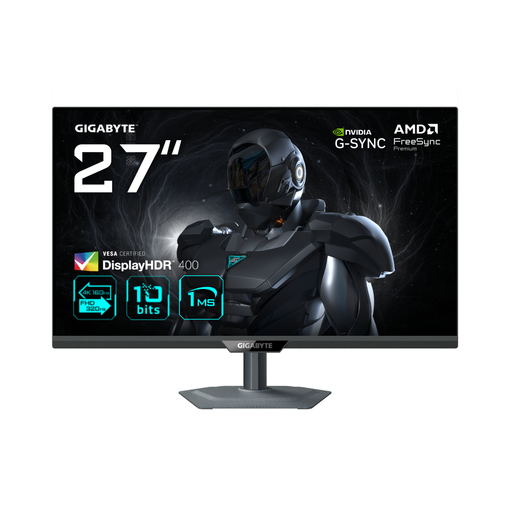
The G27U offers a 27-inch 4K mode and a separate FHD mode with a higher maximum refresh rate.
The curved MAG 275CQDF X24 is a 27-inch WQHD option for anyone who plays fast-paced games as well as designing parks.
This selection includes a compact gaming monitor and models for 27-inch QHD and 4K use. Check that each model’s dimensions and preferred screen mode suit your desk and PC.
 No image available
This option suits a compact setup in a small workspace. Before deciding, check the space available for the stand and controls.
Screen size according to the product title: 60.4 cm.
 No image available
This 27-inch option suits anyone looking for more pixels or a fast FHD mode too. Check that the screen and stand will fit on your desk.
According to GIGABYTE: 3840 × 2160 pixels at up to 160 Hz in UHD mode and up to 320 Hz in FHD mode. The stated stand depth is 192 mm; VESA mounting is 100 × 100 mm.
 No image available
This 27-inch option suits the QHD route if construction details matter to you. Check the desk space available and the dimensions of your setup.
Screen size and resolution according to the product title: 27 inches and 2560 × 1440 pixels.
Measure the available width and depth, leaving room for your keyboard and mouse. Compare these measurements with the monitor’s dimensions, including the stand. If you’re using a monitor arm, also check the VESA size, weight capacity and space for the mount.
VESA support means the monitor can be fitted to a suitable arm; it doesn’t mean the arm is included. LG and GIGABYTE list VESA 100 × 100 mm for the models discussed here. Check what’s included with the specific product offer.
Compare your PC’s video output with the monitor’s HDMI or DisplayPort input, then check the resolution and refresh rate combination you want. For the GIGABYTE G27U, GIGABYTE lists up to 160 Hz at UHD and 320 Hz at FHD.
According to ACM ConsuWijzer, ordinary online product purchases generally come with a statutory 14-day cooling-off period from the day after delivery. You’re also covered by statutory consumer rights if, under normal use, the product doesn’t meet what you could reasonably expect. The retailer must then offer an appropriate remedy under the law.
According to the Dutch government, when buying a new, similar electrical appliance, consumers can hand in their old one free of charge under the take-back scheme. This also applies to online purchases; check the return process with the retailer or delivery service.