What should you look for when choosing?
Start with the space available and the level of detail you want. Then check that the screen, stand and connections suit your desk and computer.
Compact 23.8-inch Full HD
A good fit if: desk space is your main priority and Full HD is enough for your game interface.
The trade-off: Full HD displays fewer pixels than QHD. Also check the screen height and leave room behind the monitor for cables.
27-inch QHD for more detail
A good fit if: you want more pixels for garden features and menus, and your desk has room for a larger screen.
The trade-off: a larger screen doesn’t guarantee that the stand will fit. Check the dimensions of the complete model and what your computer can support.
Curved 27-inch QHD
A good fit if: you specifically want a curved screen and have enough room for this size.
The trade-off: the curve and screen size don’t solve space constraints. Compare the full model code and dimensions, including the stand.
| What to consider |
What should you check? |
Who is this important for? |
| Desk space |
Measure the width and depth of your desk and compare them with the monitor’s dimensions, including the stand. Leave room for controls and cables too. |
If my desk is shallow, I want the monitor and stand to fit without taking over my workspace. Around 36% of consumers say desk space is their top priority. |
| Image detail |
Compare screen size and resolution, and see how large the interface appears in your game. |
I want to make out small garden features and in-game menus, as long as the screen and computer suit my setup. Around 29% of consumers put image detail first. |
| Viewing position |
Check whether the stand is height-adjustable, how far you can tilt the screen and whether it reflects light. |
For longer sessions, I want to position the screen to suit where I sit and check for distracting reflections. Around 21% of consumers make viewing position their top priority. |
| Refresh rate and connections |
Check the outputs on your computer or console, the monitor’s ports and the refresh rate available at your chosen resolution. Only compare response times when they use the same measurement method. |
If smooth motion is my priority, I want to make sure my equipment supports the setting I’m after. Around 14% of consumers start with refresh rate and connectivity. |
Brands worth comparing
These examples refer to specific models and product lines. The features listed don’t necessarily apply to every monitor from the same brand.
LG
The UltraGear 24GS60F-B is a specific 23.8-inch Full HD example for a compact gaming setup.
- LG lists an IPS panel, up to 180 Hz, VESA 100 × 100 mm and a depth of 180,5 mm including the stand.
- The included stand tilts, but check separately whether the screen height suits your seating position.
Philips
The Evnia models mentioned offer a compact Full HD version and a larger QHD version, letting you compare options for different space and detail requirements.
- Philips lists 180 Hz for the 23.8-inch Full HD 24M2N3200A/01 and 144 Hz for the 27-inch QHD 27M2N3500NF/00.
- Check the dimensions, including the stand, for the exact version. The two models don’t address the same space constraints.
Samsung
The Odyssey G5 LS27CG552EUXEN is a curved 27-inch QHD option for anyone prepared to make room for this size.
- For this full model code, Samsung lists 1000R curvature and a 165 Hz refresh rate.
- Check that the screen and stand will fit on your desk. The stated 1 ms MPRT isn’t the same as a GtG measurement for another model.
MSI
The G244F E2 is a 23.8-inch Full HD alternative with stated dimensions including the stand, making it useful for comparing space requirements.
- MSI lists dimensions of 541,9 × 231,9 × 424,3 mm including the stand, and VESA 75 × 75 mm.
- The stated maximum refresh rate of 180 Hz is available through the specified connections. Check the version on offer and its terms.
Acer
The Acer Store lists the Nitro VG240YG as a specific compact model.
- VG240Y is also used for other versions. Compare the full product name and manufacturer code of the model you’re looking at.
Joybuy product picks
The Joybuy picks below include compact Full HD gaming monitors and larger 27-inch QHD models for anyone looking for more image detail.
 No image available
KTC H24B9S 24-inch Full HD gaming monitor
A compact option if you’re looking for a 24-inch screen for a smaller desk.
The product name lists Full HD 1080p, IPS, 144 Hz and Adaptive Sync. HDMI and DisplayPort connections and a tilting design are also mentioned.
View at Joybuy
 No image available
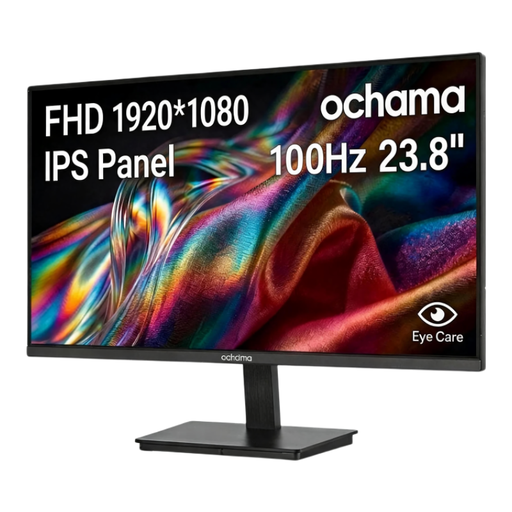
Ochama 23.8-inch gaming monitor, 1080p
A compact option if you’re looking for a 23.8-inch screen with Full HD resolution.
The product name lists 1080p and a 100 Hz refresh rate.
View at Joybuy
 No image available
Samsung LS27FG500SUXEN 27-inch QHD OLED gaming monitor
A larger option if you want to compare QHD for more image detail and have enough desk space.
The product name lists a 27-inch QHD OLED screen and 180 Hz. Make sure you have enough room for the 27-inch size.
View at Joybuy
 No image available
AOC Q27G42XNE 27-inch Quad HD monitor
A 27-inch QHD option to consider if image detail matters and the larger screen will fit on your desk.
The product name lists 2560 × 1440, 180 Hz, FreeSync Premium, HDR10, two HDMI 2.0 ports and one DisplayPort 1.4 port. Check that the connections suit your equipment.
View at Joybuy
 No image available
Philips Evnia 27M2N3500NF 27-inch QHD gaming monitor
A larger QHD option if you’re looking for more image detail and have room for a 27-inch monitor.
The product name lists IPS, 144 Hz, Adaptive Sync, DisplayPort 1.4 and HDMI 2.0. Check that your computer supports the resolution and refresh rate you want.
View at Joybuy
Frequently asked questions
Should I choose Full HD or QHD for a virtual garden?
Start by choosing a size that suits your desk and viewing distance. Full HD is a compact option at 23.8 inches; the Philips model mentioned is available in 27-inch QHD. Compare how your game interface looks and check that your computer supports the setting you want.
Can I use a monitor arm to free up desk space?
Only if the monitor, arm and mounting point are compatible. LG lists VESA 100 × 100 mm for the 24GS60F-B. Also check the weight limit, space available for the clamp and cable clearance.
What can I do if the screen isn’t at the right height?
Before buying, check what adjustments the stand offers and whether a suitable VESA mount is possible. LG lists tilt adjustment for the 24GS60F-B. Different Dutch rules may apply to employees’ workspaces and may not necessarily apply to private use.
Who should I contact if the monitor is faulty, and do I need an extended warranty?
According to the Dutch Government, the retailer is your point of contact for a solution if a product is faulty. An extended warranty doesn’t automatically replace your statutory rights, so check what additional situations it covers.
Can I return a monitor bought online if it doesn’t fit on my desk?
For many eligible consumer purchases made at a distance, the statutory cooling-off period is 14 days, according to the Dutch Government. Check the terms that apply to your purchase, and separately see whether the retailer offers a longer returns period.


