What should you look for when buying?
For tactical games on a small desk, the space needed for the stand and mouse, the motion clarity you want and the available connections determine which features to check first.
| What to consider |
What should you check? |
Who should pay particular attention? |
| Space for the stand and mouse |
Measure your desk’s width and depth, then compare them with the screen’s dimensions including the stand. Also check height adjustment and whether it supports VESA mounting. For example, ASUS lists the VG249Q3A as measuring 54,10 × 39,40 × 17,40 cm with the stand and supporting VESA 100 × 100 mm. |
If I want plenty of room to move my mouse, I need to know how much space the stand takes up. This is the top priority for around 36% of consumers. |
| Motion clarity |
Compare the refresh rate with what your computer can output, and look at independent tests of the exact model. A GtG pixel response time isn’t the same as overall motion clarity or input lag. |
For fast tactical games, I want to track movement clearly and match my choice to my system. Around 29% of consumers put motion clarity first. |
| Use beyond esports |
Consider panel type, resolution and adjustability alongside speed. Don’t assume a particular image quality based on the panel name alone. |
If I use the same screen for other tasks, I look for a balance that suits them too. Versatile picture quality is the top priority for around 21% of consumers. |
| Connection and refresh rate |
Check the maximum refresh rate for each input, as well as the output of your computer or console. For example, Dell lists a maximum of 360 Hz via DisplayPort and 255 Hz via HDMI for the AW2523HF. |
I want to be able to set my preferred picture mode using the connection I’ll actually use. Around 14% of consumers give connection compatibility top priority. |
Joybuy products for gaming on a small desk
These models are worth comparing for tactical games in a limited workspace, from portable screens to Full HD gaming monitors with different quoted refresh rates. Before you choose, always check the stand, the space you’ll need and the support available for each connection.
 No image available
Samsung Odyssey G4 G40H 25-inch FHD monitor
Compare this model if you’re looking for a Full HD gaming monitor with a high quoted refresh rate; check that your computer and connection can support it.
Fast IPS; up to 300 Hz via DisplayPort and up to 240 Hz via HDMI; 1 ms according to the product title.
View at Joybuy
 No image available
KTC H24B9S 24-inch FHD IPS gaming monitor
A model worth comparing if you’re looking for a 24-inch Full HD IPS screen for gaming; measure the stand and check that it will fit on your desk.
144 Hz; tilt-adjustable according to the product information; the title lists HDMI and DisplayPort.
View at Joybuy
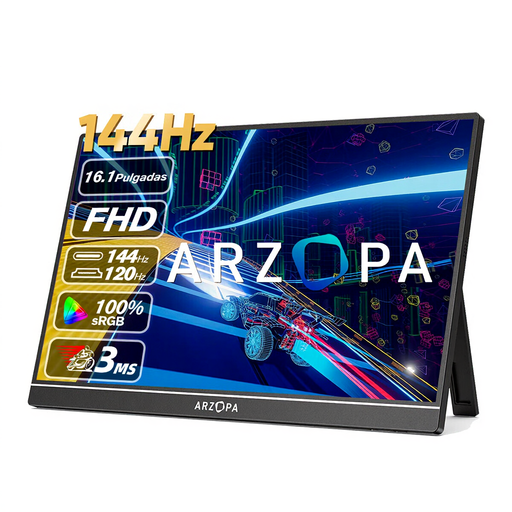 No image available
ARZOPA Z1FC 16.1-inch portable FHD monitor
A portable screen worth comparing if a smaller size and built-in stand suit your setup; check which connections your device needs.
144 Hz; Full HD; built-in kickstand according to the product title.
View at Joybuy
 No image available
TITAN ARMY C24A1H R1500 VA FHD monitor
Compare this model if you’re considering a Full HD screen with a high quoted refresh rate; check the stand dimensions and what your computer and connection can support.
240 Hz; VA panel; 16:9 according to the product title.
View at Joybuy
 No image available
ASUS TUF Gaming VG249Q3A 23.8-inch Full HD monitor
A model worth comparing for tactical games and everyday use; check that the supplied stand gives you the height and positioning you want.
IPS; up to 180 Hz. ASUS lists dimensions of 54,10 × 39,40 × 17,40 cm with the stand, which isn’t height-adjustable.
View at Joybuy
Frequently asked questions
Will a 24-inch monitor automatically fit my small desk?
No. Screen size doesn’t tell you how much room the stand takes up. Compare the width and depth of the screen with the stand against your desk, and leave enough space for your mouse. For example, ASUS lists the full dimensions of the VG249Q3A with the stand.
Why can’t I always get the maximum refresh rate?
The refresh rate you can achieve depends on the input you choose, your device’s output and the picture mode you’ve selected. For example, Dell lists a maximum of 360 Hz via DisplayPort and 255 Hz via HDMI for the AW2523HF.
What can I do if a monitor I bought online doesn’t fit or is faulty?
For a standard online consumer purchase, ACM ConsuWijzer says you generally have a statutory cooling-off period of up to 14 days after delivery, subject to applicable exceptions. If the monitor is faulty, the Dutch government says the seller is your point of contact for a solution, such as a free repair or replacement.
Where can I take my old monitor for recycling in the Netherlands?
The Dutch government lists options including returning it when you buy a new, similar device, or taking it to your local council’s recycling centre. Under the old-for-new scheme, the shop must take back a similar old device.


