What should you look for?
First, measure the space for the screen, stand and controls. Then compare your preferred aspect ratio and resolution with what your game supports and the outputs on your device.
| What to consider |
What to check |
Who is this important to? |
| Will the whole setup fit? |
Measure the available width and depth, then compare them with the dimensions including the stand. If you’re using a monitor arm, check the VESA pattern and mounting system too. |
If I need to fit a screen and controls on a cramped desk, I want to know whether the stand will take up too much room. Around 33% of consumers say physical fit is their main consideration. |
| Will a wider view improve gameplay? |
Check whether your game supports 21:9 and whether the complete monitor setup will fit in the available space. Samsung Netherlands lists the Odyssey G5 LC34G55TWWPXEN as 34 inches, with a resolution of 3440 × 1440 and a refresh rate of 165 Hz. |
If I want a wider cockpit view, I first want to know whether my game displays the wider aspect ratio. Around 27% of consumers prioritise a wider view of the game. |
| Are the interface and text easy to read? |
Compare the native resolution and screen size, and assess the interface from your intended viewing distance. MSI lists the MAG 274QRF QD E2 as 2560 × 1440 on a 27-inch screen; Samsung Netherlands lists the aforementioned Odyssey G5 as 3440 × 1440 on a 34-inch screen. |
If I want to read instruments and text clearly while playing, I consider the resolution, screen size and viewing distance together. Around 20% of consumers prioritise readability. |
| Will the picture mode you want work? |
Check the PC output, monitor port and cable together. For the MAG 274QRF QD E2 at 2560 × 1440, MSI specifies a maximum of 180 Hz via DisplayPort or compatible USB-C, and a maximum of 144 Hz via HDMI. |
If I’m connecting the monitor to my own device, I want to make sure the chosen input can handle the setting I want. Around 20% of consumers prioritise the combination of connectivity and smooth visuals. |
Joybuy products
This selection includes compact desktop monitors and portable screens for gaming setups with limited space. Check the connections and available space for the screen and controls for each model.
 No image available
MSI MAG 272QPF E20 27-inch 2K WQHD 200 Hz Rapid IPS gaming monitor
A 27-inch 16:9 option to compare if you’re looking for a desktop monitor rather than an ultrawide.
The product details list a resolution of 2560 × 1440, a refresh rate of 200 Hz, IPS, HDR and a response time of 0.5 ms. Check that your device and connection support the setting you want.
Joybuy
 No image available
TECLAST V16Q portable monitor, 16 inch, 2.5K, 144 Hz
A portable screen to consider if a smaller display area is important; check that its connections are compatible with your device.
The product details list a resolution of 2560 × 1600, a 16:10 aspect ratio, IPS, FreeSync, two USB-C connections and Mini HDMI.
Joybuy
 No image available
LG UltraGear 24G414B-B 24-inch Full HD gaming monitor
A 24-inch 16:9 option to consider if you’re looking for a smaller desktop monitor. Remember to measure the stand and the space you need for your controls.
The product details list a resolution of 1920 × 1080, a refresh rate of 144 Hz, DisplayPort, height and tilt adjustment, and VESA 100 × 100 mm.
Joybuy
 No image available
UPERFECT portable 16-inch 2K monitor, 144 Hz
A portable monitor to compare if you’re looking for a smaller screen; check which connections your device needs.
The product details list a resolution of 2560 × 1600, a 16:10 aspect ratio, QLED, Mini HDMI, Type-C and VESA compatibility.
Joybuy
 No image available
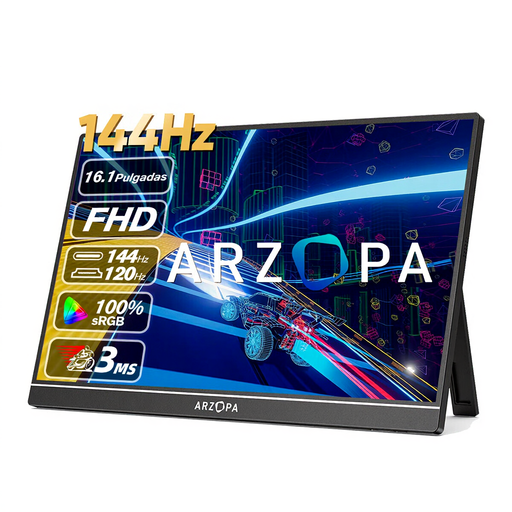
ARZOPA Z1FC portable 16.1-inch 144 Hz gaming monitor
A portable 16:9 option to compare if you want a smaller screen; check that the connections match your gaming device.
The product details list a resolution of 1920 × 1080, a refresh rate of 144 Hz, IPS, two USB-C ports and Mini HDMI.
Joybuy
Frequently asked questions
Will a monitor arm automatically fit a VESA monitor?
No. Compare the VESA pattern on the exact monitor with the one on the arm, and check the weight limit and how it attaches to your desk. MSI lists 75 × 75 mm for the MAG 274QRF QD E2; LG lists 100 × 100 mm for the 27GS75Q-B. These patterns are not the same.
Do I need to use DisplayPort for 180 Hz?
It depends on the monitor and device. For the MAG 274QRF QD E2 at 2560 × 1440, MSI specifies a maximum of 180 Hz via DisplayPort or compatible USB-C, compared with a maximum of 144 Hz via HDMI. So check the exact version and the output on your PC.
How do I compare monitor energy consumption?
Compare the energy label for the exact version. According to the European Commission, computer monitors are rated on a scale from A to G. Bear in mind that your own settings also make a difference.
What cooling-off period applies to an online purchase in the Netherlands?
ACM ConsuWijzer states that online purchases come with a statutory cooling-off period, which usually ends 14 days after the product has been delivered. Check the exceptions and the returns information that applies to your purchase.
Is the manufacturer’s warranty the only protection if a monitor breaks too soon?
No. According to ACM ConsuWijzer, your statutory warranty is separate from any seller’s or manufacturer’s warranty. If a product breaks sooner than you could reasonably expect under normal use, the seller must provide an appropriate solution at no cost. In the Netherlands, there is no fixed statutory two-year period that applies to every monitor.


