Who is this choice relevant to?

Gamers with limited desk depth

You want to leave room for your mouse and keyboard, so check the depth with the stand, the screen width and possible mounting options. GIGABYTE, LG and MSI publish dimensions and VESA measurements for the models mentioned.

Gamers who value smooth motion

For fast-paced squad matches, you’ll want to know which refresh rate your gaming device and connection can actually make use of, and which synchronisation features the screen supports. Manufacturers such as LG, AOC, MSI and ASUS list these capabilities; your PC’s output matters too.

Gamers weighing image quality against their set-up

You’re balancing detail and screen space against connections, adjustability and the room you have available. Lenovo points out that larger screens need more space, so check the dimensions of both the screen and its stand.

What should you look for when buying?

Compact monitor with a shallow stand

A good fit when: desk depth is your main constraint; compare the stand dimensions of the specific model with the space available.

Trade-off: a shallow stand doesn’t automatically mean the monitor is height-adjustable.

Full HD with a high refresh rate

A good fit when: your PC or console can deliver the refresh rate you want through the input you’ve chosen.

Trade-off: 180 Hz is a stated maximum, not a guarantee that your game will reach that many frames per second.

More screen space or a higher resolution

A good fit when: detail and screen space matter to you, and you have enough room to view and position the monitor.

Trade-off: a larger screen takes up more physical space; a higher resolution can also put more demand on your PC at high refresh rates.

What to consider What should you check? Who is this important for?
Desk space Measure the available width and depth, then compare them with the monitor’s dimensions including its stand. If necessary, also check the VESA measurement for the specific model. If I want to leave enough room for my mouse and keyboard, I look at the whole stand rather than just the screen size. Around 36% of consumers put desk space first.
Smooth motion Check the maximum refresh rate for each input, your device’s video output, and the refresh rate and adaptive synchronisation settings. For fast-paced matches, I want a refresh rate my device can actually make use of. Around 29% of consumers prioritise smooth motion.
Detail and screen space Compare the physical width, resolution and panel type; measure the space available before choosing a larger size. If I want more detail or screen space while gaming, I weigh that against how much room I have on my desk. Around 21% of consumers prioritise image quality and screen space.
Connections and adjustability Check the ports, the maximum resolution and refresh rate for each input, plus tilt, height adjustment and any monitor arm compatibility. I want the monitor to work with my existing device and sit comfortably on my desk. Around 14% of consumers prioritise connections and adjustability.

Common buying considerations people overlook

  • Measuring only the screen size

    Two 23.8-inch monitors can have stands of different depths. According to the manufacturers, the stated depth including the stand is 152 mm for the GIGABYTE GS24F14A, for example, and 231.9 mm for the MSI G244F E2.

    Also measure the space for your keyboard and mouse, and compare the width and depth of the complete set-up.

    You may need to reposition the monitor or use a monitor arm; check whether the arm has to be bought separately.

  • Assuming the stated refresh rate or response time guarantees gaming performance

    According to GIGABYTE, the GS24F14A has a standard maximum of 144 Hz and reaches 175 Hz only when overclocked. Manufacturers also use different terms, such as GtG and MPRT, for response time measurements.

    Check the settings, measurement method, connection and output of your gaming device. Don’t compare response time claims measured using different methods as if they mean the same thing.

  • Confusing an extended warranty with your statutory rights

    In the Netherlands, any additional warranty is separate from your statutory rights. If a product is faulty, the retailer must provide a solution.

    Before agreeing to any additional cover, read what it includes and what it adds. The Dutch government explains that there is no single statutory warranty period that applies to all products.

Brands to consider

GIGABYTE

According to GIGABYTE, the GS24F14A is designed for a compact set-up with a shallow stand.

  • GIGABYTE lists a 23.8-inch Full HD screen, a depth of 152 mm including the stand, and VESA 75 × 75 mm.
  • The stated maximum is 144 Hz without overclocking and 175 Hz with overclocking. The stand isn’t height-adjustable.

LG

For the UltraGear 24GS60F-B, LG lists a 23.8-inch Full HD IPS screen with a maximum refresh rate of 180 Hz.

  • LG lists FreeSync, G-SYNC Compatible and VESA 100 × 100 mm.
  • According to LG, the depth with the stand is 180.5 mm. The stand offers tilt adjustment; the stated 1 ms GtG applies in ‘Faster’ mode.

MSI

According to MSI, the MSI G244F E2 has a 23.8-inch Full HD screen with a maximum refresh rate of 180 Hz.

  • MSI lists 180 Hz through the HDMI and DisplayPort inputs mentioned, and VESA 75 × 75 mm.
  • The depth including the stand is 231.9 mm, and the stand can be tilted. Check the version of the model on offer.

AOC

For the 24G4X, AOC lists a 23.8-inch Full HD Fast IPS screen with a maximum refresh rate of 180 Hz.

  • AOC lists Adaptive Sync and a response time claim of 1 ms GtG.
  • These specifications don’t demonstrate an advantage in match results. Check the stand dimensions and the version of the model on offer.

ASUS

For the TUF Gaming VG249Q3A, ASUS lists a 23.8-inch Full HD Fast IPS screen with a maximum refresh rate of 180 Hz.

  • ASUS lists FreeSync Premium and adjustable overdrive.
  • Check the dimensions, ports and version of the model on offer. ASUS claims about gaming advantages are manufacturer claims, not independent findings.

Monitors at Joybuy

These Joybuy products range from portable Full HD monitors to desktop models for fast-paced gaming. For each model, compare the dimensions, connections and stated refresh rate with your own desk and gaming device.

TECLAST V16H portable 16-inch monitor

TECLAST V16H portable monitor, 16 inch

This portable model may suit you if you’re looking for a smaller screen for a compact set-up; check that the size works for your gaming space first.

The product name lists 144 Hz, Full HD, IPS, a 16:10 aspect ratio, FreeSync, two USB-C ports, Mini HDMI and a built-in kickstand.

Joybuy
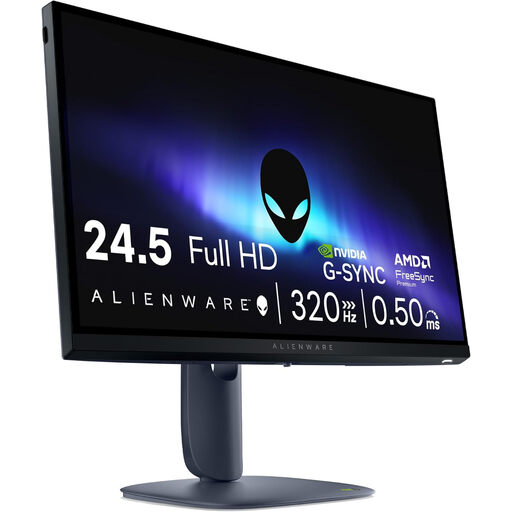
Alienware AW2525HM 24.5-inch monitor

Alienware AW2525HM, 24.5 inch

This model may be worth considering if you’re looking for a desktop gaming monitor; measure the stand and available desk space before choosing.

The product name lists a 24.5-inch Full HD LCD screen with a resolution of 1920 × 1080.

Joybuy

DELL SE2425HG 24-inch monitor

DELL SE2425HG, 24 inch

The product name describes a 24-inch monitor for anyone looking for a desktop-sized screen. Check which input and source device support the refresh rate you want.

The product name lists 200 Hz. The product information specifies DisplayPort 1.2 for this refresh rate; the HDMI refresh rate may depend on the source device.

Joybuy

KTC H24B9S 24-inch gaming monitor

KTC H24B9S, 24 inch

This desktop model may suit you if you’re looking for a 24-inch Full HD gaming monitor; check that the stand fits on your desk.

The product name lists 144 Hz, 1080p Full HD, IPS, HDMI, DisplayPort, Adaptive Sync and a tiltable stand.

Joybuy

GIGABYTE GS24F14A gaming monitor

GIGABYTE GS24F14A

This 23.8-inch monitor may suit you if desk depth is a key concern: GIGABYTE lists a depth of 152 mm including the stand. Remember to leave room for your mouse and keyboard too.

GIGABYTE lists Full HD, FreeSync and a standard maximum of 144 Hz; 175 Hz is available only with overclocking. The stand isn’t height-adjustable.

Joybuy

Frequently asked questions

Is 180 Hz worthwhile if my PC delivers fewer frames per second?

Not necessarily: a screen that accepts 180 Hz won’t automatically display 180 different game frames per second. Check how many frames your game and PC deliver, and which refresh rate the connection you’re using supports.

Can a monitor arm free up desk space?

A monitor arm can lift the stand off your desk, provided your desk and mounting point are suitable. Check the screen’s VESA measurement and make sure the arm and mounting point are compatible; GIGABYTE and MSI list 75 × 75 mm for the models mentioned, while LG lists 100 × 100 mm.

What terms should I check when buying online?

Check who the seller is and read the delivery, returns and any additional warranty terms. According to the Dutch government, faulty products are covered by statutory warranty, and the seller is your point of contact for a solution.

Do I have a cooling-off period when buying a monitor online in the Netherlands?

When you buy online from a business, you generally have 14 days to change your mind. The Dutch government lists exceptions, including online purchases from private individuals, so check who the seller is.

Does a computer monitor need an energy label?

The European Commission states that the energy labelling rules for electronic displays also cover computer monitors. The label ranges from A to G and helps you compare screens by energy use, not gaming performance.
