Start by measuring the space available on your desk, then check which resolution and refresh rate your PC can deliver through the connection you plan to use. A compact Full HD screen with a high refresh rate could suit ranked matches, but the highest Hz figure alone doesn’t guarantee sharper motion or lower input lag. Factor in the stand, adjustability and independent test results too.
Who is this buying guide for?
Ranked player who puts speed first
If you mainly play tactical matches, you can weigh up refresh rate and motion handling against what your PC and connection can support. RTINGS.com explains how a higher refresh rate can make the picture feel smoother and more responsive.
Player with limited desk space
If you want to leave room for your mouse and keyboard, measure the stand as well as the screen. MSI and Dell list dimensions and adjustment options for specific models, so check the details for the model you’re considering.
Player who uses one screen for more than gaming
If you also use the same screen for other tasks, consider the panel type and everyday usability rather than focusing solely on the maximum refresh rate. For the 24G4X, AOC specifies a 23.8-inch Full HD Fast IPS panel and 180 Hz, among other details.
What should you look for when buying?
First, measure the space taken up by the monitor stand. Then compare the refresh rate supported by each connection with your PC’s output, and consider the features that matter to you outside of matches.
| What to consider |
What should you check? |
Who is this important for? |
| Smooth motion |
Check the refresh rate supported by each port, and compare independent tests of motion handling and input lag. |
If I mainly play ranked, I want to know what my PC can actually output through the port I’ve chosen. Around 33% of consumers put speed first. |
| Desk space |
Measure the available width and depth, then check the dimensions with the stand, adjustment options and any VESA mounting size. |
With a small desk, I want to leave enough room for my mouse and keyboard and know in advance whether the stand will fit. Around 27% of consumers put desk space first. |
| Connection and usable refresh rate |
Check the maximum refresh rate at your chosen resolution for both the monitor’s port and your PC’s output. |
I don’t want to choose a specification that my setup can’t make use of. Around 20% of consumers focus mainly on getting features that suit their needs and setup. |
| Use beyond gaming |
Compare the resolution, panel type and independent motion tests for the exact models that will fit on your desk. |
If I also want to use the same screen for everyday computing, I care about more than just the highest refresh rate. Around 20% of consumers prioritise mixed use. |
Common pitfalls
-
Focusing only on the highest Hz figure
The maximum refresh rate can vary depending on the connection. For example, MSI lists up to 300 Hz via DisplayPort and up to 240 Hz via HDMI for the MAG 255XF in Full HD.
Check which resolution and refresh rate the input supports on the exact monitor model, then compare it with your PC’s output.
-
Assuming a millisecond figure means input lag
Pixel response time and input lag describe different things. So an advertised minimum figure doesn’t, on its own, tell you everything about motion handling.
Where possible, look at independent tests for the refresh rate you’ll actually play at, and compare results measured under similar conditions.
-
Assuming a compact screen will automatically fit your desk
The stand takes up space too and can limit where you place the screen. MSI lists the MAG 255XF as 220.1 mm deep including the stand; Dell says the SE2426HG offers tilt adjustment only.
Measure the available desk depth and check the stand dimensions, adjustment options and any VESA support before buying.
-
Assuming a commercial warranty covers all your legal rights
ACM ConsuWijzer distinguishes between statutory rights and warranties offered by a retailer or manufacturer.
Keep your proof of purchase and contact the retailer if a product doesn’t perform as you could reasonably expect under normal use.
Brands and models to consider
Dell / Alienware
Dell describes the SE2426HG and Alienware AW2523HF as compact models with different specified refresh rates.
- Dell lists the SE2426HG as 23.8 inches, Full HD and 240 Hz; the AW2523HF is listed by Dell as 24.5 inches and 360 Hz.
- Dell says the SE2426HG offers tilt adjustment only. Check how much space the AW2523HF stand itself needs too.
MSI
MSI specifies the MAG 255XF as a 24.5-inch Full HD Rapid IPS monitor, with a maximum refresh rate that depends on the connection.
- MSI lists up to 300 Hz via DisplayPort and up to 240 Hz via HDMI, plus VESA 100 × 100 mm.
- The specified 0.5 ms GtG is a manufacturer’s minimum figure, not an independent measurement of input lag or overall motion handling.
BenQ ZOWIE
BenQ describes the European ZOWIE XL2566X+ as a 400Hz Fast TN model with DyAc 2, aimed at competitive FPS players.
- The refresh rate and DyAc 2 are model specifications and claims made by BenQ.
- This panel type involves different trade-offs from the IPS models mentioned; compare independent test results for your own needs.
AOC
AOC specifies the 24G4X as a 23.8-inch Full HD Fast IPS monitor with 180 Hz.
- This combination offers a compact Full HD option with a clearly specified refresh rate.
- AOC’s claims about gaming benefits are manufacturer claims and don’t confirm an advantage for every player.
Philips Evnia
Philips describes the 25M2N3200U/00 as a 24.5-inch Full HD Fast IPS monitor with an overclockable refresh rate of up to 310 Hz.
- The product information for the Netherlands lists the 25M2N3200U/00 model and its overclocking capability.
- Check the conditions for overclocking. The claimed Smart MBR figure of 0.3 ms isn’t directly comparable with input lag or GtG measurements.
Joybuy products for compact gaming
These gaming monitors are designed for compact Full HD setups and have a high specified refresh rate. Compare the dimensions, adjustment options and refresh rate for each connection with your own desk and PC.
 No image available
Samsung Odyssey G4 G40H 25-inch Full HD
An option for ranked play if you want an adjustable stand and the connections suit your PC.
Fast IPS; up to 300 Hz via DisplayPort and up to 240 Hz via HDMI. The stand supports height, tilt, swivel and pivot adjustment.
View at Joybuy
 No image available
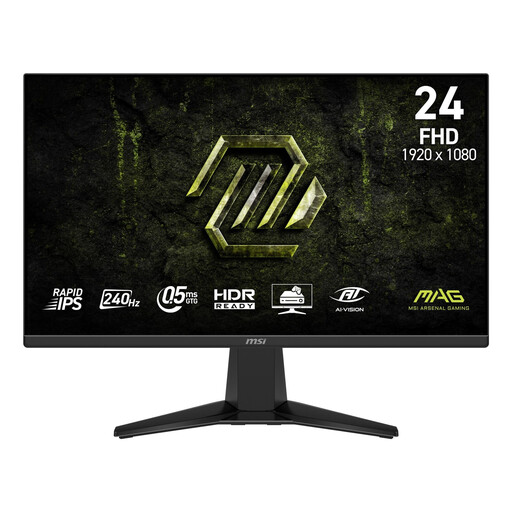
MSI MAG 245F X24 23.8-inch Full HD
A compact option if you plan to use a monitor arm and don’t need to adjust the stand’s height.
Rapid IPS, 240 Hz and VESA 100 × 100 mm. The stand offers tilt adjustment only.
View at Joybuy
 No image available
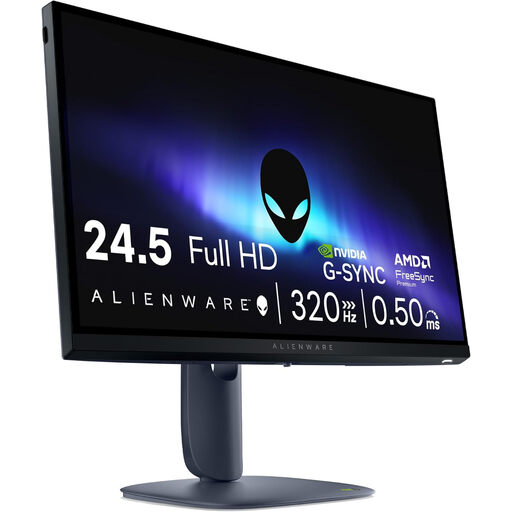
Alienware AW2525HM 24.5-inch Full HD
A model to compare if you’re looking for a high specified refresh rate and an adjustable setup.
Fast IPS, 320 Hz, HDMI 2.1 and DisplayPort 1.4. The product specifications list support for G-SYNC and FreeSync Premium.
View at Joybuy
 No image available
Thunderobot CF25F300L 24.5-inch Full HD
An option to consider if the specified refresh rate and adjustment options suit your PC and workspace.
The product information lists 320 Hz, 450 nits, height and swivel adjustment, and VESA 100 × 100 mm.
View at Joybuy
 No image available
TITAN ARMY C24A1H 23.6-inch Full HD 240Hz, EU Version
A compact option to compare if you want to use a monitor arm or adjust the tilt.
VA panel, 240 Hz at Full HD via HDMI and DisplayPort, VESA 100 × 100 mm, and tilt adjustment from −5° to 15°.
View at Joybuy
Frequently asked questions
How do I get the specified refresh rate working?
First, check which resolution and refresh rate are supported by the specific monitor input and your PC’s output. Then select the appropriate setting in your operating system. For example, MSI lists the MAG 255XF as supporting up to 300 Hz in Full HD via DisplayPort and up to 240 Hz via HDMI.
Is a specified response time of 0.5 or 1 ms the same as input lag?
No. Pixel response time refers to pixels changing colour; input lag is the time between a signal being received and the image appearing on screen. Compare measurements taken under similar conditions.
For a small desk, should I only consider the screen size?
No. Measure the space taken up by the stand and check the adjustment options too. MSI lists the MAG 255XF as 220.1 mm deep including the stand; Dell specifies tilt adjustment only for the SE2426HG.
What are my rights when buying a monitor online in the Netherlands?
When you buy from a trader online, you generally have a statutory 14-day cooling-off period after delivery, according to ACM ConsuWijzer. Your statutory rights are separate from any commercial warranty: if a product doesn’t perform as you could reasonably expect under normal use, the retailer is responsible for providing an appropriate solution at no cost. In the Netherlands, statutory rights aren’t simply limited to a fixed two-year period.


