Start by checking your available desk depth, viewing distance and stand dimensions. A 23.8-inch screen usually takes up less room, while a suitably sized 27-inch QHD screen offers more pixels for text and fine details. Then think about the scenes you play and check each model’s connections, adjustability and performance in dark scenes. A high refresh rate alone shouldn’t determine your choice.
Who is this monitor guide for?
Players with a shallow desk
You want the screen, stand and viewing distance to work together in your space. Measure your desk and compare the monitor’s dimensions with the stand before choosing based on screen size alone. AOC lists the 24G4X as a 23.8-inch model, while ASUS gives separate dimensions for the VG249Q3A with its stand.
Players who value fine puzzle details
You prioritise readable text and sharp images, and have room for a larger QHD screen, provided your PC or console can output the resolution you want through the connection you choose. LG lists the 27GS75Q-B as a 27-inch QHD monitor with a resolution of 2560 × 1440 pixels.
Fans of dark scenes
You want to compare panel types and picture performance without treating HDR support alone as proof of image quality. Dell lists the S2722DGM as a curved VA monitor; compare the manufacturer’s specifications with those of the specific IPS models you’re considering.
What should you look for?
On a small desk, your main considerations are how well the monitor fits, the level of detail you want, performance in dark scenes and a practical setup.
| What to consider |
What to look for when buying |
Who will find this important? |
| How it fits on your desk |
Measure the available width and depth, then compare them with the monitor’s overall dimensions, including the stand. If you’re using a monitor arm, check the VESA mount size too. |
If space is limited, I want to know whether the screen and stand will really fit. Around 36% of consumers say desk fit is their top priority. |
| Text and fine details |
Compare screen size and resolution, and check whether your PC or console can output the resolution you want through the HDMI or DisplayPort connection you’ll use. |
If small clues and text need to be easy to read, I look at both resolution and how much space the screen takes up. Around 29% of consumers prioritise detail and sharpness. |
| Dark scenes |
Compare the picture performance of the exact models you’re considering. A panel type or HDR label alone doesn’t prove that a monitor will display dark scenes better. |
If atmosphere and visibility in dark scenes matter to me, I want to compare models based on their actual picture performance. Around 21% of consumers make this their top buying priority. |
| Adjustability and connections |
Check for height adjustment, the VESA mount size, available inputs and what your PC or console supports through those connections. |
With a dedicated spot on a small desk, I want to be able to position and connect the monitor properly. Around 14% of consumers give setup and connections top priority. |
Common buying pitfalls
-
Measuring only the screen diagonal
The stand takes up space too. ASUS gives separate overall dimensions for the VG249Q3A with and without its stand.
Measure the available desk depth and compare it with the dimensions of the exact model, including its stand.
You may need to reposition it or use a monitor arm that fits.
-
Assuming HDR10 guarantees great HDR pictures
LG lists HDR10 support for the 27GS75Q-B, but also notes that this model has neither VESA DisplayHDR certification nor mini-LED. Support for an HDR signal doesn’t tell you how HDR pictures will look in practice.
Compare the actual picture performance of the models and don’t base your choice on an HDR label alone.
-
Confusing the manufacturer’s warranty with your statutory rights
The Netherlands Authority for Consumers and Markets (ACM) says that the retailer is responsible for the statutory guarantee when a consumer product is faulty.
Keep your proof of purchase and contact the retailer if there’s a problem.
Brands to consider for compact and QHD monitors
AOC
The 24G4X is an example of a 23.8-inch Full HD IPS monitor for anyone considering a compact screen.
- AOC lists a 180 Hz refresh rate and Adaptive Sync for this model.
- These speed-related features don’t prove a specific advantage for story-driven puzzles; check the stand’s dimensions and adjustability.
LG
The UltraGear 27GS75Q-B is an example of a 27-inch QHD IPS monitor with an adjustable stand.
- LG lists a resolution of 2560 × 1440 pixels, height adjustment and HDR10.
- LG lists neither VESA DisplayHDR certification nor mini-LED for this model. Also check that the larger screen will fit on your desk.
ASUS
The TUF Gaming VG249Q3A is a 23.8-inch Full HD IPS alternative for which ASUS provides the overall dimensions.
- ASUS lists HDMI, DisplayPort and VESA 100 × 100 mm support.
- The supplied stand tilts but doesn’t adjust in height, so check whether its fixed height will work with your setup.
Dell
The S2722DGM is an example of a curved 27-inch QHD VA monitor to compare with flat IPS models.
- Dell specifies a VA panel, 1500R curvature and a 165 Hz refresh rate for this model.
- These manufacturer specifications aren’t an independent assessment of contrast or suitability for a small desk.
BenQ
The European MOBIUZ EX240 is a 23.8-inch Full HD IPS alternative with built-in speakers and height adjustment.
- BenQ lists a 165 Hz refresh rate, speakers and 100 mm of height adjustment.
- BenQ’s claims about HDRi and sound quality are manufacturer claims, not independently verified advantages over other models.
Monitors on Joybuy for a small desk
These product options focus on compact Full HD monitors suited to limited desk space. Check the exact dimensions and features of each model.
 No image available
Philips 1000 Series 24E2N1100LB/00
A 24-inch monitor to consider if you’re looking for a compact Full HD option.
Full HD, 1920 × 1080 pixels, VA panel and 100 Hz.
Joybuy
 No image available
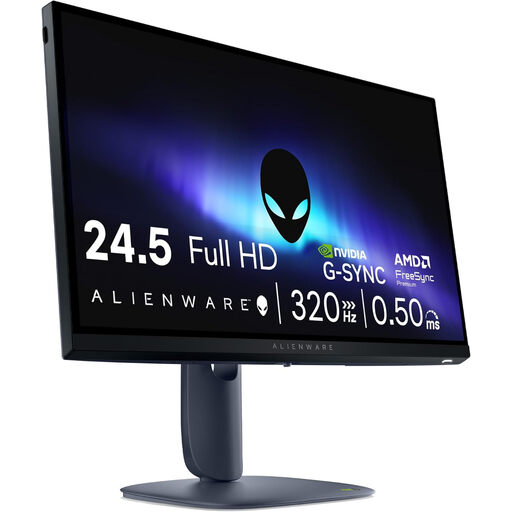
Alienware AW2525HM
This 24.5-inch model is worth comparing if you’re looking for a Full HD monitor and its stand will fit on your desk.
24.5 inches, Full HD, 1920 × 1080 pixels and LCD.
Joybuy
 No image available
KTC H24B9S 24-inch gaming monitor
A 24-inch Full HD IPS model to consider if you’re looking for a compact gaming monitor.
IPS, Full HD 1080p and 144 Hz.
Joybuy
 No image available
Philips 24E1N1100A
The stated 23.8-inch diagonal makes this a compact screen option; compare the stand dimensions with your available space.
Full HD IPS, 100 Hz and built-in speakers.
Joybuy
 No image available
TITAN ARMY C24A1H
A curved VA option to compare if you’re specifically considering this type of screen; check that the monitor and stand will fit on your desk.
Full HD, 1500R, VA and 240 Hz.
Joybuy
Frequently asked questions
Do you need 180 Hz for story-driven puzzle games?
No, 180 Hz isn’t a general minimum requirement for story-driven puzzle games. First choose a screen size, resolution and setup that suit the way you play, then check which display settings your PC or console can output through the connection you’ve chosen.
How can I check whether a monitor will fit on my desk?
Measure the available width and depth, then compare them with the dimensions of the exact model, including its stand. If you want to use a monitor arm, check that the monitor’s VESA mount size matches the arm; ASUS lists VESA 100 × 100 mm for the VG249Q3A.
What do the energy label and running costs tell you?
According to the European Commission, computer monitors are covered by the energy labelling rules for electronic displays. Compare information for the specific models, including figures for SDR and, where stated, HDR. Your usage and electricity tariff also affect your personal running costs.
What cancellation period and warranty apply to an online purchase in the Netherlands?
For a standard online consumer purchase, you generally have a statutory cancellation period of up to 14 days after delivery, subject to legal exceptions, as explained by ACM ConsuWijzer. If a product is faulty, the retailer is responsible for the statutory guarantee; a commercial manufacturer’s warranty doesn’t replace that responsibility.


