For a small desk, a monitor around 23.8 inches is a compact starting point. However, screen size alone doesn’t tell you whether the stand will fit, so measure the available width and depth too. Then choose based on your PC or console and the refresh rate you want. Extra Hz are only useful if your game, device and connection support that output. Coolblue describes 24 inches as a size that won’t take up your whole desk.
Who is this guide for?
Football gamer with limited desk space
Your first priority is finding a screen and stand that will fit on your desk. Then you can compare picture quality and speed. A compact screen doesn’t guarantee that every stand will fit. Coolblue describes 24 inches as a space-saving screen size.
PC gamer looking for smooth gameplay
You want camera movements and on-screen action to look smooth, and you can check your game settings and PC performance. EA lists adjustable frame-rate limits of 144, 165 and 240 FPS for FC 26 on PC, among others. This doesn’t guarantee that your PC can reach those figures.
Console gamer who wants to check HDMI compatibility
You want to know in advance which resolution and refresh rate your console can use through its connection. PlayStation says that 120Hz output on PS5 requires support from both the screen and the game.
What should you look for when buying?
First measure the space for the screen and stand. Then check your PC or console’s output, and only after that compare the speed and sharpness you want.
| What to consider |
What should you check? |
Who should pay particular attention? |
| Desk space |
Measure the available width and depth, then compare them with the full dimensions of the exact model, including its stand. ASUS lists a stand depth of 17,40 cm for the VG249Q3A, while MSI lists 23,19 cm for the G244F E2. Check the manufacturer’s specifications for your region. |
If I’m short on space, I want to know whether the screen and stand will fit without taking over my gaming area; around 36% of consumers name space as their top buying priority. |
| Smooth gameplay |
Compare the Hz specification with your game and PC’s performance and settings. EA lists several adjustable frame-rate limits for FC 26 on PC; a monitor’s refresh rate doesn’t guarantee the game’s frame rate. |
I want gameplay to look smooth, but only if my PC and game can handle the output; around 29% of consumers prioritise smooth visuals. |
| Connection and platform |
Check the supported resolution and Hz for your device on each HDMI or DisplayPort input. PlayStation shows information about the connected HDMI device and says that 120Hz output requires compatible games. |
I want to connect my existing PC or console without any uncertainty and use the output I’m aiming for; around 21% of consumers prioritise platform compatibility. |
| Sharpness and screen space |
Only compare Full HD and QHD once you know how much space you have and what resolution your device and game can output. Tweakers, published on NU.nl, describes a 27-inch QHD model as a larger alternative; that size won’t automatically fit every small desk. |
If my desk has enough room, I want to weigh up a larger screen or sharper picture against a more compact set-up; around 14% of consumers prioritise this trade-off. |
Buying pitfalls
-
Measuring only the screen diagonal
According to their manufacturers, two 23.8-inch models can have different overall dimensions, including the stand. So the screen diagonal alone won’t tell you whether the stand will fit on your desk.
Measure the available width and depth, then compare them with the full dimensions of the exact model. Manufacturer dimensions for a version sold abroad may differ by region.
If the stand supplied with the monitor doesn’t fit, a suitable monitor arm could be an alternative. If so, check the VESA size and whether your desk can support the arm.
-
Assuming 180 Hz means 180 FPS in the game
EA describes adjustable frame-rate limits for FC 26 on PC. The monitor’s specification doesn’t guarantee that your game and PC will deliver the same number of frames per second.
Before choosing a higher Hz rating, check your game settings, your PC’s performance and the maximum refresh rate supported by the input you plan to use.
-
Choosing a larger QHD monitor without considering the space
A larger screen gives you more viewing area, but it also takes up more space. A general preference for 27 inches doesn’t take the space on your desk into account.
Measure the screen and stand, and check your viewing space before choosing a larger model.
-
Assuming the manufacturer’s warranty limits your legal rights
ACM ConsuWijzer explains that your statutory guarantee depends on what you can reasonably expect from the product under normal use; it is separate from any manufacturer’s warranty period.
Check any additional warranty cover separately, and contact the seller if the product is faulty.
Brands to consider
ASUS
The TUF Gaming VG249Q3A is a 23.8-inch Full HD model that lets you compare screen size with your PC’s specifications.
- ASUS lists a refresh rate of up to 180 Hz, two HDMI 2.0 inputs and a stand depth of 17,40 cm for this model.
- ASUS says it has no height adjustment; the listed dimensions may vary by region.
MSI
The G244F E2 is another 23.8-inch Full HD model to compare for stand size and inputs.
- MSI lists a refresh rate of up to 180 Hz via DisplayPort and HDMI at Full HD, two HDMI 2.0b inputs and a depth of 23,19 cm including the stand.
- MSI says specifications may vary by country, so check the details for the version on offer.
Philips
The Evnia 24M2N3201A/00 is described on the Dutch manufacturer’s website as a 23.8-inch Full HD gaming monitor.
- Philips lists a Fast IPS panel and a refresh rate of up to 180 Hz for this model.
- Check the full dimensions and input specifications for the version on offer.
AOC
The 24G4X is a compact 23.8-inch Full HD option, while the Q27G4ZR is a separate, larger QHD alternative.
- AOC lists a Fast IPS panel and a refresh rate of up to 180 Hz for the 24G4X. The cited manufacturer page is British and doesn’t confirm a Dutch version.
- Based on its own tests, Tweakers, published on NU.nl, describes the Q27G4ZR as an LCD alternative with lower contrast than an OLED model and no HDMI 2.1. This applies to that specific model.
LG
The UltraGear 24GS60F-B is another 23.8-inch Full HD model to compare for size and stand dimensions.
- On its Philippine manufacturer page, LG lists a refresh rate of up to 180 Hz, VESA 100 × 100 mm and a depth of 18,05 cm including the stand.
- That page also says ‘Discontinued’; this regional information doesn’t indicate current availability or specifications in the Netherlands.
Joybuy product picks
These Joybuy product picks are for anyone looking for a relatively compact gaming monitor for football games. Check the size, listed specifications and connection you plan to use for each model.
 No image available
Samsung Odyssey G4 G40H 25-inch Full HD gaming monitor
An option if you’re looking for a Full HD screen around 25 inches; measure the space available for the stand before ordering.
The product title lists Fast IPS, DisplayPort up to 300 Hz, HDMI up to 240 Hz and 1 ms. Check which figures are supported by your device and the input you’re using.
View at Joybuy
 No image available
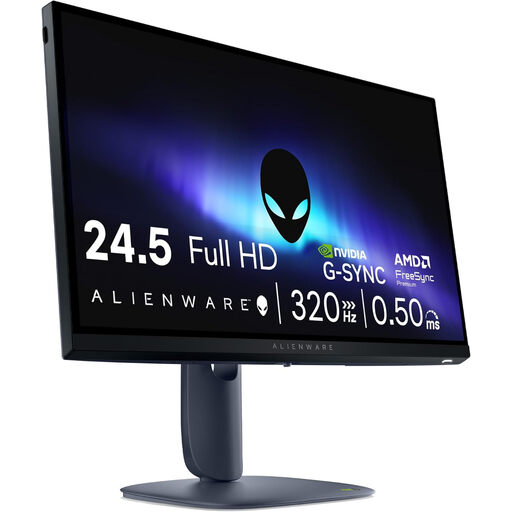
Alienware AW2525HM 24.5-inch Full HD monitor
This model is an option if you’re considering a 24.5-inch Full HD screen; check that the stand will fit on your desk.
The product title lists 1920 × 1080 pixels and an LCD screen.
View at Joybuy
 No image available
Dell SE2425HG 24-inch 200Hz monitor
An option if you’re looking for a 24-inch gaming monitor with a high listed refresh rate; check the connection you’ll use for your game.
The product title lists 200 Hz. Check the resolution and supported Hz for each input on the version being offered.
View at Joybuy
 No image available
ASUS TUF Gaming VG249Q3A 23.8-inch Full HD monitor
This model could suit your search for a 23.8-inch Full HD screen; compare the stand dimensions with the space on your desk.
The product title lists 1920 × 1080 pixels and an LCD screen.
View at Joybuy
 No image available
Thunderobot CF25F300L 24.5-inch Full HD gaming monitor
An option if you’re looking for a 24.5-inch Full HD gaming monitor; check the space available for both the screen and stand first.
The product title lists 320 Hz, 450 nits and a height-adjustable, pivoting stand. Check the output supported by your own device.
View at Joybuy
Frequently asked questions
Do I need 180 Hz to play a football game on PS5?
No. A 180 Hz monitor specification isn’t a requirement in itself. PlayStation describes 120Hz output for compatible screens and games that support 120 Hz. Check the specific game and the information about the connected HDMI device.
How do I check whether a monitor will fit on my desk?
Measure the available width and depth, then compare them with the full dimensions of the exact model, including the stand. If you’re considering a monitor arm, check the VESA size of both the screen and the arm, and make sure your desk can support it.
How do I check the output from a new monitor on PS5?
Connect the monitor to the HDMI input you intend to use. On your PS5, go to Settings, Screen and Video, then Video Output to see the current signal and information about the connected HDMI device. Sony distinguishes between 60 Hz, 120 Hz and VRR; what you can use also depends on the monitor and game.
What are my rights if a monitor bought online doesn’t fit or is faulty?
For a standard online purchase, ACM ConsuWijzer describes a 14-day cancellation period from delivery; check the applicable exceptions and returns policy too. If a product is faulty, your statutory guarantee is separate from any manufacturer’s warranty. Contact the seller.
What can I compare when it comes to power consumption?
Compare the EU energy label and the product information for the exact monitor. The European Commission says that computer monitors are covered by the rules for electronic displays; the energy label shows details including the efficiency class, size and resolution.


