
Player with limited desk space
Wants to avoid the screen and stand taking over their workspace. Compare the actual dimensions, not just the diagonal measurement; RTINGS lists compact screens as an option for desks with limited space.


Start by checking the width and depth of the monitor, including its stand. A screen around 24 inches is a sensible starting point for a small desk, but only the actual measurements will tell you whether it fits. Then choose the resolution and refresh rate to suit your computer or console and the farming simulation you play. A high Hz figure alone won’t automatically make a game look better or run more smoothly.
Wants to avoid the screen and stand taking over their workspace. Compare the actual dimensions, not just the diagonal measurement; RTINGS lists compact screens as an option for desks with limited space.
Wants text and details in the game world to be clear on a compact screen, and is weighing up Full HD against QHD.
Wants to connect, for example, a PC and another gaming device, so checks the ports and display modes available for each connection.
First, measure the space available for the monitor and its stand. Then compare the resolution, connections and refresh rate with the capabilities of your device and game.
| What to consider | What should you check? | Who is this important to? |
|---|---|---|
| Desk space | Measure the available width and depth and compare them with the dimensions, including the stand. If you’re using a monitor arm, check the VESA size too. | If I have limited workspace, I want to know whether both the screen and stand will fit without making my desk impractical to use. That’s why around 36% of consumers put suitable dimensions first. |
| Clarity and resolution | Compare the native resolution and consider whether your computer or console, and the game, can make practical use of it. | I want to make out landscapes and text clearly on a compact screen, so I look beyond screen size alone. Around 29% of consumers give details and readability top priority. |
| Motion and refresh rate | Check which resolution and refresh rate are available through the port you plan to use, and whether your device supports the mode you want. | If smooth camera movement matters to me, I want to know what my device and game can actually display. Around 21% of consumers focus mainly on smooth motion. |
| Connections and positioning | Make a list of your devices and cables; check the ports, VESA size, adjustability and what’s included with the exact model. | I want to connect my devices and position the monitor properly on my desk without finding out later that a connection is missing. Around 14% of consumers start by checking connections and positioning options. |
Monitor stands vary in size and VESA compatibility, even on screens of a similar size. For example, MSI lists the G244F E2 as measuring 541,9 × 231,9 × 424,3 mm, including the stand.
Measure the space for both the screen and stand. If you’re using a monitor arm, check that the VESA size and arm are suitable for the exact model.
You may need to rearrange your desk or get a suitable monitor arm, so check before you decide.
The maximum refresh rate is a monitor specification, not a promise that a farming simulation will deliver the same number of frames per second. Resolution, connection and the performance of the connected device also play a part.
First choose a suitable size and resolution, then check which refresh rate your device supports through the connection you plan to use.
A manufacturer’s warranty does not replace your statutory rights in the Netherlands if a product does not conform to the contract. The Dutch Government explains that there is no fixed general warranty period for this in the Netherlands.
Read the additional warranty terms and contact the seller if something is wrong with the product.
The G244F E2 is an example of a 23,8-inch Full HD gaming monitor with published dimensions, connections and VESA size.
The TUF Gaming VG249Q3A is a compact 23,8-inch Full HD model. ASUS lists an IPS panel and a 180 Hz refresh rate.
The 24G4X is an example from the G4 gaming range, with a 23,8-inch Full HD Fast IPS panel.
The 24G411A-B is an example of a compact model with a stand depth of 220 mm and VESA 100 × 100 mm. LG lists the model as discontinued.
The XQ2566X shows that QHD is also available at around 24 inches, and is aimed at competitive gaming.
This selection focuses on compact Full HD monitors around 24 inches. Compare the stated resolution, connections and refresh rate with your desk, devices and game.
 No image available
Worth considering if you’re looking for a compact Full HD monitor and 100 Hz suits the way you use it.
23,8 inches, IPS, Full HD, 100 Hz, 1 ms, HDMI and VGA. According to the product description, the power adapter must be purchased separately.
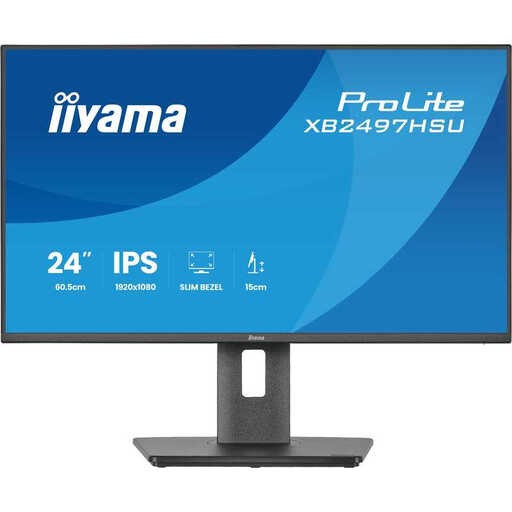 No image available
A compact Full HD option if an adjustable stand matters to you as well as screen size.
23,8 inches, IPS, Full HD and up to 120 Hz. The description lists height adjustment, tilt, swivel and pivot.
 No image available
A compact Full HD option to compare if you’re looking for multiple connection options and an adjustable stand.
23,8 inches, IPS, Full HD and 100 Hz. The stated dimensions with the stand are 539,5 × 343,0–493,0 × 209,5 mm; height adjustment is listed. Connections include HDMI, DisplayPort and USB-C.
 No image available
A compact Full HD monitor to compare if 100 Hz and a VA panel fit your selection criteria.
24 inches, Full HD, VA, 100 Hz and 4 ms.
 No image available
A 24-inch Full HD model to compare if you’re looking for an IPS panel and DisplayPort.
The product description lists an IPS panel, 200 Hz, AMD FreeSync and DisplayPort. Check which display mode your device supports through the connection you plan to use.
No. First measure the available width and depth and compare them with the dimensions, including the stand. For example, MSI lists the G244F E2 as having a depth of 231,9 mm, including the stand; the diagonal measurement won’t tell you that.
Full HD is a compact option, but whether you’ll see enough detail depends on your preferences and how you use it. QHD has more pixels than Full HD; at the same time, check whether your computer or console can comfortably handle the chosen resolution in the game.
No. 180 Hz is the monitor’s maximum refresh rate and doesn’t guarantee that a game will reach that many frames per second. The game, connected device, chosen resolution and connection all matter too.
Compare the model information on the EU energy label and in EPREL. The European Commission explains that energy labels apply to electronic displays, including computer monitors, subject to relevant exceptions.
For online consumer purchases, you generally have up to 14 days after delivery to change your mind, subject to exceptions, according to ACM ConsuWijzer. You’re also entitled to a product that conforms to the contract; the Dutch Government states that there is no fixed general time limit for this in the Netherlands. Contact the seller if something is wrong with the product.