
Practising on a wet racing line
You want to judge the track surface and braking points in changing wet conditions. iRacing explains that the usual rubbered-in racing line can be more slippery in the rain; a monitor can’t predict grip.


Choose a screen setup that suits your seating position, available space, simulator and computer. A 27-inch 16:9 monitor is one single-screen option; ultrawide and 32:9 screens, or three monitors, can give you more room for the cockpit view, but need suitable space and settings. A higher refresh rate or greater contrast does not prove that you’ll be able to judge grip on a wet racing line more accurately.
You want to judge the track surface and braking points in changing wet conditions. iRacing explains that the usual rubbered-in racing line can be more slippery in the rain; a monitor can’t predict grip.
You’re setting up a dedicated space and weighing up one wide screen against three monitors. Your available space and simulator settings both matter; iRacing’s basic instructions for a three-screen setup assume that all three monitors are the same model, size and resolution.
You want a practical screen position for repeated practice. If you’re considering OLED, also think about how to manage high-contrast HUD elements that stay on screen for long periods; ASUS warns that prolonged static images can cause image retention or burn-in.
First measure the space around your cockpit, then check which aspect ratio, resolution and refresh rate your simulator and computer can support.
| Consideration | What to look for | Who should consider this? |
|---|---|---|
| Track view in the rain | Compare the picture in your own simulator and with the settings you use; don’t infer grip from contrast or HDR. | If I want to judge the track surface and braking points, I look at what the simulator actually shows. Around 33% of consumers put a clear track view at the top of their list. |
| View alongside the car | Measure the available width and check whether your simulator supports the aspect ratio or configuration you want. | If I want to see more alongside the car from my fixed cockpit, I compare an ultrawide with three screens and measure the space first. Around 25% of consumers give side visibility top priority. |
| Smooth visuals | Check the maximum Hz supported by each connection and what your computer can manage at your chosen resolution. | If smooth visuals matter to me while driving, I check that my computer and connection can handle the setting I want. Around 25% of consumers put motion performance first. |
| Use during long sessions | Check the adjustment range and, for OLED, the model-specific care instructions for static image elements. | For repeated sessions, I want to position my screen comfortably and know how to manage fixed HUD elements. Around 17% of consumers put practical long-term use first. |
The monitor displays the images your computer and connection deliver at your chosen resolution. The refresh rate doesn’t tell you how much grip information the simulator calculates.
Check the connection specifications and your computer’s performance in your simulator, as well as the track view that matters to you.
21:9, 32:9 and three-screen setups each need a suitable arrangement and display settings.
Measure the available space and check the field of view and instrument display in your own simulator before choosing.
Prolonged static, high-contrast images can cause image retention or burn-in on OLED screens. ASUS describes this risk for OLED displays.
Read the care instructions and warranty terms for the exact model before you buy.
The Q27G4XF is an example of a single 27-inch 16:9 QHD screen with Fast IPS.
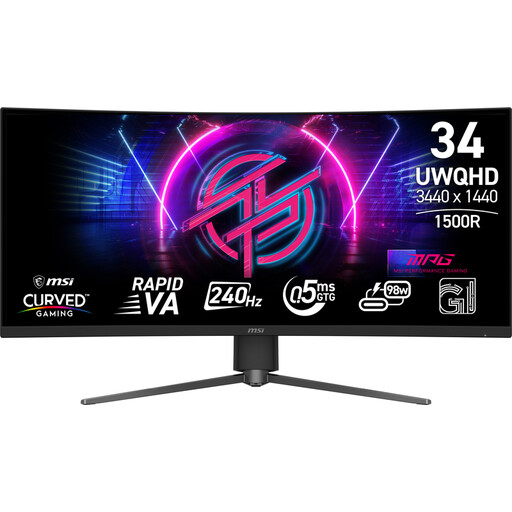
The MPG 346CQRF X24 is an example of a single 34-inch 21:9 Rapid-VA ultrawide for a cockpit.
The Odyssey G9 G91F is an example of a single 49-inch 32:9 screen for a spacious, dedicated setup.
The AW3423DWF is an example of a 34-inch QD-OLED ultrawide for anyone who values panel contrast.
These Joybuy products are standalone gaming monitors for a dedicated cockpit, ranging from 16:9 to ultrawide 21:9 and 32:9 formats. Measure your setup and check that your simulator supports the screen before choosing one.
 No image available
An option if you’re looking for a single QHD screen for racing games and want to adjust its position in your cockpit.
32-inch IPS panel; 2560 × 1440 pixels; up to 180 Hz. The description lists G-SYNC and FreeSync support, height, swivel and tilt adjustment, and VESA mounting.
 No image available
An option if you want more horizontal screen space for a single cockpit monitor than a 16:9 screen provides.
WOLED panel; 21:9; 3440 × 1440 pixels; 800R curvature; up to 240 Hz. Prolonged static, high-contrast images can cause image retention or burn-in on OLED screens; check the instructions for this model.
 No image available
An option if you’re looking for a single 27-inch QHD screen for racing games.
16:9; 2560 × 1440 pixels; IPS panel; 144 Hz; Adaptive Sync. The product name lists DisplayPort 1.4, HDMI 2.0, HDR10 and 0.5ms Smart MBR.
 No image available
An option if you’re looking for a very wide single screen for a spacious, dedicated cockpit.
5120 × 1440 pixels; 165 Hz; 1500R curvature; VA panel. The product information specifies a minimum load capacity of 15 kg for a desk or VESA mount and recommends installation by two people.
 No image available
An option if you want more horizontal space for a single cockpit view and your simulator supports the display format you choose.
Rapid-VA panel; 3440 × 1440 pixels; up to 240 Hz; Adaptive-Sync. The product information also lists a stand with height, swivel and tilt adjustment.
No, not on its own. iRacing explains that the usual rubbered-in line can be more slippery in the rain, and that you may sometimes need to look for grip away from it. Practise in the track and weather conditions in your simulator; don’t infer grip from an HDR or Hz specification.
iRacing describes displaying the game in a window across three screens, as well as using a combined virtual display. Enter your monitor details in the display settings; the basic instructions assume that all three screens are the same model, size and resolution.
Yes. ASUS warns that prolonged static, high-contrast images can cause image retention or burn-in, and describes protection features for its own OLED models. Check the manual and terms for the model you’re buying; ASUS features aren’t automatically available on other brands.
According to ACM ConsuWijzer, the seller is responsible for providing an appropriate solution if a product doesn’t meet what you’re entitled to expect from it. There’s no single fixed statutory warranty period for every monitor; any manufacturer’s or seller’s warranty is separate.
For an online consumer purchase in the Netherlands, ACM ConsuWijzer says you generally have a statutory 14-day cooling-off period after delivery. Check the applicable terms and exceptions for your purchase.