Who is this guide for?

Sim racer with a small desk

You want a clear view of the track from your usual racing position, without the screen and stand taking over your desk. Measure the width and stand depth, and check your viewing distance from your seated position, as iRacing Support recommends when setting up a single monitor.

Racer who follows the action

You want a steady image under braking and while turning in. RTINGS.com notes that pixel response affects motion blur and inverse ghosting, so look beyond the refresh rate or advertised millisecond figure alone.

Racer who wants to see track details

You’re weighing up the extra visual detail for wet-weather racing against desk space and what your PC can handle. The line with the most grip depends on the simulation and conditions; iRacing Support, for example, explains that the usual rubbered-in line can be more slippery in the wet.

What should you look for?

Flat 23.8-inch Full HD IPS

Choose this when: desk width is your priority and Full HD gives you enough detail for your racing. Acer Netherlands lists the VG240Y Gbip as 23.8 inches, 1920 × 1080, 120 Hz and 540.30 mm wide, including the stand.

The trade-off: according to Acer, this specific model doesn’t have height adjustment and offers fewer pixels than the 27-inch QHD screens considered here.

Flat 27-inch QHD IPS

Choose this when: the screen width and stand depth fit your desk, and your PC can handle your preferred resolution and refresh rate. ASUS and LG offer examples with height adjustment and a maximum refresh rate of 180 Hz.

The trade-off: these models take up more space than the 23.8-inch screen considered here; ASUS’s stated maximum depends on the connection.

Curved 27-inch QHD VA

Choose this when: you specifically want a curved screen and its dimensions suit your racing setup. The MSI MAG 27CQ6F and Samsung Odyssey G5 LS27CG552EUXEN are examples of this type.

The trade-off: a curved screen doesn’t prove that wet-weather grip will be easier to see. Also check the refresh rate for each connection and compare motion test results for the exact model.

What to consider What should you check? Who is this important for?
Space and viewing distance Measure the available width and depth from your racing position, and check the dimensions of the exact model, including the stand. Acer Netherlands lists the VG240Y Gbip as 540.30 mm wide and 199.50 mm deep; LG Netherlands lists the 27GS75Q-B as 613.5 mm wide, with a stand depth of 253.7 mm. If my desk has limited space, I want to know whether the screen and stand will fit before choosing a larger size. Around 33% of consumers prioritise desk space.
Motion handling Where available, look for independent tests of the exact model and check for blur, overshoot and the settings used. RTINGS.com distinguishes between pixel response and refresh rate; also check VRR support on both the monitor and PC. If I want to follow moving details under braking and while turning in, I look beyond the stated refresh rate. Around 27% of consumers prioritise motion clarity.
Resolution and track detail Compare the resolution and dimensions with the space on your desk, and view the track in your own simulation. iRacing Support explains that the usual rubbered-in line can be more slippery in the wet; a monitor doesn’t determine grip. If I want to see more visual detail in wet-weather racing, I weigh up the extra pixels against the space on my desk and what my PC can manage. Around 20% of consumers prioritise track detail.
PC and connection Check which resolution and refresh rate your PC, cable and monitor connection support together. MSI and ASUS list different maximum refresh rates over DisplayPort and HDMI for the QHD models mentioned here. If I want to keep using my current PC, I check in advance that the chosen combination can handle my preferred resolution and refresh rate. Around 20% of consumers prioritise PC and connection compatibility.

Common buying mistakes

  • Measuring only the screen diagonal

    The diagonal doesn’t tell you how much space the stand takes up or how far the screen will be from your eyes. Including the stand, the 23.8-inch Acer considered here is 199.50 mm deep; the 27-inch LG is 253.7 mm deep, according to the specifications from Acer Netherlands and LG Netherlands.

    Mark out the width and stand depth on your desk, and check your viewing distance from your usual racing position, as iRacing Support recommends.

    A monitor arm may be an alternative if the screen and desk are suitable for one. Bear in mind that you may need to buy one separately, and check the mounting compatibility before relying on it.

  • Treating an advertised ‘1 ms’ as a real-world test

    The measurement terminology varies by model: Acer lists VRB, Samsung MPRT and MSI a minimum GtG figure. These terms aren’t directly comparable measures of blur or overshoot.

    Where possible, compare independent motion tests of the exact models using the same test method, and check which settings were used.

  • Choosing the maximum refresh rate without checking the port or PC

    For the QHD models considered here, MSI lists a maximum of 180 Hz over DisplayPort and 144 Hz over HDMI 2.0; ASUS lists 180 Hz over DisplayPort and 144 Hz over HDMI. The available refresh rate therefore also depends on the connection you use.

    Before buying, check the video output, cable, and supported resolution and refresh rate of both your PC and the exact monitor model.

  • Confusing an extended warranty package with your statutory rights

    ACM ConsuWijzer explains that your statutory guarantee exists alongside any retailer or manufacturer’s guarantee, and depends on what you can reasonably expect from the product.

    Check what an additional package covers, but don’t assume you only have statutory rights if you buy one.

Relevant brands to consider

Acer

The Nitro VG240Y Gbip is an example of a flat 23.8-inch Full HD screen for a compact desk setup.

  • Acer Netherlands lists a 120 Hz refresh rate, a stand depth of 199.50 mm and VESA 100 × 100 mm for this model.
  • According to Acer, this model’s stand isn’t height-adjustable; these specifications don’t necessarily apply to other Nitro models.

LG

The UltraGear 27GS75Q-B is an example of a flat 27-inch QHD IPS screen with an adjustable stand.

  • LG lists a maximum refresh rate of 180 Hz, height adjustment and a stand depth of 253.7 mm for this model.
  • According to LG, the stated 1 ms response time applies when using the Faster setting; this isn’t an independent measurement.

ASUS

The TUF Gaming VG27AQL3A is an example of a flat 27-inch QHD IPS screen with an adjustable stand.

  • ASUS lists height adjustment and a maximum refresh rate of 180 Hz over DisplayPort for this model.
  • ASUS lists a maximum of 144 Hz over HDMI; check which connection you’re using before assuming you’ll get 180 Hz.

MSI

The MAG 27CQ6F is an example of a curved 27-inch QHD Rapid VA screen.

  • MSI specifies a 1500R curve and a maximum refresh rate of 180 Hz over DisplayPort for this model.
  • MSI lists a maximum of 144 Hz over HDMI and a minimum GtG specification of 0.5 ms; this isn’t an independent result across all pixel transitions.

Samsung

The Odyssey G5 LS27CG552EUXEN is an example of a curved 27-inch QHD screen.

  • Samsung Netherlands lists a 1000R curve, 165 Hz refresh rate and FreeSync for this model.
  • The stated 1 ms is an MPRT figure; it doesn’t provide a measured GtG value or a conclusion about other Odyssey models.

Joybuy products

This selection includes compact Full HD models and 27-inch QHD screens, so you can weigh up desk space against your preferred resolution and stated refresh rate.
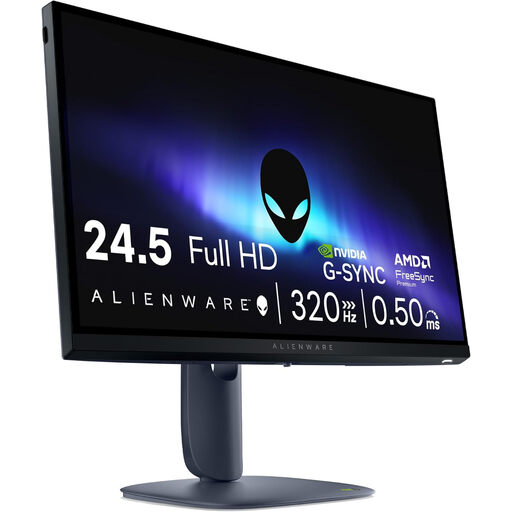
Alienware AW2525HM 24.5-inch Full HD monitor

Alienware AW2525HM 24.5-inch Full HD monitor

A 24.5-inch screen may suit a setup where desk space is an important consideration.

24.5 inches; 1920 × 1080; Full HD; LCD.

View at Joybuy

KTC H24B9S 24-inch Full HD 144Hz IPS gaming monitor

KTC H24B9S 24-inch Full HD 144Hz IPS gaming monitor

A 24-inch Full HD model to consider if you’re looking for a compact gaming screen.

24 inches; Full HD 1080P; IPS; 144 Hz; Adaptive Sync.

View at Joybuy

TITAN ARMY C24A1H 23.6-inch FHD VA gaming monitor

TITAN ARMY C24A1H 23.6-inch FHD VA gaming monitor

The 23.6-inch size is a compact option to consider alongside the available space, your preferred panel type and resolution.

23.6 inches; FHD; VA; 240 Hz; 16:9.

View at Joybuy

MSI MAG 272QPF E20 27-inch QHD 200Hz Rapid IPS gaming monitor

MSI MAG 272QPF E20 27-inch QHD 200Hz Rapid IPS gaming monitor

A 27-inch QHD screen is worth considering if you want more pixels and have room for it on your desk.

27 inches; 2K WQHD; 200 Hz; Rapid IPS.

View at Joybuy

Samsung LS27FG500SUXEN 27-inch QHD OLED 180Hz gaming monitor

Samsung LS27FG500SUXEN 27-inch QHD OLED 180Hz gaming monitor

This 27-inch QHD model may suit you if you want more pixels and have enough room for a larger screen.

27 inches; Quad HD; OLED; 180 Hz.

View at Joybuy

Frequently asked questions

How do I set up the monitor for a realistic field of view?

In your usual racing position, measure the shortest distance from your eyes to the screen and the screen width. If you use iRacing, enter these measurements in the monitor settings and select either a single flat or a single curved screen. These are setup instructions from iRacing, not a guarantee of faster lap times.

Will 180 Hz automatically make the wet racing line clearer?

No. A higher refresh rate doesn’t automatically make movement clearer: pixel response, overshoot, connection and the frames your PC can deliver all matter. iRacing also explains that the usual rubbered-in line can be more slippery in the wet; the monitor doesn’t determine grip.

Do I need an extended warranty package for statutory cover in the Netherlands?

No. ACM ConsuWijzer explains that statutory cover exists alongside any retailer or manufacturer’s guarantee. If a product breaks sooner than you could reasonably expect under normal use, the retailer must offer an appropriate solution at no cost; this right doesn’t depend on buying an additional package.

Does the European energy label apply to computer monitors?

Yes. The European Commission includes computer monitors among the electronic displays covered by energy labelling rules. Compare the energy label and product information sheet for the exact model, not those for a different screen variant.
