
Gamers short on desk space
You want to know whether the monitor and its stand will fit without getting in the way of your keyboard or controls. BenQ and MSI list the dimensions of their compact models, including the stand.


For a small desk, a 23.8-inch Full HD monitor is the compact choice. A 27-inch QHD screen is an option if you want more pixels for your instruments and have room for a larger setup, with a PC that can handle it. Choose a 34-inch ultrawide only if your desk, game display, viewing distance and PC are up to the task. Check which resolution and refresh rate are supported by each connection.
You want to know whether the monitor and its stand will fit without getting in the way of your keyboard or controls. BenQ and MSI list the dimensions of their compact models, including the stand.
You’re comparing screen size, resolution and setup to make sure maps and small controls are easy to see. The Dutch Arboportaal identifies small symbols, contrast and reflections as factors that can affect readability.
You’re considering an ultrawide screen, but want to check first that your desk, PC and game’s display support are suitable.
Choose this option: if desk space or a Full HD setup is your main priority.
Bear in mind: Full HD has fewer pixels than QHD for maps and small instruments.
Choose this option: if you want more pixels and the screen fits your desk and viewing setup.
Bear in mind: check that your PC and game settings can handle the resolution.
Choose this option: only if you specifically want a wide view and your desk and game support it.
Bear in mind: this screen needs considerably more desk space. A wider format doesn’t guarantee that every game will show more of the game world.
| What to consider | What to check | Who should consider this? |
|---|---|---|
| Will the monitor fit on your desk? | Compare the width and depth, including the stand: BenQ lists 540 × 182,6 mm for the EX240N, while MSI lists 541,9 × 231,9 mm for the G244F E2. | I want to make sure the stand doesn’t take up my workspace. Around 40% of consumers make desk space their top priority. |
| Will the instruments be easy to read? | Compare the resolution and check the text scaling in your game. Dell specifies 2560 × 1440 pixels for the G2725D; the compact models reviewed are Full HD, with 1920 × 1080 pixels. | I want to be able to read text on maps and small controls from my usual viewing distance. Around 30% of consumers prioritise readability. |
| Is an ultrawide screen right for you? | Check whether your game supports the 21:9 view you want and measure the available space. MSI lists the MAG 342CQR E2 as 808,60 × 269,97 mm with the stand. | I want a wide bridge view, but only if it works with my setup. This is the top priority for around 20% of consumers. |
| Can the connection deliver the speed you want? | Check the specifications for your chosen input, resolution and PC output. For the MAG 342CQR E2 at 3440 × 1440, MSI lists a maximum of 180 Hz via DisplayPort and 100 Hz via HDMI 2.0b. | I want to know whether my PC and monitor can handle my chosen settings over the same connection. Around 10% of consumers start by considering connectivity and smooth performance. |
Two 23.8-inch screens can still take up different amounts of desk depth once you include their stands. For example, BenQ and MSI list different dimensions for the EX240N and G244F E2.
Measure the available width and depth on your desk, then compare them with the dimensions including the stand. If you’re using a monitor arm, also check the VESA size and whether the arm will fit your desk.
If the stand takes up workspace, a suitable monitor arm could be an alternative. Check the mount and compatibility first.
Labels such as HDR Ready, HDR10 or 1 ms aren’t, on their own, an independent comparison of HDR performance or instrument readability.
Compare the exact measurement term and, where needed, look for independent test results for the specific model and variant you’re considering.
For the MSI MAG 342CQR E2, the stated maximum refresh rate at 3440 × 1440 varies by input.
Before buying, check the specifications for the monitor port you’ll use and your PC’s output.
If your current connection doesn’t support the setting you want, you may need to use a different compatible connection or cable.
The MOBIUZ EX240N is a compact Full HD example with a VA panel.
The G244F E2 represents the compact Rapid IPS option, while the MAG 342CQR E2 is a larger, curved VA model.
The 24G4X is a 23.8-inch Full HD Fast IPS example for a compact setup.
The G2725D gives you an idea of what to compare in a 27-inch QHD model.
The Evnia 34M2C3500L/00 is an ultrawide option to compare if you have enough room on your desk.
This selection ranges from portable and compact Full HD screens to 27-inch QHD and 34-inch ultrawide models. Compare the actual space required, how your game is displayed and the connections available on your PC.
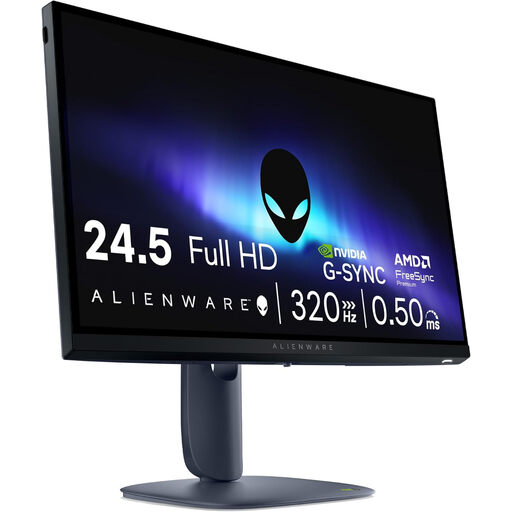 No image available
This 24.5-inch Full HD setup could work well in a compact gaming space. Measure the available room before ordering.
Fast IPS, 1920 × 1080 pixels, 320 Hz, HDMI 2.1 and DisplayPort 1.4 are listed. The stated width and depth are 555,59 × 206 mm.
 No image available
This 24-inch Full HD option suits a compact screen setup. Check the stand dimensions and available desk space.
The product name lists IPS, 1920 × 1080 pixels and 144 Hz. Adaptive Sync, HDMI and DisplayPort connections are also listed.
 No image available
A portable 15.6-inch screen could be an option if space is your main constraint and this screen size is large enough for your instruments.
Full HD, 60 Hz, HDMI and two USB-C connections with DisplayPort Alt Mode are listed. The product name also mentions speakers; the display area is smaller than that of a 23.8- or 24-inch screen.
 No image available
This 27-inch QHD option could suit you if you want more pixels for maps and instruments and have room for a larger screen.
2560 × 1440 pixels, IPS and 180 Hz are listed. The description mentions an adjustable stand, HDMI 2.1 and DisplayPort 1.4. Check that your PC supports the settings you want.
 No image available
Consider this ultrawide format only if it works with your desk and your game’s display.
3440 × 1440 pixels, 21:9, 180 Hz and Adaptive Sync are listed. The stated width and depth are 809 × 223,2 mm; the description mentions height, swivel and tilt adjustment.
Measure the available width and depth where the stand will sit, then compare these with the dimensions including the stand. If you’re using a monitor arm, also check the VESA size and whether the arm and desk are suitable for mounting.
The maximum refresh rate can depend on the resolution and the input you use. For the MAG 342CQR E2 at 3440 × 1440, MSI lists a maximum of 180 Hz via DisplayPort and 100 Hz via HDMI 2.0b. So remember to check your PC’s output and the settings you’ve chosen too.
Check your game’s scaling settings, and adjust the screen position and ambient lighting. The Dutch Arboportaal identifies small symbols, insufficient contrast and reflections as factors that can reduce readability. This doesn’t prove that a particular gaming monitor will solve the problem.
For online purchases from a business, you’re entitled to a statutory 14-day cooling-off period in many cases, although there are exceptions. Products must also conform to the contract. The Dutch government states that the Netherlands has no fixed statutory guarantee period and that you should contact the seller if a product is faulty. Check the terms that apply to your order.
Use the product information and energy label for the specific models you’re comparing. The European Commission states that energy labelling rules apply to electronic displays within their scope, so don’t assign an energy label rating without checking the specific product.