
Competitive arena player
You want to follow movement and controls without delay, so you compare refresh rate, measured motion handling and input lag separately. RTINGS treats these as distinct measurements.


First, choose a monitor with a refresh rate and connection that match what your PC or console can output. Also look at independently measured motion handling and input lag, not just the advertised response time. Compact Full HD puts less emphasis on resolution, while QHD gives you more detail. For long sessions, an adjustable screen position may matter more than extra hertz.
You want to follow movement and controls without delay, so you compare refresh rate, measured motion handling and input lag separately. RTINGS treats these as distinct measurements.
You want to position the screen properly and vary your posture. Arboportaal offers guidance for screen-based work; this is not a specific gaming rule for home gamers.
You want more screen space and detail as well as speed, and check whether your device can output the QHD refresh rate you want. ASUS and LG list models with different resolutions and refresh rates.
A good fit if: a smaller screen and a high stated refresh rate matter more to you than QHD detail.
Bear in mind: according to ASUS, the stand on the ASUS VG249Q3A is not height-adjustable. Check that it will sit at the right height on your desk.
A good fit if: you want more screen space and detail, along with an adjustable screen position.
Bear in mind: LG says QHD at 240 Hz on the 27GR83Q-B requires a PC graphics card with DisplayPort 1.4 DSC or HDMI 2.1. Also check which outputs your device supports.
A good fit if: you specifically want a curved screen and its shape suits your viewing distance.
Bear in mind: Samsung lists 1 ms MPRT for the Odyssey G5 G55C. This is not the same measurement as GtG or input lag. Compare separate motion measurements.
A high Hz rating doesn’t tell you everything about how a monitor handles motion in a match. RTINGS treats refresh rate, motion blur and input lag as separate measurements.
| What to consider | What to check before buying | Who it matters to |
|---|---|---|
| Motion and responsiveness | Compare independent tests of pixel transitions, overshoot and input lag at the Hz settings you play at. Also check the refresh rate and VRR supported by your device and connection. | If I play fast-paced arena battles, I want to follow movement and controls without delay; around 36% of consumers prioritise motion handling and responsiveness. |
| Screen position during long sessions | Check height adjustment, tilt, VESA mounting and the space available on your desk. Consider whether the stand suits your seating position. | If I play for a long time, I want to position the screen to suit me and vary my posture; around 29% of consumers give screen position top priority. |
| Sharpness and achievable performance | Compare screen size and resolution with your viewing distance, and check whether your PC or console supports the resolution and Hz combination you want via your chosen connection. LG lists specific PC connections for QHD at 240 Hz on the 27GR83Q-B. | If I want more detail, I want to know whether my device can output that picture too; around 21% of consumers prioritise sharpness and extra screen space. |
| Power consumption and after-sales rights | Compare the EU energy labels of the specific models you’re considering and check the applicable warranty terms. An extended warranty you pay for does not replace your statutory rights. | If I use a monitor often, I want to compare its energy consumption and know what to expect after buying; around 14% of consumers prioritise running and after-sales costs. |
These terms describe different measurements. A stated figure doesn’t rule out blur or overshoot at your gaming settings.
Note which measurement the manufacturer uses, then compare independent tests of motion handling and input lag at the relevant Hz settings.
For the LG 27GR83Q-B, LG lists specific PC connections for QHD at 240 Hz and a maximum of 120 Hz for video devices such as consoles.
Check your source device, port, cable and preferred resolution and refresh rate combination in advance.
According to ASUS, the ASUS VG249Q3A tilts and has VESA 100 × 100 mm mounting, but its stand is not height-adjustable.
Check that the stand suits your desk and seating position. If you’re mounting it on an arm, also check the mounting points and weight capacity.
You may need to buy a suitable monitor arm separately.
According to ACM ConsuWijzer, your statutory guarantee rights apply alongside any retailer or manufacturer’s warranty.
Check what an additional warranty product actually covers, and contact the retailer if the product is faulty.
According to ASUS, the TUF Gaming VG249Q3A is a compact Full HD IPS model with a refresh rate of up to 180 Hz.
According to LG, the UltraGear 27GR83Q-B is a 27-inch QHD IPS model with a refresh rate of up to 240 Hz and an adjustable position.
According to BenQ, the MOBIUZ EX240N is a 23.8-inch Full HD VA model with a refresh rate of 165 Hz.
According to Samsung, the Odyssey G5 G55C LS27CG552EUXEN is a 27-inch curved QHD model with a refresh rate of 165 Hz.
According to Philips, the Evnia 24M2N3200A/01 is a 23.8-inch Full HD Fast IPS model with a refresh rate of up to 180 Hz.
These models are for online players looking for high refresh rates and choosing between a more compact Full HD screen and larger QHD or UWQHD options. Some models have an adjustable stand.
 No image available
A curved UWQHD model for players looking for a wide picture and a high stated refresh rate during matches.
34.18 inches; 3440 × 1440; QD-OLED; 280 Hz; G-SYNC Compatible and FreeSync Premium Pro.
 No image available
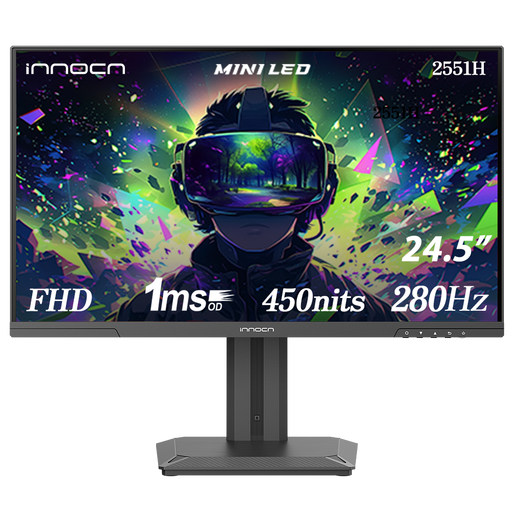
A compact Full HD option for players who also want a height-adjustable stand for fast-paced matches.
24.5 inches; Full HD 1080p; IPS; 280 Hz; Mini LED; 180 zones; height adjustment and VESA mounting.
 No image available
A 24.5-inch Full HD model for players looking for a high stated refresh rate and an adjustable screen position.
Full HD; 320 Hz; height and swivel adjustment.
 No image available
A QHD option for players who want to combine fast-paced matches with extra picture detail and a height-adjustable stand.
26.5 inches; 2560 × 1440; QD-OLED; 240 Hz; G-SYNC Compatible and VESA Adaptive-Sync.
 No image available
A larger QHD model for players who want several screen adjustment options for long sessions.
27 inches; 2560 × 1440; Fast IPS; 240 Hz, overclockable to 275 Hz; height, tilt, swivel and pivot adjustment.
No. Check which measurement the manufacturer uses: Samsung lists MPRT for the G55C, while LG lists GtG in ‘Faster’ mode for the 27GR83Q-B. Also look at separately tested pixel transitions, overshoot and input lag.
Position the monitor directly in front of you and check that the screen height and tilt suit your posture. Remember to change your position from time to time. This follows Arboportaal guidance for screen-based work, but it doesn’t guarantee that a particular monitor will prevent discomfort and isn’t a legal requirement for gaming at home.
No. For QHD at 240 Hz, LG specifies a PC graphics card with DisplayPort 1.4 DSC or HDMI 2.1, and lists a maximum of 120 Hz for video devices such as consoles with this model. Also check your device’s output and the cable you’re using.
Compare the energy labels of the specific monitors you’re considering to check their energy efficiency; annual costs also depend on usage and your energy tariff. According to ACM ConsuWijzer, online purchases generally come with a statutory cooling-off period of up to 14 days after delivery. Your statutory rights against the retailer are also separate from the manufacturer’s warranty period if a product used normally doesn’t meet the standard you could reasonably expect.
The European Commission says that electronic displays, including computer monitors, carry an energy label on a scale from A to G. This is a product labelling framework, not a requirement to buy a monitor in a particular energy class.