If you mainly play dark scenes on PC, compare OLED for contrast with ultrawide if your specific RPGs support 21:9. If you often have static HUD or desktop images on screen, it’s also worth considering LCD. On PS5, check that your console, game and connection support the resolution and refresh rate you want. Before you buy, decide whether to connect your headset to the monitor or directly to your gaming device: a headphone output doesn’t prove that the microphone will work too.
Who is this guide for?
PC gamer who loves immersive worlds
If you mainly play story-driven RPGs, compare how monitors display dark scenes and check whether your games support ultrawide. Your graphics card’s capabilities also matter; RTINGS lists aspect ratio as one of the factors to consider when choosing a screen.
Console gamer with a headset
If you want picture and headphone audio without connection surprises, check your console’s video output and decide where to connect your headset. PlayStation says that available audio settings depend on the connected devices and configuration.
Gamer with a persistent HUD
If the same interface elements or desktop images often stay on screen for a long time, weigh up OLED contrast against the risk of permanent image retention and the terms of any cover. RTINGS describes this risk for OLED; AOC’s burn-in cover for the AG326UD is subject to specified screen-care requirements.
What should you look for?
16:9 OLED
A good fit if: dark scenes and contrast matter more to you than a wider PC gaming view.
Also consider: static HUD elements that stay on screen for long periods and the terms of any burn-in cover for the specific model.
Ultrawide for PC
A good fit if: you play on PC, have enough desk space and play RPGs that support 21:9.
Also consider: a wide aspect ratio won’t work automatically in every game or on every console.
LCD, such as IPS or mini-LED
A good fit if: you often use your screen with fixed HUD or desktop images and want to consider an alternative to OLED.
Also consider: IPS generally can’t produce blacks as deep as OLED; specifications vary by panel and model.
| What to consider |
What should you check? |
Who is this important for? |
| Contrast and HDR |
Compare panel types and reviews of the exact model. Also check whether your game and gaming device support HDR; an HDR label alone doesn’t tell you what the picture will look like. |
If I mainly play in dark game worlds, I want to know how contrast and highlights will look. Around 33% of consumers put the look and feel of the picture first. |
| Headphone connection |
Check the type of headset connection, the output on the exact monitor model and your gaming device’s audio settings. PlayStation says that audio options depend on the connected devices and configuration. |
I want to know in advance where my headphones will get their audio and whether I can use the microphone in the same way. Around 25% of consumers prioritise a headphone connection. |
| Resolution, screen size and Hz |
Check what your games support and the maximum resolution and refresh rate combination for each input. PlayStation offers a test for 1440p output at 60 and 120 Hz; the game must support the output you want. |
If I switch between PC or console and specific RPGs, I want to be sure the screen and connection are right for that combination. Around 25% of consumers consider compatibility the most important factor. |
| Static HUD and cover |
Weigh up the risk of permanent image retention on OLED against LCD options, and read the terms for the exact model. AOC lists a three-year OLED warranty with burn-in cover for the AG326UD, subject to screen-care requirements. |
If I often leave the same HUD or desktop images on screen, I want to consider panel risk and aftercare. Around 17% of consumers prioritise long-term use and cover. |
Avoiding common buying mistakes
-
Assuming the maximum Hz rating applies to every game and input
The output you can achieve depends on the game, gaming device and connection. On PS5, 120Hz output is intended for games that support it.
Check your gaming device’s output and the resolution and Hz combination supported by the input you plan to use.
-
Confusing a headphone output with full headset support
A headphone audio output doesn’t automatically mean that your headset’s microphone will work through the monitor.
Before you buy, decide where you’ll connect both the game audio and any microphone.
Depending on the connection you choose, you may need a different connection route or a compatible adapter; check this in advance.
-
Assuming OLED burn-in cover always applies
AOC’s stated burn-in cover for the AG326UD is subject to following the care instructions. Elements that stay on screen for long periods are also a consideration with OLED.
Read the terms for the exact model and consider an LCD screen too if you often have a fixed HUD or desktop images on screen.
-
Choosing ultrawide without checking your games and gaming device
A 21:9 screen has a different aspect ratio from 16:9; its benefits depend on what you play and which device you use.
Check the aspect ratio supported by your specific RPGs and compare 16:9 screens too if you mainly play on console.
Brands worth considering
GIGABYTE
The MO27Q2A is a 27-inch QHD QD-OLED 16:9 model with a headphone output.
- For this model, GIGABYTE specifies 2560 × 1440 resolution, up to 280 Hz, two HDMI 2.1 inputs and a headphone output.
- The output doesn’t confirm that a connected microphone will work. With OLED, also consider the effects of leaving a static image on screen for a long time.
AOC
The AG326UD is a 31.5-inch 4K QD-OLED model for anyone who values screen size and detail.
- AOC lists a resolution of 3840 × 2160, up to 165 Hz and a three-year OLED warranty with burn-in cover.
- AOC makes burn-in cover conditional on following the prescribed care instructions. Also check that the headset connection suits your setup.
ASUS
The TUF Gaming VG27AQ3A is a 27-inch QHD IPS model to compare if you’re concerned about using a screen with static interfaces for long periods.
- ASUS specifies an IPS panel and up to 180 Hz for this model.
- RTINGS describes IPS as generally unable to produce blacks as deep as OLED. An HDR label alone isn’t an independent assessment of HDR performance.
Alienware
The AW3426DWM is a 34-inch ultrawide VA LCD model for a PC setup with space for a wide screen.
- Dell specifies 3440 × 1440 resolution and up to 240 Hz for this model.
- Check whether your specific PC games support ultrawide and whether the screen will fit your setup.
Joybuy products for your gaming setup
These product picks include 16:9 OLED and LCD monitors, plus an ultrawide model for PC gaming. They suit different priorities, including dark scenes, static HUD elements and headphone connections.
 No image available
MSI MAG 322UP QD-OLED E16 31.5-inch 4K UHD Gaming Monitor
A 16:9 option for anyone looking for a headphone output and QD-OLED panel for dark scenes.
31.5 inches, 4K UHD, 165 Hz and a headphone output.
Consider how long static images stay on screen when choosing OLED.
Joybuy
 No image available
LG UltraGear 27G810A-B 27-inch 4K UHD IPS Gaming Monitor
A 16:9 IPS model to compare if you’re looking for an LCD panel and headphone output.
27 inches, IPS, 4K UHD up to 180 Hz or Full HD up to 360 Hz, according to the product information.
Joybuy
 No image available
LG UltraGear 27GX704A-B.AEU 27-inch OLED QHD Gaming Monitor
A 16:9 OLED option for anyone looking for QHD resolution and a headphone output.
QHD (2560 × 1440), 240 Hz and a 3.5mm audio output.
Consider how long static images stay on screen when choosing OLED.
Joybuy
 No image available
KTC M27P6 27-inch 4K MiniLED Gaming Monitor
An LCD alternative to consider if you often have static images on screen.
MiniLED, Fast IPS and a dual-mode setting of 4K at 160 Hz or Full HD at 320 Hz.
Joybuy
 No image available
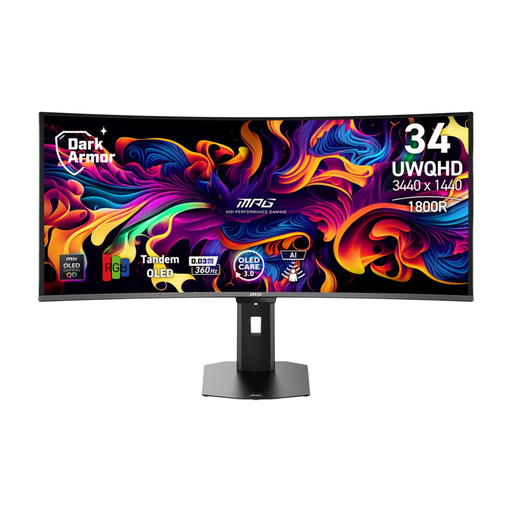
MSI MPG 341CQR QD-OLED X36 34-inch UltraWide Gaming Monitor
An ultrawide PC option for games that support 21:9; check whether your RPGs support it.
21:9, 3440 × 1440, 175 Hz and a 4-pole headphone output.
Consider how long static images stay on screen when choosing OLED.
Joybuy
Frequently asked questions
Do I need a monitor with an audio output to use headphones?
No, it depends on your headset and gaming device. On PS5, you can check the audio output and headphone volume in the system settings. If you want to connect wired headphones to the monitor, check the output on the exact model. A headphone output doesn’t prove that your headset’s microphone will work through the monitor.
How can I check whether my PS5 outputs 1440p, HDR or 120 Hz?
On PS5, go to Settings, Screen and Video, then Video Output to view information about the connected HDMI device. PlayStation also offers a 1440p test for SDR and HDR at 60 and 120 Hz, and VRR. 120Hz output is relevant for games that support it.
What should I do if my monitor develops a fault, and does OLED burn-in cover always apply?
If your monitor develops a fault, contact the retailer about your statutory rights; the Dutch government lists free repair or replacement as possible solutions. Additional manufacturer cover depends on the model and its terms: AOC makes the stated burn-in cover for the AG326UD subject to following the care instructions.
If I buy online in the Netherlands, do I have a cooling-off period, and where can I take my old monitor?
For many online consumer purchases from a business, you have 14 days to change your mind; check the terms and exceptions that apply to your purchase. For old electrical appliances, the Dutch government lists options including returning them to the shop or online service where you buy a new, similar appliance, or taking them to your local council’s recycling centre.


