Who is a compact monitor suitable for?

Replay viewer with a small desk

You want to fit the screen and controls on your desk without the stand taking over your workspace. RTINGS considers 24–25-inch monitors suitable when desk space is limited; be sure to check the footprint of the exact model too.

Detail-focused match analyst

You pause replays to examine small details or view several windows. Compare the resolution of your source footage with the screen’s resolution before prioritising a higher refresh rate.

Analyst who also plays competitively

You use the same screen for replay analysis and fast-paced live gameplay. As well as the panel and refresh rate, measured motion clarity and the connections available for your computer matter too.

What should guide your choice?

Compact Full HD with IPS

Choose this option if: you have limited desk space and mainly watch Full HD replays. AOC and Philips list Full HD and 180 Hz for the 23.8-inch models mentioned here.

Bear in mind: Full HD won’t show the extra detail in a QHD recording, and stand dimensions vary between models.

Compact QHD for replay and live gameplay

Choose this option if: you want to review QHD replays at their original resolution and also play fast-paced games. The BenQ ZOWIE XQ2566X is a 24.1-inch QHD model; RTINGS notes that the tested model has a fast response time.

Bear in mind: the stated 360 Hz won’t add frames to a recording. Check the model’s availability before you buy.

Larger QHD screen for extra windows

Choose this option if: you want to view a timeline, notes or other windows alongside your replay, and have room for a larger screen. LG lists a 27-inch QHD UltraGear model in its range.

Bear in mind: the larger panel and stand may take up more desk space; check the dimensions of the exact model.

What to consider What should you check? Who is this important for?
Desk size and placement Measure the available width and depth; compare them with the dimensions of the exact model, including its stand, adjustment range and any VESA mounting options. If my desk has limited depth, I want to know whether the stand will fit before choosing a screen size. Around 36% of consumers put desk space first.
Detail in still images Check the resolution of your replays and whether the player, timeline and any additional windows will remain easy to read. When I look at small details in paused footage, I want the screen resolution to match the source. Around 29% of consumers prioritise detail in still images.
Motion clarity Check the frame rate of your recordings, your computer’s capabilities and connections, and independent response-time and input-lag measurements for the exact model. If I play fast-paced matches as well as analysing replays, I look at how the screen handles live motion. Around 21% of consumers prioritise fast-paced live gameplay.
Purchase and running costs Compare the current total price, any cables or mounting equipment you’ll need, and the energy label for the exact model. If I mainly watch existing replays, I don’t want to pay for features I won’t use. Around 14% of consumers put total costs first.

Which buying pitfalls can you avoid?

  • Making the highest refresh rate your main priority

    A higher screen refresh rate won’t create extra frames for an existing recording. Live gaming has different requirements from watching recorded footage.

    First check the resolution and frame rate of your replays. Give a high refresh rate more weight if you’ll also use the monitor to play competitively.

    Otherwise, you could pay for speed that your usual recordings can’t make use of.

  • Assuming a small screen means a small stand

    The screen size doesn’t tell you how much desk depth the stand takes up. Adjustability and mounting options can also vary between models.

    Measure your available space and compare it with the dimensions of the screen and stand. Check the mounting options for the exact model too.

    You may need to rearrange your desk or use a separate monitor arm.

  • Treating a manufacturer’s ‘1 ms’ claim as a complete performance test

    The AOC 24G4X’s 1 ms figure is a GtG specification. It doesn’t describe every setting or, on its own, the monitor’s overall motion performance.

    Compare independent response-time and input-lag measurements for the same model, and check which settings were used.

Which brands are useful points of reference?

AOC

The AOC 24G4X is a compact Full HD/Fast IPS option for replay viewers who also game.

  • AOC lists a 23.8-inch screen, 1920 × 1080 resolution, 180 Hz and Adaptive Sync for this model.
  • The stated 1 ms figure is GtG. Compare independent measurements and check the stand dimensions against your desk.

Philips Evnia

The 24M2N3200A/00 is a compact Full HD/Fast IPS monitor to compare with other 23.8-inch models.

  • Philips lists Full HD and 180 Hz for this model.
  • Manufacturer claims about precision and smoothness aren’t independent measurements; check the stand dimensions and connections for each model.

BenQ ZOWIE

The European product page describes the XQ2566X as a 24.1-inch QHD/Fast TN monitor with 360 Hz.

  • RTINGS notes a fast response time for the tested model.
  • Claims about visibility and DyAc 3 come from BenQ ZOWIE. Check current availability too.

LG UltraGear

LG lists a 27-inch QHD UltraGear model for anyone who wants to view replay footage alongside other windows.

  • LG lists QHD and 200 Hz for the 27G610A-B.
  • Those specifications don’t tell you whether the monitor and stand will fit on a small desk; check the exact dimensions and availability.

Joybuy monitors for replay analysis

These Joybuy picks are compact Full HD monitors for watching Full HD replays; some models also list features for live gaming.

Acer SA242YH1 23.8-inch Full HD monitor

Acer SA242YH1 23.8-inch Full HD monitor

An option to compare if you watch Full HD replays and are looking for a 23.8-inch screen.

The listed specifications are 1920 × 1080, 100 Hz, a VA panel, HDMI and VGA. The product description says the charger must be purchased separately.

View at Joybuy

Philips 1000 Series 24E2N1100LB/00 24-inch Full HD monitor

Philips 1000 Series 24E2N1100LB/00 24-inch Full HD VA monitor

A 24-inch Full HD option to consider if you mainly watch Full HD replays.

The listed specifications are 1920 × 1080, 100 Hz and a VA panel; the product description states a response time of 4 ms.

View at Joybuy
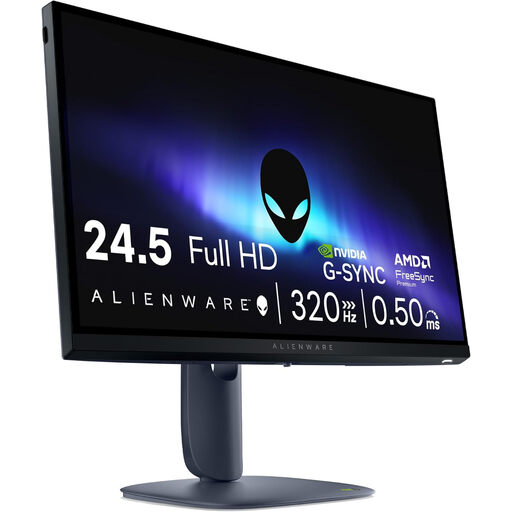
Alienware AW2525HM 24.5-inch Full HD gaming monitor

Alienware AW2525HM 24.5-inch Full HD Fast IPS gaming monitor

A compact Full HD option to compare if you play competitively as well as watching replays.

The listed specifications are 1920 × 1080, 320 Hz and a Fast IPS panel. Connections listed include HDMI 2.1 and DisplayPort 1.4.

View at Joybuy

KTC H24B9S 24-inch Full HD IPS gaming monitor

KTC H24B9S 24-inch Full HD IPS gaming monitor

A 24-inch option for Full HD replays if you also want to compare gaming features.

The listed specifications are 1920 × 1080, 144 Hz and an IPS panel. The product title mentions Adaptive Sync, HDMI and DisplayPort; the description states a tilt range of −5° to 15°.

View at Joybuy

Philips 24E1N1100A 24-inch Full HD IPS monitor

Philips 24E1N1100A 24-inch Full HD IPS monitor

A 24-inch monitor to compare if you watch Full HD replays and want to consider built-in speakers.

The listed specifications are 1920 × 1080, 100 Hz and an IPS panel. The product description mentions HDMI, VGA and built-in speakers.

View at Joybuy

Frequently asked questions

Is 360 Hz worthwhile if I mainly watch competitive replays?

Not necessarily: a higher screen refresh rate won’t add frames to an existing recording. First check the resolution and frame rate of your source footage. If you also play live, compare response time, input lag and the frame rate your computer can actually deliver.

How can I stop a compact monitor from taking up too much desk depth?

Measure the available desk depth and compare it with the dimensions of the exact model, including its stand. Also check the height adjustment and any VESA mounting options if you need a different setup; the screen diagonal alone doesn’t tell you how much room the stand takes up.

What can I do if the monitor develops a fault too soon during normal use?

Contact the seller. According to ACM ConsuWijzer, a product should last as long as you can reasonably expect it to. If a monitor develops a fault sooner during normal use, the seller must put this right free of charge by repairing or replacing it, or refunding you. The expected lifespan isn’t the same fixed number of years for every monitor.

Can I try out a monitor bought online and return it?

For an online purchase, you generally have a statutory cooling-off period of up to 14 days after delivery, according to ACM ConsuWijzer. Check the terms for unpacking, trying out and returning the monitor; don’t assume the same rules apply to purchases made in a physical shop.

What legal product information can I check for a monitor?

The European Commission describes an A-to-G energy label for electronic displays, including computer monitors. Check the label for the exact model; the label class alone doesn’t tell you whether the monitor is suitable for replay analysis.
