
Competitive PC gamer
You practise fast visual reactions and want to know how input lag and motion handling perform in the picture mode you actually use. RTINGS describes input lag and pixel transitions as separate measurements.


For reaction training, choose a monitor whose input lag and motion handling have been assessed in independent tests at the resolution and refresh rate you plan to use. An advertised pixel response time does not tell you how quickly an image signal appears on screen. RTINGS treats input lag and pixel transitions as separate characteristics. Connect your headset to your PC or console unless the specifications for the exact monitor model confirm that the audio and microphone features you need work through the monitor.
You practise fast visual reactions and want to know how input lag and motion handling perform in the picture mode you actually use. RTINGS describes input lag and pixel transitions as separate measurements.
You want to hear audio while training, so you need to work out whether your headset should connect to your PC, console or a suitable monitor output. For example, PlayStation Support describes a USB adapter for compatible wireless PS5 headsets.
You switch between devices and want to check which video and audio connections support your preferred settings. Connection requirements can vary by monitor, source device and feature.
Start with the picture mode your source device can actually output, then check the video and headset connections separately.
| What to consider | What should you check? | Who should pay particular attention? |
|---|---|---|
| How quickly the image appears | Compare independent input lag measurements and tests of motion blur and overshoot in the picture mode you intend to use. | If you want to minimise the delay between input and the image appearing during fast-paced drills, this measurement matters more than an advertised response time alone; around 36% of consumers prioritise picture timing. |
| Headset connection | Check where your headset connects and whether you need both audio and a microphone. | If you want to use your own headset during training, check whether it works directly with the source device or via the monitor; around 29% of consumers give the headphone connection top priority. |
| Source compatibility | For each input, check whether your PC or console supports your preferred resolution, refresh rate and, if applicable, VRR. | If you switch between PC and console, don’t assume you can use a mode that your connected device cannot output; around 21% of consumers start by checking source compatibility. |
| Detail and care | Weigh up resolution and panel type against how you’ll use the monitor. For OLED, also check the guidance on displaying static elements for long periods. | If screen detail, panel type and everyday use matter more to you than maximum training speed, the associated usage guidance is important too; around 14% of consumers prioritise this balance. |
Pixel transitions and input lag describe different aspects of how an image is displayed. An advertised response time therefore doesn’t tell you, by itself, how quickly an image signal appears on screen.
Compare independent measurements of input lag and motion using settings that match how you’ll use the monitor.
A monitor’s refresh rate and the number of frames your PC or console outputs are not the same thing. A maximum refresh rate may also require specific connections or source hardware.
For each input, check that both the monitor and your source device support your preferred resolution and refresh rate.
A monitor output may only pass through headphone audio. LG specifies that the 27GS75Q-B has a 3-pole output for audio only, while PlayStation Support says compatible wireless PS5 headsets can connect to the console using a USB adapter.
For your exact headset and source device, check separately whether both audio and the microphone work through the connection you plan to use.
LG describes temporary image retention when static elements remain visible for long periods on OLED monitors.
Read the care instructions and terms for the exact OLED model before choosing it for long training sessions.
The XL2566X+ is an example of a Fast-TN model that ZOWIE targets at competitive FPS gamers.
According to LG, the LG 27GR83Q-B combines a 27-inch QHD IPS panel with 240 Hz. This describes this model, not the entire product range.
The 25M2N3200W/01 is a 24.5-inch Full HD model specified by Philips at 240 Hz; the 27M2N6501L/00 is a separate QHD QD-OLED option.
These models are options for fast-paced PC or console training, with Full HD and QHD choices. For each model, check the picture mode it can support and whether your headset needs to connect to the screen or your source device.
 Image unavailable
An option if you’re looking for QHD detail and a high refresh rate for PC or console training.
32 inches, QHD and up to 180 Hz. The description lists HDMI 2.0, DisplayPort 1.2 and a headphone output.
 Image unavailable
A QHD option if you want to use a higher resolution during fast-paced games.
27 inches, 2560 × 1440 and 180 Hz. The product name lists FreeSync Premium, two HDMI 2.0 ports and one DisplayPort 1.4 port.
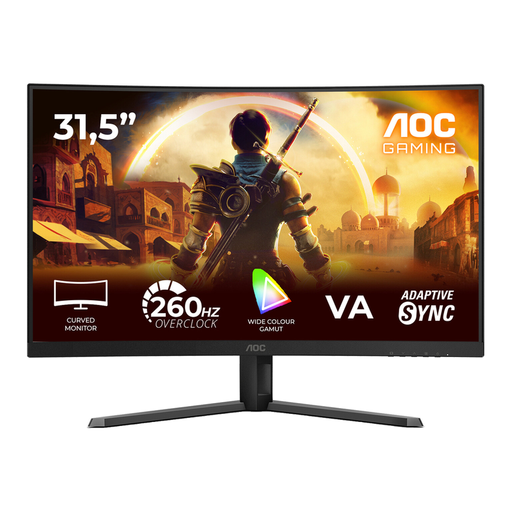 Image unavailable
A Full HD option to compare if a high refresh rate is important for your training setup.
31.5 inches, 1920 × 1080, VA panel and 1500R curvature. The native refresh rate is 240 Hz; 260 Hz is overclocked. The title lists Adaptive-Sync and HDMI and DisplayPort connections.
 Image unavailable
A Full HD model to consider if you’re looking for a high refresh rate for competitive gaming.
27 inches, 1920 × 1080, IPS panel and 240 Hz. The description mentions AMD Adaptive Sync; the product name lists HDMI and VGA connections.
 Image unavailable
A Full HD option for anyone comparing fast PC setups who also wants a headphone output.
25 inches and Fast IPS. The description lists up to 300 Hz via DisplayPort and up to 240 Hz via HDMI, plus a headphone output.
No. Pixel response time refers to pixels changing colour; input lag is the delay before a received signal becomes visible. For reaction training, compare separate measurements, ideally in the picture mode you plan to use.
No. PlayStation Support describes using a USB adapter connected to the console for compatible wireless PS5 headsets. If you want to use the monitor output, check whether the exact model also supports the microphone feature you need; LG specifies that the 27GS75Q-B has an output for audio only.
Once connected, check the resolution, refresh rate and input in use on both the source device and the monitor. For QHD at 240 Hz on the 27GR83Q-B, LG requires a PC graphics card with DisplayPort 1.4 DSC or HDMI 2.1; for other models, check the specifications for that model.
Follow the care instructions for the exact model and avoid leaving static elements on screen for longer than necessary. LG describes temporary image retention on OLED monitors; image-cleaning guidance can vary by model.
For eligible distance purchases from a business, the Dutch government says you generally have a 14-day cooling-off period; the precise rules depend on the purchase. You are also entitled to a product that is fit for purpose. The Dutch government states that the Netherlands has no fixed statutory guarantee period and that the seller must provide a solution if there is a problem.