Who is this choice relevant to?

Reaction-time trainer in daylight

If you train in a room with windows or bright lights, consider how light and reflections affect how clearly you can see your targets. RTINGS describes brightness, room lighting and reflection handling as factors that work together to determine how visible the image remains.

Competitive PC gamer

If fast movement and low latency matter to you, look for motion handling and input-lag measurements. Also consider the number of frames per second your PC can deliver with your chosen settings.

Gamer with varied needs

If you use one monitor for both fast-paced training and other games, weigh the refresh rate against image quality and your PC’s capabilities. A high Hz specification alone won’t tell you how visible the image will be in your room.

What should you look for when choosing?

What to consider What to look for when buying Who is this important for?
Visibility in ambient light Compare the measured SDR brightness and reflection handling of the exact model. Also consider the position of windows and lights. If I train in daylight or under lights, I want to be able to see my targets clearly. Around 33% of consumers prioritise visibility in ambient light.
Motion handling and input lag Look for separate measurements of motion handling and input lag at the refresh rates you use. For fast-paced training, I want to be able to recognise moving targets and understand how input lag was measured. Around 33% of consumers give motion handling and input lag top priority.
PC and connection Check which resolution and Hz rate the chosen input supports, and what your PC can deliver at those settings. With my existing PC and cable, I want to be able to use my preferred resolution and refresh rate. Around 17% of consumers start by checking PC and connection compatibility.
Image quality for other uses Compare the exact model variant and its EU energy label. Include image quality and energy information in your decision. If I choose the same monitor for other games or everyday use, I want to take image quality and running costs into account. Around 17% of consumers prioritise versatility.

Common buying mistakes

  • Comparing only the maximum Hz rating

    The achievable refresh rate can vary depending on the connection. ASUS lists a maximum of 260 Hz via DisplayPort and 144 Hz via HDMI for the VG27AQML1A.

    Before buying, check which resolution and Hz combinations the monitor supports through the input you plan to use, and check your PC’s output too.

    You may need a compatible connection or a different PC configuration to use your preferred combination.

  • Taking a GtG figure to mean total response time

    Pixel transitions, motion handling and input lag describe different things. A stated pixel response time alone doesn’t prove that total system latency is low.

    For the exact model, compare measurements of both motion handling and input lag.

  • Assuming a bright or matte screen prevents reflections

    Direct light and reflections can affect visibility, even if a monitor has an anti-glare finish or a stated brightness rating.

    Consider the position of windows and lights, and compare measured reflection handling with SDR brightness.

  • Assuming a different model code means the same monitor

    LG Netherlands lists the LG 27GS95QE-B as discontinued. The Dell P2725D is not the same model as the G2725D.

    Check the full model code and current product status before choosing an alternative.

Relevant brands

BenQ

The MOBIUZ EX270QM is an IPS model worth considering if you want to weigh up QHD, a high refresh rate and visibility in a bright room.

  • BenQ lists QHD, 240 Hz, an anti-glare finish and typical brightness of 400 nit for the EX270QM.
  • These manufacturer specifications are not independent measurements of reflections or visibility in your room.

ASUS

The TUF Gaming VG27AQML1A is worth considering if you want to assess a high refresh rate alongside the connection you plan to use.

  • ASUS lists an anti-glare finish, typical brightness of 400 cd/m² and a maximum of 260 Hz via DisplayPort.
  • According to ASUS, HDMI is limited to 144 Hz on this model. A maximum Hz rating is not a measurement of total input lag.

AOC

The AGON Q27G4ZR is a QHD/Fast-IPS model to look into if you want to compare its standard refresh rate with its overclocked rate.

  • AOC’s product page lists 240 Hz as standard and 260 Hz when overclocked, plus 1 ms GtG.
  • These stated figures are not measurements of visibility in a bright room or total system latency.

Dell

The G2725D shows why you should check the achievable refresh rate for each input.

  • Dell lists a maximum of 180 Hz via DisplayPort and 144 Hz via HDMI for this model, with a stated brightness of 400 cd/m².
  • Dell Netherlands marks the G2725D as unavailable, so it is not a confirmed current buying option.

LG

The UltraGear 27GS95QE-B shows which OLED specifications you can weigh up alongside visibility under your room’s lighting.

  • LG lists QHD, 240 Hz, typical brightness of 275 cd/m² and an anti-glare treatment for this model.
  • LG Netherlands marks the 27GS95QE-B as discontinued. These specifications do not automatically apply to a successor model.

Joybuy monitors for gaming and reaction-time training

These models include gaming monitors with IPS and OLED panels, and a range of stated refresh rates. Compare the model details with your room, PC and chosen connection before making a decision.

LG UltraGear 27G610A-B QHD IPS gaming monitor

LG UltraGear 27G610A-B QHD IPS gaming monitor, 200 Hz, 27-inch

The stated 200 Hz makes this model worth comparing if fast-paced gaming is important to you.

The product name lists QHD, IPS, 200 Hz and 27 inches. Separately check the measured visibility under your lighting and the input lag of this exact model.

View at Joybuy

KTC H27E6S 27-inch QHD Fast IPS gaming monitor

KTC H27E6S 27-inch QHD Fast IPS gaming monitor

The stated refresh rate is worth considering if you’re looking for a monitor for fast-paced movement. Also check what your PC can deliver through your chosen input.

The product name lists QHD 2560 × 1440, 240 Hz and up to 275 Hz when overclocked, Fast IPS, 1 ms, HDR400, HDMI 2.0 and DisplayPort 1.4. The stated 1 ms is not the same as a measurement of total input lag.

View at Joybuy
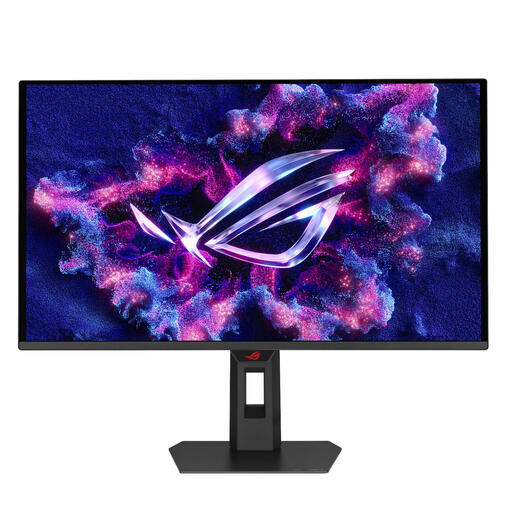
ASUS XG27AQDPG QD-OLED monitor, 26.5 inches

ASUS XG27AQDPG QD-OLED monitor, 26.5 inches, 2560 × 1440

This QD-OLED model may suit you if you want to consider panel type and resolution alongside reaction-time training.

The product name lists 26.5 inches and 2560 × 1440. The product information advises against placing it in front of a window with direct afternoon sunlight, so consider the monitor’s position carefully.

View at Joybuy

AOC GAMING Q27G4ZDR QHD QD-OLED gaming monitor

AOC GAMING Q27G4ZDR 26.5-inch QHD QD-OLED gaming monitor

The stated 240 Hz makes this model relevant if fast-paced movement matters to you, but it says nothing on its own about visibility in a bright room.

The product name lists 2560 × 1440, 240 Hz and 0.03 ms GtG. The product information lists typical brightness of 250 cd/m² and SDR peak brightness of 400 cd/m². Keep these figures and their measurement descriptions distinct.

View at Joybuy

MSI MAG 272QP QD-OLED X24 gaming monitor

MSI MAG 272QP QD-OLED X24, 26.5 inches, 240 Hz

The stated 240 Hz may be a factor if fast-paced movement is important to you. Also consider brightness during normal SDR use in your room.

The product name lists QD-OLED, QHD, 240 Hz and 0.03 ms. The product specifications list SDR brightness of 200 cd/m²; 400 cd/m² is specified as HDR peak brightness.

View at Joybuy

Frequently asked questions

How do you set your preferred refresh rate?

First, check which resolution and Hz rate the input on your exact monitor supports. Then set your preferred rate on your PC and monitor. ASUS lists a maximum of 260 Hz via DisplayPort and 144 Hz via HDMI for the VG27AQML1A.

Is an anti-glare screen always easy to see when facing a window?

No. An anti-glare finish doesn’t guarantee that the image will remain easy to see when the screen is facing a window. RTINGS explains that the light source, screen brightness and reflection handling all have an effect, so consider the set-up and measurements for the exact model too.

What does a gaming monitor’s energy label tell you?

According to the European Commission, computer monitors are covered by the energy labelling rules for electronic displays. The label uses classes from A to G and also includes information about HDR display. Compare the information for the exact EU model variant.

What are your rights when you buy a monitor online in the Netherlands?

ACM ConsuWijzer states that online purchases generally come with a 14-day cooling-off period after delivery. Your statutory guarantee is separate from any manufacturer’s guarantee: if a product doesn’t perform as you could reasonably expect under normal use, the seller is responsible for providing an appropriate solution.
