Who is this choice relevant to?

Ranked player who wants to track movement

If you mainly play fast-paced tactical matches, refresh rate can be a key factor. Choose a setting that your PC and connection can genuinely support; AOC and ZOWIE by BenQ list high refresh rates for the models covered here.

Player who enjoys long sessions

If you spend a long time at your screen, a suitable screen position and attention to reflections and readability matter as well as speed. The Arboportaal highlights ambient light and screen readability as factors to consider when working at a screen; this is not a specific study of gamers.

Ranked player who also wants good picture quality

If you use the same screen for other games or tasks, QHD detail and contrast may matter more than simply having the highest refresh rate. Your choice also depends on the resolution and settings your PC can handle.

What should you look for when choosing?

Compact Full HD LCD

Best for: playing mainly tactical matches, keeping the whole screen in view and getting a high, stable frame rate from your PC at Full HD.

The trade-off: you get a lower resolution than with QHD. The advertised Hz rating is only usable if your PC and connection support that setting.

27-inch QHD LCD

Best for: playing ranked matches, wanting more detail and having a PC that can handle QHD at a refresh rate that works for you.

The trade-off: the maximum setting varies by model and connection. LG lists DisplayPort 1.4 with DSC or HDMI 2.1 as requirements for QHD at 240 Hz on the 27GR83Q-B; AOC lists 240 Hz as standard and up to 260 Hz when overclocked for the Q27G4ZR.

27-inch QHD OLED

Best for: prioritising QHD, contrast and fast pixel transitions, while taking OLED’s considerations into account.

The trade-off: a Tweakers review of the Gigabyte MO27Q2A notes less sharp text and less convincing black levels in bright surroundings. Prolonged static images also require consideration.

Consideration What should you check? Who is this important for?
Motion clarity and speed Check the fps in your games, plus the resolution and refresh rate available through each connection. LG lists DisplayPort 1.4 with DSC or HDMI 2.1 as requirements for QHD at 240 Hz on the 27GR83Q-B. Don’t compare GtG and MPRT figures directly. If I want to track fast movement during ranked matches, I need to know which setting my PC and port can really handle; around 33% of consumers prioritise motion clarity and usable speed.
Adjustability for long sessions Check the height adjustment, tilt, desk space required and position of light sources. The Arboportaal highlights reflections and ambient light as factors that can affect readability. During long sessions, I want to position the screen to suit where I sit and reduce distracting reflections; around 27% of consumers put adjustability first.
Readability and picture quality Consider the screen size and resolution alongside your PC’s performance and the amount of ambient light. Don’t assume that an HDR label means different screens deliver the same HDR picture. If I want to enjoy detail and text as well as playing ranked matches, I’m looking for the right balance of resolution, contrast and surroundings; around 20% of consumers prioritise picture quality and readability.
Features for your own setup Check which display modes your PC and chosen input support, and whether the supplied stand suits your desk. I only want to choose features that my PC and workspace can genuinely make use of; around 20% of consumers prioritise compatibility with their own setup.

Buying pitfalls

  • Choosing the highest Hz rating without checking your setup

    The maximum refresh rate isn’t automatically the active setting. LG lists specific connection requirements for QHD at 240 Hz on the 27GR83Q-B.

    Check the fps in your ranked game and see which resolution and refresh rate your PC supports through each input.

  • Assuming millisecond figures all measure the same thing

    GtG and MPRT are different measurement methods. A lower figure on the box doesn’t, by itself, prove better motion clarity.

    Check which measurement method the stated figure uses and, where available, look for an independent review of motion and settings.

  • Judging an OLED screen on speed and contrast alone

    ASUS Support explains that prolonged exposure to visible, high-contrast static images can cause image retention on OLED screens. For the separately reviewed Gigabyte MO27Q2A, Tweakers also notes considerations around text and black levels in bright surroundings.

    Think about how long fixed game interfaces stay on screen, and check the care and warranty terms for the exact model.

  • Leaving the stand and desk setup until after you buy

    If you can’t position a screen suitably on your desk, it may not work as well with your preferred viewing position.

    Check the stand’s dimensions and adjustment options, and decide in advance where the screen will go.

Brands and models to consider

AOC

The Q27G4ZR is a 27-inch QHD LCD model for anyone looking to combine a high refresh rate with an adjustable screen setup.

  • AOC lists a Fast IPS panel, 240 Hz as standard and up to 260 Hz when overclocked.
  • A Tweakers review notes that this model has lower contrast than the OLED monitor reviewed and doesn’t list USB-C or HDMI 2.1.

LG

The UltraGear 27GR83Q-B is a specific 27-inch QHD IPS option with a listed refresh rate of 240 Hz.

  • LG lists support for variable refresh rate.
  • According to LG, QHD at 240 Hz requires a suitable PC connection via DisplayPort 1.4 with DSC or HDMI 2.1.

ZOWIE by BenQ

The XL2566K is a compact esports model with a 24.5-inch TN panel.

  • ZOWIE specifies 360 Hz and DyAc⁺ for this model.
  • In its model-specific FAQ, ZOWIE says that DyAc⁺ and variable refresh rate can’t be used at the same time.

Gigabyte

The MO27Q2A is a 27-inch QHD QD-OLED model for anyone looking to combine a high refresh rate with an OLED picture.

  • Gigabyte specifies up to 280 Hz and an adjustable stand.
  • A Tweakers review of this model notes less sharp text and a consideration around black levels in bright surroundings.

Philips Evnia

The 24M2N3200NF/00 is a compact 23.8-inch Full HD IPS model.

  • Philips lists 144 Hz and Smart MBR.
  • The stated 0.5 ms Smart MBR is not directly comparable with a GtG measurement and doesn’t, by itself, prove an advantage over another screen.

Joybuy products

This Joybuy selection includes compact Full HD options and QHD screens with high refresh rates, including a QD-OLED model.

Samsung Odyssey G4 G40H 25-inch Full HD gaming monitor

Samsung Odyssey G4 G40H 25-inch Full HD

A compact Full HD option for ranked matches where a high refresh rate and an adjustable screen position are important.

Fast IPS; up to 300 Hz via DisplayPort and 240 Hz via HDMI; 1 ms GtG listed for Extreme Mode. According to the product information, the stand adjusts for height, tilt, swivel and pivot. FreeSync Premium and G-SYNC Compatible are listed.

View at Joybuy

AOC Q27G4ZR 27-inch QHD Fast IPS monitor

AOC Q27G4ZR 27-inch QHD

A 27-inch QHD option for anyone looking to combine extra detail with fast ranked matches and an adjustable screen position.

Fast IPS; 240 Hz as standard and up to 260 Hz when overclocked. According to the product information, the stand supports height adjustment, tilt, swivel and pivot. Adaptive-Sync and FreeSync compatibility are listed.

View at Joybuy
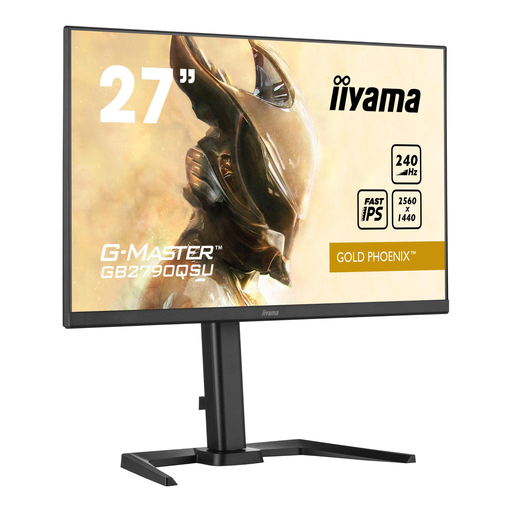
iiyama GB2790QSU Gold Phoenix 27-inch QHD gaming monitor

iiyama GB2790QSU Gold Phoenix

A 27-inch QHD option for players looking to combine a high refresh rate with an adjustable screen position.

IPS panel; 240 Hz; FreeSync. According to the product information, the stand is height-adjustable and tiltable.

View at Joybuy

Thunderobot CF25F300L 24.5-inch Full HD esports monitor

Thunderobot CF25F300L 24.5-inch Full HD

A compact Full HD model for fast matches. Check that your PC can handle your preferred refresh rate with the connection you choose.

24.5 inches; 1920 × 1080; 320 Hz. The product title lists lift and swivel adjustment.

View at Joybuy

MSI MAG 272QPW QD-OLED X28 27-inch QHD monitor

MSI MAG 272QPW QD-OLED X28 27-inch QHD

A QHD QD-OLED option for anyone looking for a high refresh rate and an OLED picture. Take prolonged static images into account when making your choice.

2560 × 1440; 280 Hz; 0.03 ms GtG according to the product information. The description says the stand supports height adjustment, tilt, swivel and pivot. NVIDIA G-SYNC and AMD FreeSync Premium Pro are listed.

View at Joybuy

Frequently asked questions

Why isn’t 240 Hz available as an option on my PC?

Check the resolution, the port you’re using and what your graphics card can support. For QHD at 240 Hz on the 27GR83Q-B, LG lists DisplayPort 1.4 with DSC or HDMI 2.1 on a suitable PC as requirements; this doesn’t automatically apply to every monitor model.

Can I use DyAc⁺ and variable refresh rate at the same time on the ZOWIE XL2566K?

No. According to ZOWIE, they can’t be used at the same time on the XL2566K. The model-specific FAQ says that DyAc⁺ must be switched off to use variable refresh rate.

What should I consider when setting up a screen for long sessions?

Check whether the stand lets you position the screen comfortably at your desk, and consider ambient light and readability. The Arboportaal highlights reflections and ambient light as factors to consider when working at a screen; it does not set a legal limit on playing time or prove that a specific gaming model offers health benefits.

Which parts of my setup should I check before choosing a monitor?

Check that your PC, the port and cable you’re using support your preferred resolution and refresh rate, and that the stand fits your desk. This helps you choose features that suit the equipment and setup you actually use.

What rights do I have in the Netherlands when buying online or if a product is faulty?

According to ACM ConsuWijzer, online product purchases generally come with a statutory cooling-off period of up to 14 days after delivery, subject to exceptions. The Authority for Consumers and Markets also states that the seller is responsible for the statutory guarantee if a product doesn’t meet what you can reasonably expect; a manufacturer’s warranty doesn’t replace these rights.
