For tactical ranked matches, 27-inch QHD is a focused choice if you want to combine speed with a clear overview. 32-inch 4K is a better fit if a larger, sharper picture matters more. Choose based on the resolution and refresh rate your PC can actually run through your preferred connection. If you’re considering OLED, check the care and maintenance requirements too.
Which monitor is right for you?
Ranked player who puts speed first
You want a larger screen, but your main priorities are smooth motion and a resolution your PC can run during matches. AOC lists QHD and a native 240 Hz refresh rate for the Q27G4ZR. Check that your own PC and connection can handle the mode you want.
Player who also wants a large, sharp picture
You play ranked matches, but also use the same monitor for games or tasks where 32 inches and 4K matter more to you. ASUS and Gigabyte’s specifications show that screen size, resolution and maximum refresh rate vary by model.
Player who wants to match their whole set-up
Your choice mainly depends on the video port, the space available on your desk, and whether you prefer IPS or OLED. Compare your preferred display mode with the connections and specifications of the exact model. ASUS also outlines points to consider when caring for an OLED screen.
What should you look for when choosing?
27-inch QHD with a high refresh rate
Choose this if: you play ranked matches and a higher stated refresh rate matters to you, but you’re not ready to move to 4K.
The trade-off: you get less screen space and fewer pixels than with a 32-inch 4K screen. Also check whether a stated Hz figure is native or applies to an overclocked mode.
32-inch 4K IPS
Choose this if: a large, sharp picture and use beyond ranked matches matter more to you than the highest refresh rate.
The trade-off: Gigabyte specifies a maximum of 144 Hz for the M32U. Also check which resolution and display mode your PC or console supports through the input you plan to use.
32-inch 4K OLED or QD-OLED
Choose this if: you want a large 4K screen and a separate fast Full HD mode, such as the one on the ASUS PG32UCDP, would be useful to you.
The trade-off: the ASUS’s 480 Hz mode is for Full HD, not 4K. ASUS warns that prolonged static, high-contrast images can cause image retention or burn-in. Screen protection features reduce the risk, but can’t eliminate it.
| What to consider |
What should you check? |
Who should pay extra attention? |
| Smooth motion |
Compare the native refresh rate with any overclocked modes, and check which video port is required. |
I want to follow movement clearly during ranked matches, so this comes before other features. Around 40% of consumers give smooth motion top priority. |
| Size and sharpness |
Compare 27-inch QHD with around 32-inch 4K at your viewing distance, and check which resolution your PC can handle in your games. |
I want more screen space without text or images looking too coarse on my desk. Around 30% of consumers prioritise a large, sharp picture. |
| Connection and display mode |
Check your PC or console’s output, the monitor’s input, and the combination of resolution and Hz. |
I want to avoid finding that my device or connection doesn’t support the mode I want. Around 20% of consumers put connection and system compatibility at the top of their buying concerns. |
| Panel care and use |
For OLED, read the care and warranty terms, and compare the energy label for the exact monitor. |
I consider maintenance, coverage and energy information before choosing a panel. Around 10% of consumers put these points ahead of their other buying concerns. |
Avoid common buying mistakes
-
Assuming the highest Hz figure is the standard mode
According to AOC, the Q27G4ZR has a native refresh rate of 240 Hz and reaches 260 Hz when overclocked. On the ASUS PG32UCDP, 480 Hz applies to Full HD, not 4K.
Before buying, make a note of the refresh rate available at your preferred resolution for each model, and whether that mode is native or overclocked.
-
Choosing a large Full HD screen without considering viewing distance
On a large screen, Full HD can look grainy when used at a desk. A higher resolution, however, puts more demand on graphics processing than QHD.
Compare QHD and 4K at your usual viewing distance, and check how your PC performs in the games you play.
-
Assuming OLED protection guarantees against burn-in
ASUS explains that prolonged static, high-contrast images can cause image retention or burn-in. ASUS’s protection features are designed to reduce the risk, not eliminate it.
Read the care instructions and coverage details for the exact model. Treat your statutory rights against the retailer separately from any additional manufacturer’s warranty.
Brands worth considering
AOC
The Q27G4ZR is a 27-inch QHD option for anyone looking for a high refresh rate.
- AOC specifies a native 240 Hz refresh rate for this Fast IPS model.
- The stated 260 Hz is an overclocked mode, not the native refresh rate.
ASUS ROG
According to ASUS, the PG32UCDP combines a 4K mode with a separate fast Full HD mode.
- ASUS specifies 4K at 240 Hz or Full HD at 480 Hz.
- The 480 Hz mode is for Full HD. ASUS says OLED Care reduces the risk of burn-in, but doesn’t eliminate it.
Samsung
The Odyssey OLED G8 G81SF is a 32-inch 4K QD-OLED option for anyone looking for a large screen and 240 Hz.
- Samsung lists 240 Hz and an energy rating of G for variant LS32FG812SUXEN.
- Check the exact variant: a descriptive passage on the same product page also mentions a 27-inch display.
Alienware
The AW3225QF is a curved 32-inch 4K QD-OLED model.
- Dell lists a curved screen and 240 Hz for this specific model.
- The curve is a matter of personal preference; the stated specifications don’t show any advantage for competitive results.
Gigabyte
The M32U is a 31.5-inch 4K IPS monitor for anyone weighing a large picture against a lower maximum refresh rate than the 240 Hz models mentioned here.
- Gigabyte specifies a maximum of 144 Hz and a KVM feature.
- Gigabyte lists 120 Hz for console gaming; check which display mode is supported by each connection.
Joybuy monitors for this choice
These Joybuy products are aimed at the 27-inch QHD gaming route, with a range of panel types and stated refresh rates.
 No image available
MSI MAG 275CQDF X24 (27-inch, WQHD)
A good fit if you’re looking for a 27-inch QHD monitor with a stated refresh rate of 240 Hz.
2560 × 1440; 240 Hz; Rapid VA; FreeSync Premium and Adaptive Sync.
Joybuy
 No image available
LG UltraGear 27GX704A-B.AEU (27-inch, OLED, QHD)
A good fit if you’re looking for a 27-inch QHD screen with an OLED panel and a stated refresh rate of 240 Hz.
2560 × 1440; 240 Hz; G-SYNC Compatible; FreeSync Premium Pro; 2 × HDMI 2.1 and 1 × DisplayPort 1.4.
Joybuy
 No image available
KTC H27E6S (27-inch, QHD)
A good fit if you want to combine 27 inches and QHD with a stated 240 Hz mode.
2560 × 1440; 240 Hz and 275 Hz when overclocked; Fast IPS; HDMI 2.0 and DisplayPort 1.4. The stand is height-adjustable.
Joybuy
 No image available
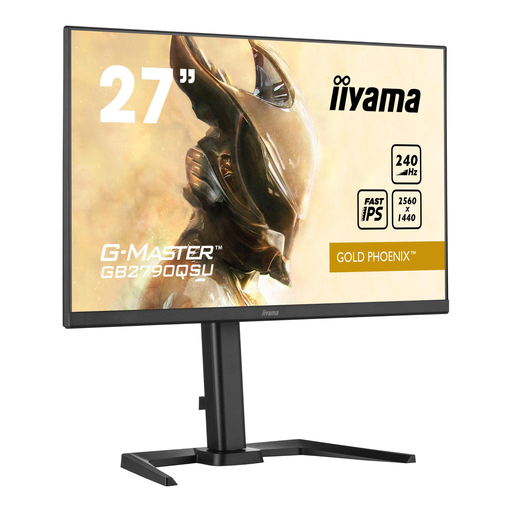
iiyama GB2790QSU Gold Phoenix
A good fit if you’re looking for a 27-inch QHD monitor with a stated refresh rate of 240 Hz.
2560 × 1440; IPS; FreeSync. The stand is height-adjustable and tiltable; VESA mounting is listed.
Joybuy
 No image available
AOC AGON PRO AG276QZD2 (27-inch, QHD)
A good fit if you’re looking for a 27-inch QHD monitor with an OLED panel.
2560 × 1440; QD-OLED; 240 Hz via DisplayPort and 144 Hz via HDMI; 2 × HDMI and 2 × DisplayPort.
Joybuy
Frequently asked questions
How can I check that I’m using the display mode I intended after connecting everything?
Set your preferred resolution and refresh rate on your device, then check the monitor’s menu too. On the ASUS PG32UCDP, 4K runs at 240 Hz and Full HD at 480 Hz; these figures apply to different modes.
What should I do if my OLED monitor displays lots of static elements?
Check the care instructions and protection features for the exact model. ASUS explains that prolonged static, high-contrast images can cause image retention or burn-in. ASUS’s features are designed to reduce the risk, not eliminate it.
Is the manufacturer’s warranty my only right in the Netherlands?
No. According to the Dutch government, if a product is faulty, you also have rights against the retailer, who must offer a solution. The Netherlands has no fixed statutory warranty period, so consider any additional manufacturer’s warranty or OLED coverage separately.
Can I return a monitor bought online within 14 days?
For a typical online consumer purchase, ACM ConsuWijzer says you generally have a statutory cooling-off period of up to 14 days after delivery. Check the applicable terms and any statutory exceptions before buying.
Where can I find information about a monitor’s energy consumption?
Compare the energy label and specifications for the exact model. The European Commission states that electronic displays, including computer monitors, have an energy label.


