
Players who prioritise motion
If you play fast-paced tactical matches, compare motion handling and input lag with the frame rate your PC and connection can deliver. RTINGS.com treats response time and input lag as separate factors to consider.


First, match your monitor to the resolution and refresh rate your PC can actually deliver in the games you play. A fast Full HD monitor suits players who prioritise motion; QHD offers more detail but puts more strain on your PC. Assess motion handling and input lag separately from the stated response times, and check where you can connect your headphones and, if applicable, your microphone.
If you play fast-paced tactical matches, compare motion handling and input lag with the frame rate your PC and connection can deliver. RTINGS.com treats response time and input lag as separate factors to consider.
If you want to use the same screen for other games or tasks where detail matters, weigh QHD against the frame rate your PC can achieve at that resolution. The AOC Q27G4XF is one example of a QHD screen with a fast IPS refresh rate.
Check in advance that you can connect your headphones and microphone where you want them. A headphone output on a monitor does not automatically mean the microphone will work too.
Start with the resolution and refresh rate your PC can run in your games. Then assess motion handling and input lag, and consider the headset connection separately.
| What to consider | What should you check? | Who is this most important for? |
|---|---|---|
| Motion and responsiveness | Compare motion handling and input lag for the exact model; check that your PC and connection can deliver your chosen resolution and Hz. Bear in mind that some settings may not work alongside VRR. | If I want a clear image in motion during fast-paced action, I look beyond a single response time figure. Around 36% of consumers prioritise motion clarity. |
| Sharpness and frame rate | Check the resolution and Hz you want, the video port and the frame rate you can achieve in the games you play. | If I want more detail as well as ranked matches, I weigh QHD against the frame rate my PC can deliver at that resolution. Around 29% of consumers prioritise image sharpness. |
| Headset connection | Check the headphone output and any microphone input on the exact model; also test which audio device your system is using. | If I use a wired headset, I want to know whether I can both listen and speak through the connection I’ve chosen. Around 21% of consumers prioritise the headset connection. |
| Ergonomics and after-sales support | Check how adjustable the stand is, as well as the support and fault terms for the panel you choose. | If I play for long sessions or am considering a different panel type, I also want to know how the screen will work in my setup and what happens if it develops a fault. Around 14% of consumers prioritise ergonomics and after-sales support. |
GtG, MPRT and input lag describe different things. So a single response time figure does not tell you the whole story about how the screen performs during fast-paced action.
Use the specification as a starting point, then compare measurements for the exact model and settings. RTINGS.com assesses input lag and response time separately.
In use, a screen may feel different or show more motion blur than you’d expect from a single specification.
A headphone output confirms that you can listen to audio, but not that your headset’s microphone will work through the same connection.
Check the headphone and microphone functions separately, and test which audio device is selected on your system.
You may need a different connection or a separate audio solution for the microphone.
According to ASUS, the ROG PG27AQWP-W offers QHD at 540 Hz or HD at 720 Hz. ZOWIE says that DyAc on the XL2566K cannot be used at the same time as VRR.
Check which resolution the advertised refresh rate applies to, and whether the picture modes you want to use can run together.
A maximum setting may not match the combination of resolution and settings you want to use.
The XL2566K is a Full HD/TN monitor designed for competitive gaming, according to its product specifications, with 360 Hz and DyAc+.
The Q27G4XF is a 27-inch QHD monitor with Fast IPS and 180 Hz; its stand is height-adjustable.
According to MSI, the MAG 272F X24 is a 27-inch Full HD Rapid IPS monitor with 240 Hz and a headphone output.
According to ASUS, the PG27AQWP-W is an OLED monitor with dual mode: QHD at 540 Hz or HD at 720 Hz.
These models cover the choice between fast Full HD performance, QHD detail and a wired headphone connection for gaming.
 No image available
Suited to anyone looking to combine QHD detail with a high refresh rate for gaming.
27-inch IPS panel with 2560 × 1440 resolution and 200 Hz.
 No image available
Suited to anyone looking for a fast Full HD monitor with the option to connect wired headphones to the screen.
Up to 300 Hz via DisplayPort and up to 240 Hz via HDMI. The product information also lists a headphone output and an adjustable stand.
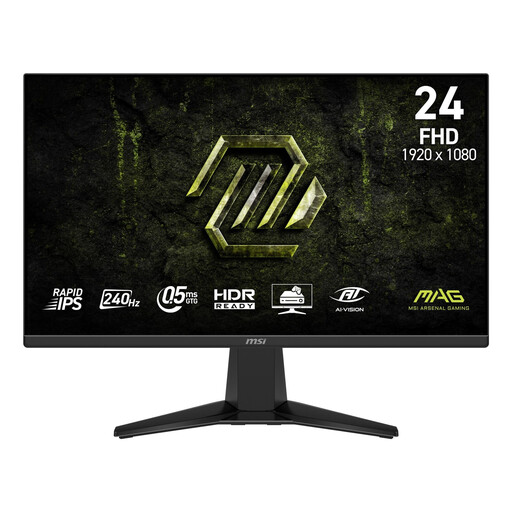 No image available
Suited to anyone looking for fast Full HD performance and a headphone output on the monitor.
240 Hz, Adaptive-Sync and a tilt-adjustable stand. The stated headphone output does not, by itself, confirm a microphone input for a headset.
 No image available
Suited to anyone looking to combine QHD detail with a high refresh rate and adjust the screen position.
2560 × 1440 and up to 275 Hz; the stated FreeSync ranges are 48–144 Hz via HDMI and 48–275 Hz via DisplayPort. The stand is height-adjustable.
 No image available
Suited to anyone looking for QHD resolution, a fast refresh rate and an adjustable screen position.
2560 × 1440 at 240 Hz; 275 Hz is the stated overclocked mode. Listed connections are HDMI 2.0 and DisplayPort 1.4.
No, you can also connect your headphones to your PC and select them as the audio output there. If you want to connect them to the monitor, check the headphone output and test the microphone connection separately. MSI specifies a headphone output for the MAG 272F X24, but this does not confirm a microphone input.
The resolution, video port, cable, system settings and number of frames your PC delivers all need to support the mode you want. MSI lists up to Full HD at 240 Hz via the specified HDMI and DisplayPort connections for the MAG 272F X24; ASUS lists QHD at 540 Hz or HD at 720 Hz for the PG27AQWP-W.
No. ZOWIE says that DyAc must be switched off before you use VRR on the XL2566K.
If a product is faulty, contact the seller. According to the Dutch Government, the Netherlands has no fixed statutory guarantee period; what you can expect from a product depends, among other things, on the product, its price and the information provided. A manufacturer’s guarantee is in addition to this.
According to the Dutch Government, distance purchases often come with a 14-day cooling-off period; check the terms and any exceptions that apply to your purchase. The European Commission explains when CE marking is required under the relevant EU product rules. A CE mark is a declaration by the manufacturer, not an independent performance test.