
Rally driver looking for a wider view
Wants to find out how much screen space their rally game can usefully display, and whether an ultrawide or three screens will fit in the room and around their seating position.


Choose your screen setup based on what your rally game supports, what display mode your PC or console can deliver, and how much space you have. One monitor keeps your setup simple; an ultrawide gives you a single wide panel, while three screens need more room for mounting and configuration.
Wants to find out how much screen space their rally game can usefully display, and whether an ultrawide or three screens will fit in the room and around their seating position.
Wants a screen whose resolution and refresh rate are suited to their connections, PC or console, and rally game.
Wants to compare dimensions, connections, energy information and service terms before installation.
Start with your rally game's display options and the space available. Then check whether your video source can handle your preferred resolution and refresh rate.
| What to consider | What should you check? | Who is this most important for? |
|---|---|---|
| Usable view of the rally stage | Check your game's supported aspect ratio and field of view. Also measure whether a 21:9 or 32:9 screen will fit in the available space. | If I want to see more of my surroundings, I'll first check what my game actually displays. Around 36% of consumers give usable visibility their top priority. |
| Smooth visuals and video source | Compare the resolution and refresh rate supported by each connection with the output from your PC or console. Also take your rally game's performance into account. | I want to know which display mode my system can deliver in my game, not just the monitor's maximum Hz rating. Around 29% of consumers prioritise a suitable combination of resolution, connection and refresh rate. |
| Positioning and mounting | Measure the available width and depth; check the stand or VESA mounting options for the exact model, and count the available video outputs. | In a dedicated gaming room, I want to know in advance whether my screens will fit around my seating position and can be connected. Around 21% of consumers say positioning and configuration are their main considerations. |
| Running costs and service | Compare the EU energy label for the exact models and read the warranty and maintenance terms. | For extended use, I also want to factor in energy information and after-sales terms. Around 14% of consumers give running costs and service their top priority. |
The display modes available also depend on the video signal and the video source you use.
For the exact model, check which combinations of connection, resolution and refresh rate your PC or console supports.
iRacing's setup instructions do not confirm that your rally game supports the same settings or display correction.
First check the display options for your specific game. Then count the connections you need and check where you can mount the screens.
A three-screen setup may require extra mounting hardware and time for alignment and configuration.
Your statutory rights to a product that meets legal requirements are separate from any additional manufacturer's warranty. According to the Netherlands Government, there is no fixed statutory warranty period in the Netherlands.
Read the terms of any additional warranty, and contact the seller if there is a problem with a faulty product.
The Odyssey G9 G91F is an example of a 49-inch 32:9 model for anyone considering a single wide screen.
The UltraGear models reviewed include a 27-inch QHD monitor and a 34-inch 21:9 model.
The CU34G2XP/BK is a reviewed 34-inch ultrawide model; the Q27G4XF is a separate 27-inch QHD option.
The TUF Gaming VG27AQ3A is a 27-inch QHD model for anyone considering a single 16:9 screen.
This selection includes several gaming monitors and ultrawide models for practising rally stages on a single screen. For each model, check that its dimensions and display mode suit your game, video source and available space.
 No image available
A 32-inch gaming monitor to compare if you're looking for a single screen. Check that your preferred display mode suits your game and video source.
32 inches; IPS; 180 Hz.
 No image available
A large OLED screen to consider if you're looking for a single monitor. Measure the available space beforehand and check your preferred display mode.
44.5 inches; OLED; 3440 × 1440 pixels.
 No image available
A curved 49-inch gaming monitor to compare if you're considering a single, very wide screen. Check the available space and game support beforehand.
49 inches; DQHD; 240 Hz; QD-OLED; curved.
The product description gives a weight of 13,96 kg and recommends two people for moving or installing it, along with a stable surface or suitable monitor arm.
 No image available
A 34-inch ultrawide to consider if you're looking for more screen width on a single panel. Check that your game makes useful use of your chosen aspect ratio.
34 inches; UWQHD; VA; 21:9; 200 Hz; 1500R.
 No image available
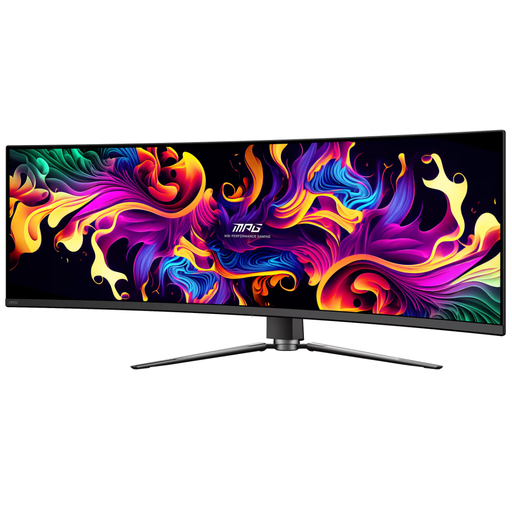
A 49-inch widescreen monitor to compare if you're looking for a single panoramic screen. Check that your game and video source support it.
49 inches; QD-OLED; 5120 × 1440 pixels; 144 Hz.
The product description recommends avoiding long periods of displaying static images to reduce the risk of OLED burn-in.
No. Check the capabilities of your specific game and PC. iRacing Support's instructions cover configurations for iRacing and don't confirm that other rally games support the same display options.
iRacing Support describes, among other options, a windowed display across three screens and settings where you enter your monitor details. The instructions recommend connecting the screens to the separate graphics card, not the video output on the motherboard.
No. The available refresh rate also depends on the resolution, connection and video source. Check which combination is supported by the exact model and your PC or console.
Check the care instructions for the exact model and avoid displaying the same static image for long periods if the manufacturer recommends doing so. LG warns that an unchanged image displayed for a long time can leave faint marks on an OLED monitor.
No. The manufacturer's warranty is in addition to your statutory rights to a product that meets legal requirements. According to the Netherlands Government, there is no fixed statutory warranty period in the Netherlands; if a product is faulty, contact the seller.