Who are these screen options for?

Rally driver with a narrow workspace

Wants to place a single screen next to the steering wheel or on a small desk, so needs to check the overall dimensions and stand. For example, ASUS Netherlands lists the ASUS TUF Gaming VG249Q3A as 54,10 cm wide and 17,40 cm deep with the stand.

Rally driver looking for more detail

Has room for one 27-inch screen and is weighing up QHD and adjustability against the extra space it takes up and the demands on their system. LG lists the 27GS75Q-B as 61,35 cm wide and 25,37 cm deep with the stand.

Rally driver who wants a wider view

Is considering one ultrawide instead of multiple screens, provided there’s enough width and their game and platform support the desired display.

What should you look for when choosing?

One compact 24-inch screen

Choose this if: available width and depth are your priority and you want to practise with one central field of view.

Bear in mind: you’ll have less physical screen width than with the larger options; according to ASUS Netherlands, the stand supplied with the ASUS VG249Q3A isn’t height-adjustable.

One 27-inch QHD screen

Choose this if: you have room for around 61 cm of width and want a higher resolution and an adjustable stand. LG lists height adjustment as a feature of the 27GS75Q-B.

Bear in mind: this option takes up more space. Also check what frame rate your system can achieve in your rally game at QHD.

One 34-inch ultrawide

Choose this if: a wider view is more important and you’ve checked that the screen, stand and steering wheel will all fit in your setup.

Bear in mind: according to AOC Netherlands, the AOC CU34G2XP/BK has a 21:9 aspect ratio. That specification doesn’t guarantee that your game and platform will make use of it.

What to consider What should you check? Who should prioritise this?
Will the setup fit? Measure the available width and depth, then compare them with the dimensions including the stand. If you’re using an arm, check the VESA pattern and weight capacity too. If I want to put the screen next to my steering wheel in a narrow workspace, I need to know whether the whole setup will fit. Around 36% of consumers prioritise placement above all else.
How much visibility and detail do you want? Compare 16:9 QHD with 21:9 ultrawide, and check the aspect ratio and camera settings in your own game. If I want a clearer picture or a wider view around the car, I weigh that against the space the screen takes up. Around 29% of consumers prioritise visibility and detail.
Will the picture stay smooth? Check the resolution, the maximum refresh rate supported by your connection and the game settings your system can handle. If I want to make the most of a high refresh rate, I need to know whether my connection and system can support it. Around 21% of consumers make system compatibility and smooth visuals their top priority.
Installation and aftercare Check what’s included, compare the energy label of specific models and read the terms of any additional cover. If I’m also considering installation, use and aftercare, I want to factor these into my choice in advance. Around 14% of consumers make these their top priority.

Buying pitfalls

  • Comparing screen size alone

    The diagonal measurement doesn’t tell you how much space the screen casing and stand will take up; your steering wheel also needs to fit where you plan to put it.

    Measure your entire setup in advance and compare it with the dimensions including the stand. If you’re using a monitor arm, check the VESA pattern and weight capacity too.

    A different stand or a suitable monitor arm may require separate mounting hardware.

  • Assuming the maximum refresh rate applies to every connection

    For the MSI MAG 274QRF QD E2, MSI lists a maximum of 180 Hz at QHD via DisplayPort or the specified USB-C video input, compared with a maximum of 144 Hz via HDMI.

    Check the stated refresh rate for your resolution, input and system, not just the highest figure.

  • Expecting ultrawide to give you the same wider view in every rally game

    A monitor’s 21:9 specification alone doesn’t tell you how a particular game or platform will display the picture.

    Check the resolution, aspect ratio and camera settings you want for your game and platform.

  • Confusing an extra warranty package with your statutory rights

    According to the Dutch government, additional cover is separate from your statutory right to receive a product that’s in good working order.

    Before buying, check exactly what an additional package covers and who to contact as the retailer if something goes wrong.

Brands as a guide to monitor options

ASUS

The TUF Gaming VG249Q3A is an example of a compact 23,8-inch Full HD screen for a workspace with limited width.

  • ASUS Netherlands lists a width of 54,10 cm, VESA 100 × 100 mm and a maximum refresh rate of 180 Hz.
  • According to ASUS, the supplied stand isn’t height-adjustable.

LG

The UltraGear 27GS75Q-B is an example of an adjustable 27-inch QHD option.

  • LG Netherlands lists IPS, 2560 × 1440 pixels, 180 Hz and height adjustment for this model.
  • LG specifically marks the 27GS75Q-B as discontinued.

AOC

The AGON CU34G2XP/BK is an example of a single 34-inch ultrawide for anyone with room for a wider screen.

  • AOC Netherlands lists a 21:9 aspect ratio, 3440 × 1440 pixels, Fast VA and a maximum refresh rate of 180 Hz for this model.
  • The product specifications don’t show how a specific rally game will display the extra picture on your platform.

MSI

The MAG 274QRF QD E2 is an example of a 27-inch QHD option where the connection you use matters.

  • At 2560 × 1440, MSI lists a maximum of 180 Hz via DisplayPort or the specified USB-C video input.
  • At 2560 × 1440, MSI lists a maximum of 144 Hz via HDMI; check the exact model and input.

Joybuy product picks for a compact screen setup

These Joybuy product picks focus on standalone gaming monitors around 24 inches for anyone with limited space for rally practice who’s considering a single central screen.

Acer SA242YH1 24-inch Full HD monitor

Acer SA242YH1 24-inch Full HD monitor

A 24-inch screen for anyone looking to fit a single monitor into a compact workspace.

Full HD; 100 Hz; 1 ms.

View at Joybuy

LG UltraGear 24G414B-B Full HD gaming monitor

LG UltraGear 24G414B-B Full HD gaming monitor

A 24-inch gaming monitor for anyone who wants to practise on a single screen without jumping straight to a larger size.

Full HD.

View at Joybuy
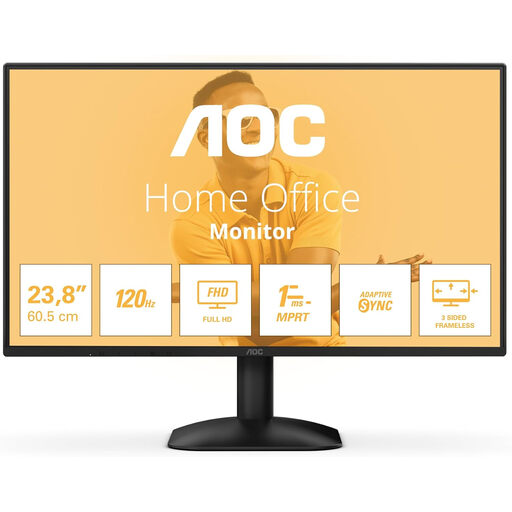
AOC 24B31H 24-inch Full HD monitor

AOC 24B31H 24-inch Full HD monitor

A 24-inch Full HD screen for anyone considering a single monitor in a limited space.

16:9; 300 cd/m²; 1 ms; HDMI and DisplayPort.

View at Joybuy

GIGABYTE GS24F14A gaming monitor, 60.4 cm

GIGABYTE GS24F14A gaming monitor

A 60.4 cm gaming monitor for anyone checking whether this screen size will fit their available space.

View at Joybuy

ASUS TUF Gaming VG249Q3A 23.8-inch Full HD monitor

ASUS TUF Gaming VG249Q3A

A 23.8-inch Full HD screen for anyone looking to fit a single monitor into a compact workspace.

ASUS Netherlands lists it as 54,10 cm wide and 17,40 cm deep with the stand; the supplied stand isn’t height-adjustable. VESA 100 × 100 mm; maximum refresh rate of 180 Hz.

View at Joybuy

Frequently asked questions

Should I get a 34-inch ultrawide for rally practice?

No, start by considering the space available and how you want your game to look. An ultrawide only gives you extra width if the game and platform support that aspect ratio; a 24- or 27-inch 16:9 screen may fit your setup better.

How can I stop a monitor taking up more desk space than necessary?

Compare the depth including the stand with the space available behind your steering wheel. Only consider a monitor arm if the VESA pattern, weight and mounting point are suitable; then check your viewing position and camera settings in the game.

Will a 180Hz monitor always run at 180 Hz via HDMI?

No, it depends on the input and the resolution you choose. For the MAG 274QRF QD E2 at QHD, MSI lists a maximum of 180 Hz via DisplayPort or the specified USB-C video input, and a maximum of 144 Hz via HDMI. Your system also needs to be able to deliver the frame rate you want in the game.

Do I need to pay for extra cover to have a statutory guarantee?

No. According to the Dutch government, additional cover is separate from your right to receive a product that’s in good working order. The Netherlands doesn’t have a fixed general statutory guarantee period; if something goes wrong, contact the retailer.

Do I always have 14 days to change my mind when buying a monitor online?

Not in every case. The Dutch government states that distance purchases often come with a 14-day cooling-off period, but there are exceptions, including purchases from private sellers. Check the terms that apply to your purchase.
