For a small desk, 23.8-inch Full HD is the more compact choice. LG, ASUS and Philips list models in this size, while Dell specifies the 27-inch, QHD G2725D. Choose the larger option only if the screen and stand will fit, and your PC can handle the resolution you want through your chosen connection. Also check the stand’s adjustment options and the ports on the exact model.
Who is this scenario for?
Gamer with limited desk space
Wants to know whether both the screen and stand will fit alongside their other things, so compares the overall dimensions rather than just the screen diagonal. ASUS lists the dimensions of the VG249Q3A with and without its stand.
Reader of maps and menus
Prioritises comfortably readable in-game text and room for interface elements. LG specifies Full HD for the 24GS60F-B, while Dell lists QHD for the G2725D; a higher resolution does not automatically mean larger text.
Gamer sharing a desk
Also uses the screen for other computing tasks or plays faster-paced games, so pays attention to the stand, ports and refresh rate. LG, ASUS and Philips list a maximum of 180 Hz for the models mentioned.
What should you look for?
First measure the available space, then compare the resolution, screen position and ports with the way you play and use your PC.
| What to consider |
What to look for |
Who should prioritise this? |
| Will the whole monitor fit? |
Measure the available width and depth, then compare them with the overall dimensions of the exact model, including its stand. |
I want to know first whether both the screen and stand will fit on my small desk. Around 36% of consumers give physical fit the highest priority. |
| Are text and menus easy to read? |
Compare Full HD and QHD, and check that you can set the game interface and system display to your liking at the chosen resolution. |
If I look at lots of maps, text and menus, I want them to be easy to read without assuming QHD automatically makes text larger. Around 29% of consumers prioritise readability and interface space. |
| Is the screen position practical? |
Check the height adjustment, tilt, VESA size, and the space available for cables and ports on the model you’re considering. |
At a shared desk, I want to be able to position and connect the screen to suit my needs. Around 21% of consumers see setup comfort as their top buying priority. |
| Does a smoother picture matter? |
Check which refresh rate the monitor supports through your chosen connection, and whether your PC can handle that combination. |
If I play games with faster movement as well as political simulations, refresh rate may matter more. Around 14% of consumers prioritise this additional gaming experience. |
Common buying pitfalls
-
Focusing only on the screen diagonal
The stand takes up space too, so the screen size alone won’t tell you whether the whole monitor will fit on your desk.
Measure the available width and depth, then compare them with the dimensions of the screen including its stand. If the supplied stand doesn’t fit, you may need a different stand or a suitable monitor arm.
-
Assuming the stand is height-adjustable
According to ASUS, the ASUS TUF Gaming VG249Q3A has no height adjustment; LG lists tilt adjustment for the 24GS60F-B. Adjustment options therefore vary by model.
Before buying, check the adjustment options on the supplied stand. If you’re considering an arm, also check the VESA size and mounting point.
-
Judging the maximum refresh rate without considering the connection
For the Dell G2725D, Dell lists a maximum of 180 Hz at QHD via DisplayPort and 144 Hz via HDMI.
Compare your preferred resolution and refresh rate with both the monitor’s port and your PC’s output.
Relevant brands
LG
The UltraGear 24GS60F-B is a compact Full HD option for anyone short on desk space.
- LG specifies a 23.8-inch IPS screen with 1920 × 1080 pixels and a maximum refresh rate of 180 Hz.
- LG lists tilt adjustment for the stand; check whether the available positioning works for your desk.
ASUS
The TUF Gaming VG249Q3A is a 23.8-inch Full HD model worth comparing if a compact size is your priority.
- ASUS lists a maximum refresh rate of 180 Hz and VESA mounting at 100 × 100 mm.
- According to ASUS, the supplied stand has no height adjustment; check the overall dimensions against your setup.
Philips
The Evnia 24M2N3200A/00 is another 23.8-inch Full HD option.
- Philips lists a Fast IPS panel and a maximum refresh rate of 180 Hz.
- Compare the stand and ports on this exact model; these specifications alone don’t tell you how easy a particular game interface will be to read.
Dell
The G2725D is a larger, 27-inch QHD option for anyone who values more pixels over a compact screen.
- Dell specifies 2560 × 1440 pixels, with a maximum of 180 Hz via DisplayPort and 144 Hz via HDMI.
- The supplied stand offers tilt adjustment; check that the screen and stand will fit on your desk, and which connection your PC supports.
Joybuy monitors for a small desk
This Joybuy selection includes compact Full HD screens for a small desk, including a portable 16-inch option. As well as the screen diagonal, compare the stand’s position and the available ports.
 Image unavailable
TECLAST V16H 16-inch Portable Monitor
Could suit a desk where you’d prefer a smaller, portable screen; check how the built-in kickstand sits on your desk.
The product title lists Full HD, 16:10, IPS, up to 144 Hz, two USB-C ports and Mini HDMI.
Joybuy
 Image unavailable
Dell SE2425HG 24-inch gaming monitor
A compact Full HD option if you value a higher refresh rate for strategy and simulation games as well as other genres.
The product information lists a 24-inch IPS screen with 1920 × 1080 pixels and a maximum of 200 Hz. DisplayPort is specified for up to 200 Hz.
Joybuy
 Image unavailable
KTC H24B9S 24-inch gaming monitor
A 24-inch Full HD option to compare if you’re looking for a compact screen and also play other types of games.
The product title lists 1080p Full HD, IPS, up to 144 Hz, Adaptive Sync, and HDMI and DisplayPort connections.
Joybuy
 Image unavailable
GIGABYTE GS24F14A gaming monitor
Its 23.8-inch size fits the compact Full HD option; still measure how much space the whole screen will take up on your desk.
The product information lists 1920 × 1080 pixels, an IPS panel, up to 175 Hz and FreeSync.
Joybuy
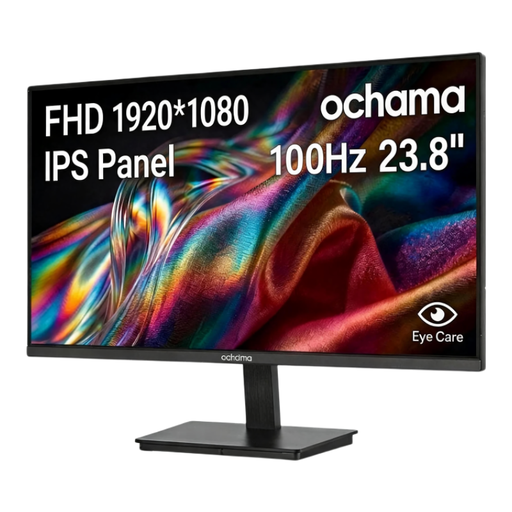 Image unavailable
Ochama 23.8-inch gaming and office monitor
A compact size to consider if you’re looking for a Full HD screen for a small desk; check the stand dimensions against your setup.
The product title lists 1080p and a maximum refresh rate of 100 Hz.
Joybuy
Frequently asked questions
Do you need 180 Hz for a political simulation?
No, 180 Hz isn’t a general requirement for political simulations. LG and ASUS list up to 180 Hz for the models mentioned, but the right choice also depends on your game, PC and connection. If you have a small desk, prioritise fit and readability first.
Can I use a monitor arm to free up desk space?
Only if the monitor, arm and mounting point are compatible. ASUS lists VESA 100 × 100 mm for the VG249Q3A; also check that the arm and desk clamp are suitable for your setup.
What should I look for in terms of power consumption?
Compare the energy label and product information for the exact model. The European Commission states that energy labelling and ecodesign rules apply to electronic displays; don’t estimate power consumption based on screen diagonal alone.
What are my rights if a monitor I bought online doesn’t work properly or doesn’t fit?
For online purchases from a business, you generally have a 14-day cooling-off period, as explained by the Dutch government. If the product is faulty, you’re also entitled to a product that works properly, and the seller is your point of contact; a manufacturer’s warranty doesn’t replace your statutory rights. There are exceptions to the cooling-off period.


