What should you look for?
Compact Full HD with VA
A good fit if: you have limited space and want to give dark scenes extra attention when playing mystery games. BenQ lists a 3000:1 contrast ratio and a 23,8-inch screen for the EX240N.
Bear in mind: manufacturer figures aren’t independent measurements of black uniformity or performance in dark scenes. Compare Full HD with QHD too if sharpness matters more to you.
Compact Full HD with IPS
A good fit if: you’re looking for a compact screen for game visuals and readable clue text. AOC and LG list an IPS panel, 23,8 inches and Full HD for the 24G4X and 24GS60F-B.
Bear in mind: black reproduction varies between models, so don’t choose on panel type alone. Also measure how much space the stand takes up.
27-inch QHD
A good fit if: you have enough room and value the extra pixels for text and visuals. LG lists a 27-inch IPS panel with 2560 × 1440 pixels for the 27G610A-B.
Bear in mind: a larger screen won’t solve a lack of desk depth. Check that your PC or console can output the resolution you want through your chosen connection.
First measure the space for the screen and stand. Then compare resolution, black reproduction and connections with your own gaming system.
| What to consider |
What to look for |
Who should pay extra attention? |
| Will it fit on your desk? |
Measure the available width and depth, then compare them with the dimensions including the stand. BenQ lists a stand depth of 182,6 mm for the EX240N; LG lists 180,5 mm for the 24GS60F-B. |
If I have limited space, I want to know how much room the stand takes up before choosing a screen. Around 29% of consumers say desk space is their top priority. |
| Will dark scenes stay clear? |
BenQ lists a contrast ratio of 3000:1 for the EX240N; LG gives a typical 1000:1 for the 24GS60F-B. Also compare black uniformity for each model: RTINGS describes how uneven blacks can result in bright patches and clouding. |
If I often play games with dark scenes, I don’t want to rely on a contrast figure alone. Around 29% of consumers prioritise dark scenes. |
| Will clues look sharp enough? |
AOC lists 23,8 inches and 1920 × 1080 for the 24G4X; LG lists 27 inches and 2560 × 1440 for the 27G610A-B. Also check that your source device can handle your chosen resolution. |
If I want clues to remain easy to read, I weigh the extra pixels against the space a larger screen needs. Around 24% of consumers say sharpness is their top priority. |
| Will the connections and settings work? |
Check your PC or console’s video output and the monitor’s available connections. BenQ lists HDMI 2.0, DisplayPort 1.2 and 165 Hz for the EX240N; GIGABYTE lists a maximum of 144 Hz and 175 Hz in overclock mode for the GS24F14A. |
If I want to connect my own PC or console, I check in advance which display settings the combination supports. Around 18% of consumers say connections and settings are their top priority. |
Joybuy products to consider
This Joybuy selection features compact Full HD monitors for anyone looking to fit a smaller screen on their desk.
 No image available
DELL SE2425HG 24-inch 200 Hz monitor
The 24-inch size suits anyone looking for a compact Full HD screen; measure the space for the stand first.
The product information lists IPS, 1920 × 1080, 200 Hz and AMD FreeSync Premium.
View at Joybuy
 No image available
KTC H24B9S 24-inch IPS monitor
The combination of a 24-inch screen and Full HD suits a compact setup; check that the connections work with your PC or console.
The product information lists 1920 × 1080, 144 Hz, Adaptive Sync, HDMI and DisplayPort.
View at Joybuy
 No image available
Philips 24E1N1100A 24-inch Full HD IPS monitor
A 24-inch screen could be a good option if you’re after a compact size and built-in speakers.
The product name lists Full HD, IPS, 100 Hz and built-in speakers.
View at Joybuy
 No image available
iiyama ProLite 24-inch IPS Full HD monitor
The listed height adjustment may be useful if you want to set the screen height to suit your desk.
The product information lists 24 inches, 1920 × 1080, 100 Hz, FreeSync Premium, built-in speakers and 150 mm of height adjustment.
View at Joybuy
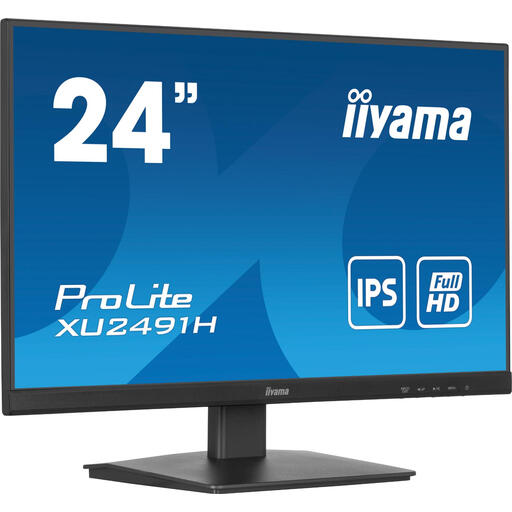 No image available
iiyama ProLite 23,8-inch IPS monitor with 100 Hz
VESA compatibility may be useful if you want to mount the monitor on a suitable arm; check the arm’s mounting requirements too.
The product information lists IPS, 1920 × 1080, up to 100 Hz, HDMI, DisplayPort and VESA mounting.
View at Joybuy
Frequently asked questions
Is 27 inches automatically better for mystery games?
No, not necessarily. The 27-inch QHD model described by LG has more pixels than the 23,8-inch Full HD models mentioned here, but first check that the screen and stand will fit on your desk and that your PC or console supports the display settings you want.
How do I set up a monitor for dark scenes?
Connect the monitor to an output that supports your preferred display settings, then select those settings on your source device. Compare the picture with dark scenes in your own game and also consider reflections, black uniformity and the screen height at your desk.
Should I buy an extended warranty?
You don’t need an extended warranty to have legal rights. According to the Dutch government, if a product is faulty, the seller must provide a solution. Compare any extra cover with your existing rights, and read the terms and exclusions.
Can I return a monitor bought online if it doesn’t fit my setup?
According to the Dutch government, many eligible distance sales from a business come with a 14-day cooling-off period. Check the seller’s terms before ordering; a private online sale isn’t the same type of distance sale.
Which energy label applies to monitors in the Netherlands?
According to the European Commission, computer monitors fall under the rules for electronic displays, with an energy label scale from A to G. Compare the product information sheet or EPREL listing for the models you’re considering, including their power consumption when displaying HDR content.


