Who is this choice relevant to?

Mystery game player

If you mainly play games with dark scenes, you’ll want to weigh up contrast against motion handling and how else you use the screen. RTINGS outlines the general differences between VA and IPS panels, but these don’t tell you how a specific model performs.

Student with a small desk

If you need to fit study materials on your desk alongside your monitor, start by checking the available space and the dimensions of the screen and stand. The AOC 24G4X is an example of a compact Full HD option with a 23.8-inch screen.

Student sharing one screen between studying and gaming

If you use the same screen for documents and games, you may want to consider QHD resolution, viewing angles and connectivity. RTINGS describes the generally wider viewing angles of IPS; also check the specifications of the model itself.

What should you look for when choosing?

What to consider What to check before buying Who is this important to?
Dark scenes Compare panel types and look for model-specific information about motion handling. Panel type alone doesn’t prove how a particular monitor performs. If I mainly play mystery games with dark scenes, I want to consider contrast without overlooking motion handling. Around 38% of consumers put dark scenes ahead of their other buying concerns.
Desk space Measure the available width and depth, including the space needed for the stand. Compare compact Full HD models with larger QHD models. If I have little room beside my study materials, the screen and stand need to fit on my desk. Around 31% of consumers give available desk space top priority.
One screen for studying and gaming Check the resolution, viewing angles and connections your computer or other devices need. If I use the same monitor for documents and games, I want to weigh up its suitability for both. Around 23% of consumers prioritise using their monitor for both studying and gaming.
Smooth motion Check which resolution and refresh rate your device can support through each connection. A monitor’s maximum specification doesn’t predict how many frames a game will deliver. If smooth motion is my main priority, my computer or console also needs to support the settings I choose through the connection. Around 8% of consumers give motion speed top priority.

Common buying pitfalls

  • Choosing solely on the highest Hz rating

    For mystery games, dark scenes, desk space and your source device may matter more than the maximum refresh rate on the box.

    Check the resolution and refresh rate supported by the connection you plan to use. Only prioritise a higher figure if it suits your games and equipment.

  • Assuming panel type guarantees picture quality

    General differences between IPS, VA and OLED don’t measure the contrast or motion handling of a specific model.

    Use panel type to compare your options, then look for model-specific tests if they’re available.

  • Confusing an extended warranty with your statutory rights

    Statutory consumer rights in the Netherlands are separate from a commercial manufacturer’s or extended warranty.

    Check what extra cover an extended warranty provides. If a product is faulty, report it to the seller.

Brands to consider

Philips

The Evnia 27M2N3500NL/00 is an example of a 27-inch QHD option with Fast VA for those who want to consider dark scenes.

  • Philips lists a resolution of 2560 × 1440 and a refresh rate of 180 Hz for this model.
  • VA generally offers more contrast than IPS, but this general difference isn’t a measurement of this model. Check its motion handling separately.

AOC

The 24G4X shows what a compact Full HD monitor with Fast IPS can offer when desk space is a priority.

  • AOC lists a 23.8-inch screen, Full HD resolution and a maximum refresh rate of 180 Hz for this model.
  • Compared with the 27-inch QHD models considered, this compact option offers less screen space and fewer pixels.

Samsung

The Odyssey G50D LS27DG502EUXEN is an example of a 27-inch QHD monitor with an IPS panel for a mix of uses.

  • Samsung lists an IPS panel and a refresh rate of 180 Hz for this model.
  • IPS generally offers wider viewing angles than VA, but usually less contrast. That alone doesn’t tell you how a particular game will look on this model.

MSI

The MAG 272QPF E20 is an example of a 27-inch QHD option with Rapid IPS and a high stated refresh rate.

  • MSI lists 2560 × 1440 and 200 Hz for this model.
  • A monitor’s maximum specification doesn’t prove what frame rate your computer will achieve in a particular game.

Dell Alienware

The Alienware AW2725D is an example of a QD-OLED option for those who value dark contrast.

  • Dell lists QD-OLED, 2560 × 1440 and 280 Hz for this model.
  • If static elements such as fixed study windows remain visible for long periods, the general risk of OLED burn-in is worth considering. This doesn’t mean this model will suffer burn-in.

Joybuy products

This selection includes QHD gaming monitors with VA, HVA, QD-OLED or OLED panels. Compare each model’s specifications with the space you have, your equipment and how you study.

AOC Gaming Q27G42XNE 27-inch QHD gaming monitor

AOC Gaming Q27G42XNE, 27-inch QHD

An option to compare if you’re considering a 27-inch QHD screen with a VA panel for dark scenes. RTINGS describes VA as generally offering more contrast than IPS; this doesn’t determine this model’s motion handling on its own.

Specifications: 2560 × 1440, 180 Hz, 1 ms, FreeSync Premium, HDR10, 2× HDMI 2.0 and 1× DisplayPort 1.4.

View at Joybuy
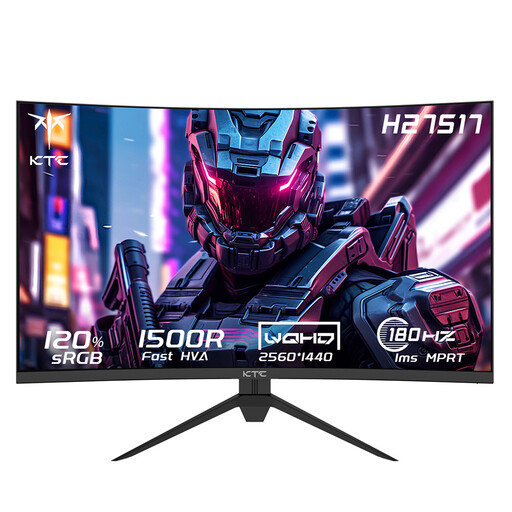
KTC H27S17 27-inch QHD gaming monitor with HVA panel

KTC H27S17, 27-inch QHD, curved

Compare this monitor if you’re considering a 27-inch QHD gaming screen with a curved HVA panel. The panel type alone doesn’t tell you how the model performs in a particular game.

Specifications: 2560 × 1440, 180 Hz, HVA panel, curved 1500R screen and Adaptive-Sync.

View at Joybuy

AOC Q27G4ZDR 26.5-inch QHD QD-OLED gaming monitor

AOC Q27G4ZDR, 26.5-inch QHD QD-OLED

A QD-OLED option to compare if dark contrast is a priority. If static study elements remain visible for long periods, bear in mind the general risk of OLED burn-in; this isn’t a prediction about any individual unit.

Specifications: 2560 × 1440, 240 Hz, 0.03 ms GtG, HDR10 and Adaptive-Sync.

View at Joybuy

MSI MAG 272QPW QD-OLED X28 27-inch QHD gaming monitor

MSI MAG 272QPW QD-OLED X28, 27-inch QHD

This QD-OLED monitor is an option to compare if dark contrast matters to you. If you regularly use static study windows for long periods, factor in the general risk of OLED burn-in.

Specifications: 2560 × 1440, 280 Hz and white finish.

View at Joybuy

LG UltraGear 27GX704A-B.AEU 27-inch OLED QHD gaming monitor

LG UltraGear 27GX704A-B.AEU, 27-inch OLED QHD

An OLED option to compare if dark contrast is important to you. If static study elements remain visible for long periods, the general risk of OLED burn-in is still worth bearing in mind.

Specifications: 2560 × 1440, 240 Hz, DisplayHDR 400 True Black, 2× HDMI 2.1 and 1× DisplayPort 1.4.

View at Joybuy

Frequently asked questions

Do you have to choose OLED for mystery games?

No, OLED isn’t essential for mystery games. Weigh dark contrast against your other screen use: VA generally offers more contrast than IPS, while static elements that remain visible for long periods are a consideration with OLED. Also assess the specifications of the individual model.

How do you check your set-up before connecting the monitor?

First, measure your desk and allow for the monitor stand. Then check the video output on your computer or console and the inputs on the model you’ve chosen. A monitor’s maximum refresh rate alone doesn’t tell you what your device and connection can deliver in a game.

What should you consider when using an OLED monitor for studying too?

Take static elements that remain visible for long periods, such as fixed windows, into account, and follow the instructions and any panel maintenance features for your specific model. The general risk of burn-in doesn’t mean an individual monitor will suffer from it.

How do you compare monitor energy consumption?

Compare the EU energy labels for the exact models. According to the European Commission, computer monitors are covered by the A to G energy label scale for electronic displays.

What are your rights when buying online in the Netherlands?

According to ACM ConsuWijzer, the statutory cooling-off period for an online product purchase generally ends 14 days after delivery. You also have statutory rights if a product is faulty; the seller is responsible for providing an appropriate solution. A commercial warranty is separate from these statutory rights.
