
Playing in daylight with reflections
You play near a window or with lamps opposite the screen, and reflections make it harder to spot clues. RTINGS.com discusses reflections and brightness as separate factors to consider when choosing a screen.


For mystery games in a bright room, a mini-LED LCD is a sensible first option to compare if you play during the day and dark details matter; assess the specific model for both SDR brightness and reflections. OLED may suit you if you can control the light sources and deep blacks matter more, but ambient light can make blacks look less deep, and displaying static images for long periods carries a risk of burn-in.
You play near a window or with lamps opposite the screen, and reflections make it harder to spot clues. RTINGS.com discusses reflections and brightness as separate factors to consider when choosing a screen.
You want to make out both shadows and small bright details. RTINGS.com explains that ambient light can raise the perceived black level.
You want to pick out small clues. Match the screen size and resolution to your viewing distance, and check which resolution your PC or console can output.
RTINGS.com treats SDR and HDR brightness, and direct reflections, as separate aspects of picture quality. So compare data for the same model under the same conditions.
| Concern | What to look for | Who should prioritise this? |
|---|---|---|
| Visibility in daylight | Compare the SDR brightness and reflection handling of the same model. | If I play during the day and reflections could hide clues, I prioritise readability in daylight. Around 36% of consumers cite daylight and reflections as their main buying concern. |
| Dark scenes and contrast | Check contrast and black levels in ambient light; local dimming can cause a halo around small bright points. | I want to make out shadows without losing sight of bright clues. Around 29% of consumers prioritise contrast and detail in dark scenes. |
| Small clues and text | Match the resolution to the screen size, and check what your device supports. | If I want to read small text and details, sharpness and a suitable resolution matter more than a speed I won't use. Around 21% of consumers put detail readability first. |
| Connectivity and long-term use | Check the ports and supported display modes; if you choose OLED, read the care guidance for that specific model. | I want the monitor to work with my PC or console and suit how I use it. Around 14% of consumers put connectivity and long-term use at the top of their buying concerns. |
Peak HDR brightness and SDR brightness describe different display conditions. Light from a window or lamp can also remain visible as a reflection.
Compare separate SDR brightness data and reflection tests for the model you’re considering.
Ambient light can raise the perceived black level, even on a screen that displays deep blacks in a dark room.
Assess reflections and black levels in lighting conditions similar to those where you play.
A high refresh rate alone tells you nothing about contrast, reflections or whether the resolution suits your device.
First consider the light in the room, picture quality and connectivity; then compare the refresh rate you can actually use.
Displaying the same static elements for long periods carries a risk of permanent burn-in on OLED screens. Commercial warranty terms can vary by product.
Read the manual and terms for the exact model you’re considering.
The TCL 27R83U is a 27-inch 4K mini-LED gaming monitor worth comparing if both daylight and dark scenes matter to you.
The LG UltraGear 27GX704A-B is a 27-inch QHD OLED option for anyone who also plays fast-paced games as well as mystery games.
The ROG Swift OLED PG32UCDM Gen3 (PG32UCDM3) is a 32-inch 4K QD-OLED option for anyone who prioritises resolution and OLED contrast.
The MO27Q2A is a 27-inch QHD OLED model that you can consider as a specific option to compare.
This Joybuy selection includes gaming monitors with features such as QHD and 4K resolution, mini-LED, IPS and OLED. Compare each model for screen size, resolution, reflections and the display modes your device supports.
 No image available
A 27-inch QHD option if you want to examine small clues and are looking for a high refresh rate.
The product name lists QHD, Rapid IPS and 200 Hz.
 No image available
A mini-LED option to include in your comparison if you want to view small details and dark scenes.
The product information lists QHD 2560 × 1440, up to 275 Hz, SDR brightness of 450 cd/m² and 1152 local dimming zones. These are stated product specifications, not independent measurements of visibility in your room.
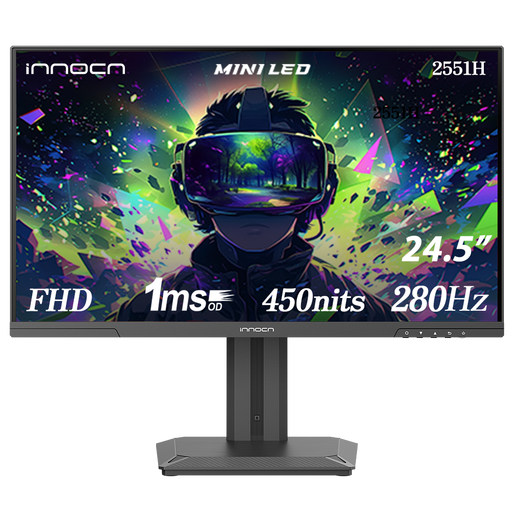 No image available
A more compact FHD option to compare if you’re not looking for a 27-inch QHD screen.
The product specifications list 280 Hz, typical brightness of 450 nits and 180 dimming zones.
 No image available
A 27-inch 4K model to compare if you’re looking for fine picture detail and want to match your device’s capabilities to the display mode.
The product information lists 4K at 160 Hz or FHD at 320 Hz, and 1152 local dimming zones. The product specifications also mention USB-C with 65 W.
 No image available
A QHD OLED option to compare if deep blacks matter to you and you can control light sources around the screen.
The product information lists 240 Hz and a glossy screen coating, so bear possible reflections in mind. If you use it for long periods with static images, follow the care guidance for this specific model.
No, OLED isn’t automatically the right choice. OLED can display deep blacks without the glow caused by local dimming, but reflections and the black level you see in ambient light also matter in a bright room. Compare specific models in lighting conditions similar to your room.
First, check the video input and set a supported resolution and refresh rate on your PC or console. Adjust the brightness and display mode to suit the light in your room; RTINGS.com advises against simply copying settings from a different unit.
For OLED, follow the care instructions for the specific model, especially if the same interface is displayed for long periods. To compare power consumption, check the European energy label for the exact monitor; the European Commission notes that electronic displays also show information for HDR viewing.
In the Netherlands, online consumer purchases generally come with a statutory 14-day cooling-off period after delivery, unless an exception applies. You’re also entitled to a statutory guarantee if a monitor, under normal use, doesn’t meet what you could reasonably expect. ACM ConsuWijzer explains that the seller is responsible and that a manufacturer’s guarantee doesn’t replace this right.
Yes. The European Commission states that computer monitors are covered by energy labelling for electronic displays. Compare the label for the exact model, but don’t use its energy rating to predict picture quality.