
Simulation player looking for a wider view
Wants to see more of the landscape and any instruments during landing. Check whether the game supports ultrawide and whether the screen will fit on your desk.


For a moon-landing simulation, an ultrawide screen is a good fit if the game supports 21:9 properly and your desk and graphics card can handle 3440 × 1440. With 27-inch QHD at 16:9, you get a conventional aspect ratio with fewer horizontal pixels. LG specifies a resolution of 2560 × 1440 for the 27GS75Q-B, while Philips advises checking that your graphics card can deliver the maximum resolution and refresh rate of the 34M2C5601QA/00. A high maximum Hz rating does not guarantee that your PC, console or game will reach that frame rate. Choose OLED primarily if dark-scene contrast matters to you, and follow the care instructions for the exact model.
Wants to see more of the landscape and any instruments during landing. Check whether the game supports ultrawide and whether the screen will fit on your desk.
Wants to choose a resolution and refresh rate that their PC or console can handle through the available connection. Philips highlights this for the maximum display mode of the 34M2C5601QA/00.
Weighs the desired contrast of a QD-OLED screen against the care instructions and warranty terms for the specific model. AOC makes the stated OLED warranty protection for the AG346UCD conditional on following the accompanying care guide.
Start with the aspect ratio your simulation supports and the resolution your PC or console can drive. Then check your preferred refresh rate, the space available and any OLED care requirements.
| Point to consider | What should you check? | Who is this important for? |
|---|---|---|
| Wide view and aspect ratio | Check whether the game supports 16:9 or 21:9, and measure the space available on your desk. | If I want a wide view of both the lunar landscape and the instruments during landing, I check that the game supports the format and that I have enough desk space. Around 33% of consumers prioritise a clear view and a suitable aspect ratio. |
| Sharpness and hardware | Compare the resolution and desired frame rate with your PC or console’s capabilities and the connection you plan to use. Philips advises checking that the graphics card can deliver the maximum combination for the 34M2C5601QA/00. | If I want QHD detail without choosing a mode my PC or console cannot handle, I match the resolution and refresh rate to its capabilities. Around 25% of consumers prioritise this hardware match. |
| Smooth motion | Check which Hz mode the chosen input supports and whether your source and screen support the same VRR technology. | During camera movements and landing, I want a screen that matches the frame rate my gaming system can actually deliver. Around 17% of consumers prioritise smooth visuals. |
| Purchase and energy costs | Compare specific models and check the energy label for the exact screen before deciding. | If I’m weighing features and size against the purchase and running costs, I want to compare specific models rather than infer a price range from a brand name. Around 17% of consumers place the greatest weight on these costs. |
| Dark-scene contrast and panel care | Read the care guide and warranty terms for the exact OLED model; AOC sets out model-specific terms for the AG346UCD. | If dark scenes matter to me, I want to know in advance what care my chosen OLED screen requires. Around 8% of consumers prioritise contrast and accept this trade-off. |
The frame rate you actually see also depends on the graphics processor, resolution and connection you use. A monitor’s maximum rating alone does not tell you how many frames your gaming computer can deliver.
Check the supported combination of resolution, Hz and connection on both the monitor and your PC or console.
3440 × 1440 has more horizontal pixels than 2560 × 1440. How useful that extra screen space is depends on the game’s display options and whether the screen will fit on your desk.
Check the aspect ratio options in your simulation and measure the available space before choosing a screen size.
For the AG346UCD, AOC makes the stated OLED warranty protection conditional on following the care guide. Don’t assume the same terms apply to other OLED models.
Read the warranty terms for the exact model before buying, especially if you display static cockpit or instrument images for long periods.
The LG UltraGear 27GS75Q-B is an example of a conventional 27-inch QHD IPS monitor.
The Evnia 34M2C5601QA/00 is a 34-inch ultrawide Fast VA LCD option.
The AGON PRO AG346UCD is a 34-inch ultrawide QD-OLED monitor we’ve looked at.
The AW3426DW is another 34-inch ultrawide QD-OLED option for a powerful gaming setup.
This selection includes conventional QHD screens, models with a high stated refresh rate and ultrawide options. For each screen, check that the resolution, connection and frame rate suit your gaming computer and simulation.
 Image unavailable
A good fit if you’re looking for a conventional QHD format on a 32-inch gaming monitor; check that your source can deliver your preferred frame rate.
QHD 2560 × 1440, 16:9 and 180 Hz.
The description lists height, swivel and tilt adjustments, as well as VESA mounting.
 Image unavailable
A good fit if you’re looking for QHD on a 27-inch OLED panel; check the care information for the exact model before buying.
QHD 2560 × 1440 and 180 Hz.
The product information lists tilt adjustment and VESA mounting.
 Image unavailable
A good fit if you’re looking for a conventional QHD gaming monitor with a high stated refresh rate; check which mode is supported through your chosen connection.
2560 × 1440, 180 Hz and FreeSync Premium.
The product title lists HDR10, two HDMI 2.0 ports and one DisplayPort 1.4 port.
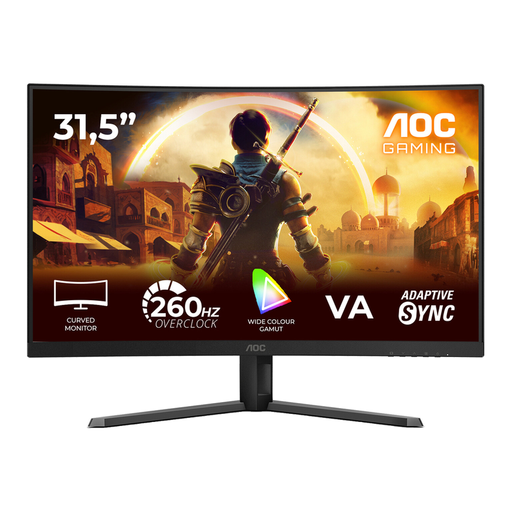 Image unavailable
A good fit if you’re considering a curved screen with a high stated refresh rate; bear the FHD resolution in mind when choosing a screen size and viewing distance.
FHD 1920 × 1080, 240 Hz native and 260 Hz overclocked.
VA panel, 1500R and Adaptive-Sync.
 Image unavailable
A good fit if you’re looking for a wide 21:9 picture; check that your simulation supports this format and that your graphics card can handle your preferred mode.
3440 × 1440, 120 Hz and a curved 1800R screen.
Compare the outputs on your PC or console with the inputs and supported modes of the exact monitor model. Choose a suitable connection, then set your preferred resolution and Hz in the display settings. Philips highlights that the graphics card must also be capable of handling the maximum combination for the 34M2C5601QA/00.
Follow the care instructions for the exact OLED model. For the AG346UCD, AOC recommends, among other things, not displaying a static image for extended periods and using the screen care features. AOC makes the stated OLED warranty protection for this model conditional on following that care guide; this is not a general legal requirement for all monitors.
No. You do not need paid extra cover to have statutory protection if a product is faulty. According to the Dutch government, there is no fixed statutory warranty period in the Netherlands, and the retailer is your point of contact if a product is faulty. If you’re considering additional cover, compare its terms with the rights you already have.
For distance purchases from a business in the Netherlands, you generally have a 14-day cooling-off period, as explained by the Dutch government. Exceptions may apply; check the information for your specific order and distinguish between buying from a business and buying from a private seller.
Electronic displays are subject to applicable EU ecodesign and energy-labelling rules. Electrical and electronic equipment may also be subject to product safety rules and CE marking requirements; the requirements that apply depend on the device. A product specification or retailer listing does not, by itself, prove that an individual unit meets all applicable requirements.