If you spend hours building game maps, an IPS LCD is a sensible starting point when text and fixed editor panels stay on screen for a long time. Choose a resolution, screen size and adjustability that suit your workspace. OLED may be more appealing if contrast and motion handling matter more, but RTINGS highlights the risk of burn-in when static elements remain on screen for extended periods. You should also choose a refresh rate that suits your PC and the connection you use.
Who is this choice relevant to?
People who build maps for long sessions
You keep map details and tool panels on screen for long periods, so you need a display that’s easy to read and suits your posture. Arboportaal cites small symbols, reflections and poor ambient lighting among the factors that can make a screen harder to read.
Builders who also enjoy fast-paced games
You switch between the editor and gameplay, and want the resolution, PC, connection and refresh rate to work well together. ASUS and MSI specifications show that the stated refresh rate can vary by model and connection.
Visually focused world builders
You also pay attention to dark scenes and image quality. RTINGS describes OLED’s contrast and motion benefits, alongside the risk of burn-in when static elements remain visible for a long time.
What should guide your choice?
IPS LCD for fixed editor panels
Choose this when: Text, grids and fixed tool panels stay on screen for much of your long sessions.
Trade-off: RTINGS does not describe the same burn-in risk for IPS as it does for OLED. According to RTINGS, OLED can offer deeper blacks and better motion handling.
OLED for contrast and motion
Choose this when: Contrast and motion handling matter most in your games, and fixed editor panels don’t stay on screen for long periods.
Trade-off: RTINGS notes a risk of burn-in if the same static elements are displayed for long periods. Check the terms for the specific model too.
| What to consider |
What to check before buying |
Who is this most relevant to? |
| Workspace and detail |
Check the native resolution, screen size and how easy the editor is to read at your chosen scaling. |
If I want to see the map, grid and tool panels at the same time, I look for plenty of workspace and clear details. Around 36% of consumers put workspace and detail clarity at the top of their buying priorities. |
| Adjustable positioning |
Check the height adjustment and tilt, and assess reflections under the lighting in your workspace. |
For long building sessions, I want to position the screen comfortably and minimise distracting reflections. Around 29% of consumers prioritise adjustable positioning. |
| Smooth gaming |
Compare the maximum resolution and refresh rate for each input with what your PC can handle. |
I want to game on the same monitor after building, so I check that my PC and connection support the picture mode I want. Around 21% of consumers let gaming smoothness make the difference. |
| Panel choice |
Weigh the panel type against how long fixed editor panels stay visible, and check the maintenance and warranty terms for the specific model. |
If the same editor panels stay on screen for a long time, I weigh OLED’s contrast and motion handling against the risk of burn-in. RTINGS describes this risk when static elements remain on screen for extended periods; around 14% of consumers make panel choice their top priority. |
Gaming monitor buying pitfalls
-
Assuming the highest refresh rate applies to every input
For the ASUS TUF Gaming VG27AQL3A, ASUS lists a maximum of 180 Hz via DisplayPort and 144 Hz via HDMI. So the highest figure doesn’t apply to every connection.
Check the resolution and refresh rate for each input, and make sure your PC supports the output you want.
-
Choosing OLED without considering fixed editor panels
RTINGS describes a risk of burn-in when the same static elements stay visible for long periods.
Weigh how you use the editor against the picture benefits, and read the terms for the specific model.
-
Treating the stated response time as a complete performance test
ASUS, BenQ and Lenovo list response time ratings such as GtG and MPRT. A single figure doesn’t tell you everything about using a monitor for editing and gaming.
As well as response time, compare readability, panel type, positioning and connections.
Brands and models to consider
ASUS
The TUF Gaming VG27AQL3A is a specific example of a 27-inch QHD IPS monitor with an adjustable stand.
- ASUS lists 2560 × 1440 resolution, height adjustment and up to 180 Hz via DisplayPort.
- ASUS lists up to 144 Hz via HDMI; check the figures for the input you plan to use.
MSI
The MAG 274QRF QD E2 is an example of a QHD Rapid IPS gaming monitor.
- MSI lists a resolution of 2560 × 1440 and a refresh rate of 180 Hz for this model.
Dell
The G2724D shows why you should compare connections and ergonomics for each model.
- Dell lists QHD, Fast IPS and height adjustment for this model.
- Dell lists up to 165 Hz via DisplayPort and 144 Hz via HDMI.
BenQ
The MOBIUZ EX2710Q is a specific example for anyone comparing QHD gaming monitors with built-in audio.
- BenQ lists QHD, 165 Hz and built-in audio for the EX2710Q.
Lenovo
The Legion R27qe is an example of a 27-inch QHD gaming monitor.
- Lenovo lists a resolution of 2560 × 1440 and 180 Hz for the R27qe.
- Note the difference between the R27qe model name and the separate R27qe Gen2.
Joybuy monitors for map building and gaming
Compare these Joybuy gaming monitors by screen size, panel type and stated refresh rate for map building and gaming.
 Image unavailable
Samsung Odyssey G5 G50F LS32FG502EUXEN
For anyone considering a 32-inch screen for map building; check that it suits your desk and viewing distance.
32-inch, IPS, 180 Hz.
View at Joybuy
 Image unavailable
MSI MAG 272QPF E20 27-inch WQHD 200Hz Rapid IPS
For anyone comparing a 27-inch WQHD model with Rapid IPS for editing and gaming.
27-inch, 2K WQHD, Rapid IPS, 200 Hz.
View at Joybuy
 Image unavailable
AOC Gaming Q27G42XNE 27-inch Quad HD 180 Hz
For anyone comparing a 27-inch Quad HD monitor with a stated refresh rate of 180 Hz.
27-inch, 2560 × 1440, 180 Hz, 2 × HDMI 2.0 and 1 × DisplayPort 1.4.
View at Joybuy
 Image unavailable
KTC H32S17 32-inch QHD 180Hz HVA 1500R
For anyone comparing a 32-inch QHD screen with a curved 1500R design for map building and gaming.
32-inch, 2560 × 1440, HVA, 180 Hz, 1500R.
View at Joybuy
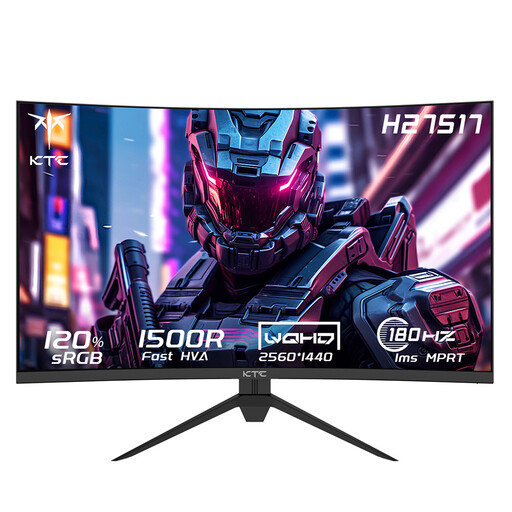 Image unavailable
KTC H27S17 27-inch QHD 180Hz HVA 1500R
For anyone comparing a 27-inch QHD screen with a curved 1500R design for editing and gaming.
27-inch, 2560 × 1440, HVA, 180 Hz, 1500R.
View at Joybuy
Frequently asked questions
Which connection should you use for the maximum refresh rate?
Check the specifications for each input and your PC’s output. ASUS lists up to 180 Hz via DisplayPort and 144 Hz via HDMI for the VG27AQL3A; don’t assume the same difference applies to other models.
Is a monitor setting enough on its own for long building sessions?
No. A setting alone doesn’t cover every consideration. Arboportaal cites readability, reflections and ambient light among the factors to consider. The specific rules for employees who work with display screens do not automatically apply to someone building maps at home as a hobby.
How can you compare monitors’ energy consumption?
Check the EU energy label and the information for the exact model. The European Commission states that electronic displays are subject to energy labelling and ecodesign requirements.
Do I have a 14-day cooling-off period and exactly two years’ legal cover for a monitor bought online?
For a standard online purchase, you will generally have up to 14 days from delivery to change your mind, subject to legal exceptions. ACM ConsuWijzer states that statutory warranty in the Netherlands does not have a fixed term of exactly two years: what matters is what you could reasonably expect from the product.


