A 34-inch ultrawide is an option if your simulation displays correctly in 21:9 and you want extra horizontal space. Choose 16:9 with 4K if fine details matter more. A 27-inch QHD screen may be a better fit if desk space and the demands on your system are more important. Before buying, check the simulation’s aspect ratio, your system’s video output and the space available.
Who is this guide for?
Simulation player who wants a clear overview
You want enough space on one screen to see both the landing view and the controls. Compare ultrawide with 16:9, and check how your simulation arranges everything on screen. AOC and GIGABYTE’s specifications show different screen formats, but they don’t confirm how a particular game will display on them.
Simulation player who wants to see the details
You prioritise a sharp picture for small details and instruments, provided your system can handle the resolution you choose. Models from GIGABYTE and AOC offer examples of 4K and QHD respectively; check readability at your chosen screen size too.
Simulation player with limited space for a setup
You want a practical screen without automatically opting for the widest or most demanding format. AOC and Philips’s 27-inch QHD models offer a more compact option than the 34-inch ultrawide models listed here.
What should you consider when choosing?
| Consideration |
What to check before buying |
Who is this important for? |
| Clear overview on one screen |
Check whether the simulation supports 21:9, and measure the space needed for the screen and stand. |
If I want to see the landing view and controls together on one screen, I need to know whether the interface fits comfortably within the display. Around 40% of consumers prioritise having a clear overview. |
| Readability of details |
Compare the native resolution and screen size; check readability with your own simulation and system. |
If I need to see instruments and small details clearly, I consider resolution and screen size together. Around 30% of consumers give top priority to being able to read fine details. |
| Space and demands on your system |
Measure the space available and check which resolutions and refresh rates your PC, cable and monitor support. |
If desk space or my system’s capabilities limit my options, I want to check those first against the screen specifications. Around 20% of consumers say space or demands on their system are decisive factors. |
| Panel choice when instruments stay on screen |
Check the panel type, and read the care instructions and warranty terms for the exact model. |
If instruments stay in the same place for long periods, I want to know in advance what care the panel needs. Around 10% of consumers prioritise panel care when displaying fixed images. |
Things to consider before buying
-
Choosing a 21:9 monitor without checking the simulation
A monitor’s aspect ratio doesn’t prove that an unspecified simulation will display its view and instruments properly in 21:9.
Before buying, check whether your own simulation supports the format and how its interface appears.
-
Assuming the quoted refresh rate is a guaranteed frame rate
The supported refresh rate can vary by connection, and it doesn’t tell you how many frames your system can render in the simulation. For example, MSI lists different maximums for DisplayPort and HDMI on the MAG 342CQR E2.
Check the signal mode supported by both the exact monitor model and your system.
-
Forgetting about fixed instruments and warranty terms with OLED
In its general OLED support information, LG warns that displaying the same image for a long time can cause faint marks. This warning doesn’t predict what will happen with a specific model from another brand.
Read the care and warranty terms for the exact model. ACM ConsuWijzer explains that an additional warranty does not replace your statutory consumer rights in the Netherlands.
Brands and models to consider
AOC
The CU34G4 and Q27G4ZR show two different AOC options: ultrawide and 27-inch QHD. These features apply to these models, not to every AOC monitor.
- For the CU34G4, AOC specifies 3440 × 1440, a 1500R curvature and 180 Hz. For the Q27G4ZR, AOC lists 2560 × 1440 and a native refresh rate of 240 Hz.
- AOC’s claims about immersion or gaming performance are manufacturer claims, not independent measurements for a lunar landing simulation. Check whether the game and interface display properly in 21:9.
GIGABYTE
The M32U is an example of a large 16:9 monitor with 4K resolution and an IPS panel.
- GIGABYTE specifies a 31.5-inch screen, 3840 × 2160 pixels and up to 144 Hz for the M32U.
- The quoted maximum refresh rate doesn’t guarantee a particular frame rate in a game. Check which signal mode your system and connection use.
Alienware
The AW3425DW is a 34-inch ultrawide QD-OLED model for anyone who has deliberately chosen this panel technology.
- Dell specifies a resolution of 3440 × 1440 and a refresh rate of 240 Hz for this model.
- In its general OLED care information, LG warns that an unchanged image displayed for a long time can cause faint marks. This doesn’t prove that this specific Dell model will be affected.
MSI
The MPG 346CQRF X24 is a 34-inch ultrawide VA model with a high refresh rate specified by MSI.
- MSI lists a resolution of 3440 × 1440 and a refresh rate of 240 Hz for this model.
- 240 Hz is the quoted monitor specification, not a measured frame rate in a lunar landing simulation. Check your system’s capabilities too.
LG
The 32GX870A-B is an example of a 32-inch, 16:9 option with a 4K OLED panel.
- LG specifies a resolution of 3840 × 2160 and a 4K mode of 240 Hz for this model.
- In its general OLED support information, LG warns that displaying the same image for a long time can cause faint marks. A brightness claim on a product page also applies under the test conditions stated there.
Joybuy monitors for a single-screen setup
This Joybuy selection includes a compact 27-inch QHD option, a 34-inch ultrawide and a 31.5-inch 4K screen. Compare the formats with your simulation’s support, your need for detail and your system’s capabilities.
 Image unavailable
Philips Evnia 27M2N3500NF QHD gaming monitor
A good fit if you’re looking for a compact 16:9 screen with QHD; check that the resolution suits your system.
27 inches; 2560 × 1440; IPS panel; 144 Hz; Adaptive Sync; HDMI 2.0 and DisplayPort 1.4.
Joybuy
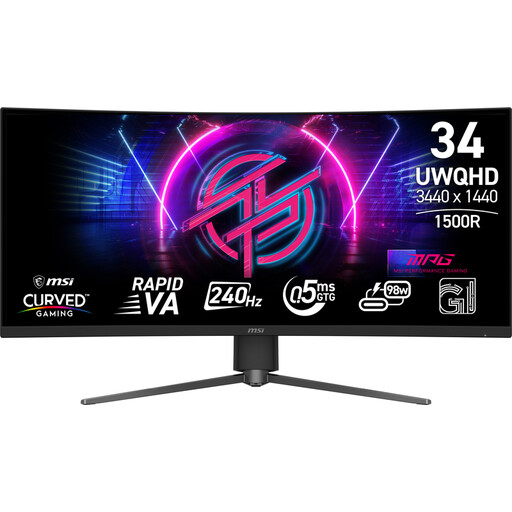 Image unavailable
MSI MPG 346CQRF X24
A good fit if you want more horizontal screen space, provided the simulation and interface display properly in 21:9.
34 inches; 21:9; 3440 × 1440; Rapid VA panel; 240 Hz; Adaptive-Sync.
Joybuy
 Image unavailable
MSI MAG 322UP QD-OLED E16 31.5-inch 4K UHD
A good fit if fine detail in a 16:9 picture matters to you and you’ve considered the points to bear in mind with OLED.
31.5 inches; 3840 × 2160; QD-OLED; 165 Hz; FreeSync Premium Pro.
If fixed instruments stay visible for long periods, OLED needs extra consideration: LG’s general guidance warns that displaying the same image for a long time can cause faint marks. This isn’t a model-specific prediction; follow the monitor’s instructions.
Joybuy
Frequently asked questions
Do I have to buy an ultrawide monitor for a lunar landing simulation?
No. Choose 21:9 if your simulation and interface display well in that format and you want the extra width. A 16:9 screen with QHD or 4K is still an alternative; monitor specifications don’t confirm support for an unspecified game.
Why might I not get the maximum refresh rate from my monitor?
The quoted refresh rate also depends on the connection and signal mode. For example, at 3440 × 1440, MSI lists a maximum of 180 Hz via DisplayPort and a maximum of 100 Hz via HDMI 2.0b for the MAG 342CQR E2. Check the limits of the exact model and your own system; this specification doesn’t automatically apply to other monitors.
What should I consider with OLED if instruments stay on screen for a long time?
LG warns that displaying the same image on an OLED monitor for a long time can cause faint marks. It also describes using the monitor settings to run image cleaning to reduce marks. Follow the instructions for the model you choose; this manufacturer advice doesn’t guarantee that marks can be prevented or removed.
Am I always entitled to exactly two years’ statutory warranty on a monitor in the Netherlands?
No. According to ACM ConsuWijzer, statutory warranty in the Netherlands has no fixed term: what you can expect from a product depends on the product and normal use. A separate manufacturer’s or seller’s warranty doesn’t replace your statutory rights.
What rules and product information should I check when buying online?
For a standard online purchase as a consumer, ACM ConsuWijzer says you generally have a statutory cooling-off period of up to 14 days after delivery, subject to legal exceptions. Before buying, check the terms for any return costs. The European Commission states that electronic displays are covered by energy labelling rules; compare the label for the exact model if energy consumption matters to you.


