
Vandaag of morgen in huis

Kwaliteit gegarandeerd

Welkomstaanbiedingen ontgrendelen: GRATIS bezorging | Tot 80% korting | Gratis 30 dagen JoyPlus-proefperiode
Download de app
Buying a gaming monitor seems straightforward until you start comparing the specifications. A screen with 240Hz, 1ms response time and HDR10 sounds appealing, but those figures don’t tell the whole story. Does the resolution suit your graphics card? Is your console using the right HDMI standard? And is a large VA screen practical for your desk?
In this guide, the Joybuy Product Recommendation Officer cuts through the marketing jargon to highlight what matters. That way, you can choose a gaming monitor that suits your games, hardware and everyday use.
A 240Hz gaming monitor can display motion more smoothly than a 144Hz or 60Hz screen. However, your computer also needs to deliver enough frames per second. If your PC averages 100 fps in a game, you won’t be making full use of a 240Hz panel.
So, check the following first:
A stated 1ms MPRT uses a different measurement method from 1ms GtG. MPRT is often linked to motion clarity settings and can affect brightness or viewing comfort in certain conditions. GtG describes the transition between shades of grey.
So, compare the full specification. A monitor with 0.5ms MPRT isn’t automatically noticeably faster than a model with 1ms GtG. Also check user settings such as overdrive and adaptive sync.
HDR10 support means the screen can process this signal. The final picture also depends on brightness, contrast, local dimming and panel type. A gaming monitor with HDR10 may therefore be suitable for compatible games and films, without delivering the same HDR performance as a screen with much higher brightness and more advanced backlighting.
Choosing between Full HD, QHD and 4K directly affects sharpness and the graphics performance you’ll need.
Full HD resolution on a 32-inch screen can look less sharp up close than the same resolution on a 24-inch screen. If you’re looking at a larger screen, QHD is often worth considering.
An IPS gaming monitor is generally known for its wide viewing angles and consistent colour reproduction. That makes it a good choice for gaming, streaming, photo editing and shared workspaces. A VA gaming monitor often has higher static contrast on paper, which can give dark scenes more depth. Picture quality varies from model to model.
As well as panel type, look at:
A monitor with FreeSync works with compatible AMD systems and sometimes with other graphics cards, depending on their support. A monitor with G-SYNC or G-SYNC Compatible is designed for NVIDIA setups. Always check that your monitor, graphics card, cable and driver are compatible.
For PC gaming, DisplayPort and HDMI are important. For consoles, pay particular attention to the HDMI version, maximum resolution and supported refresh rate. A higher monitor refresh rate isn’t much use if your console can’t output at that setting.
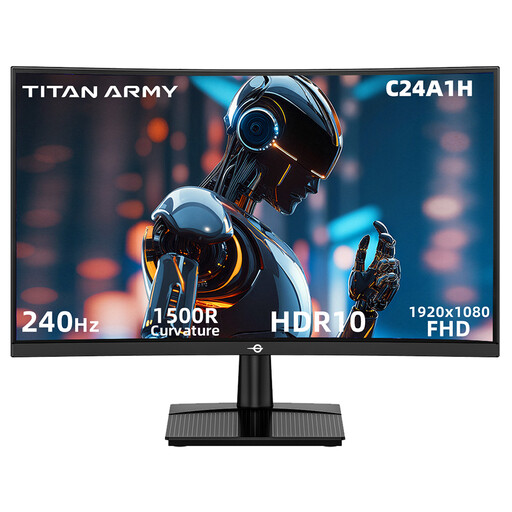
Why it suits this user: This 23.6-inch screen combines Full HD with 240Hz, making it a good fit for players who want high fps without stepping up to QHD. Its 1500R curvature suits a compact gaming setup.
The specifications clearly state FHD, HDMI 2.0 and DisplayPort 1.2 with support for 240Hz. The 1ms figure is specified as MPRT, rather than as a general response time.
VA panel, 3000:1 contrast, FreeSync Compatible, HDR10 support and VESA 100 × 100 mm.
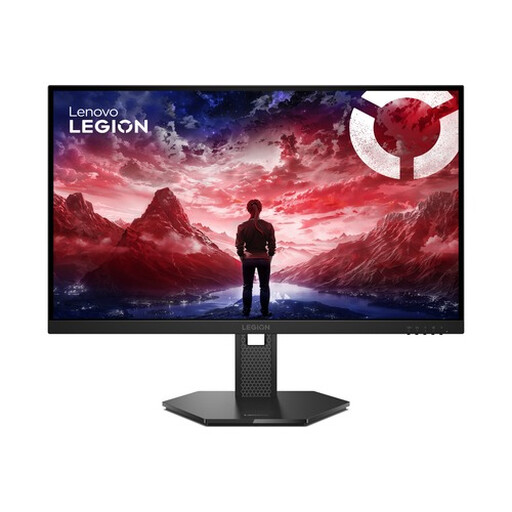
Why it suits this user: A great choice for PC gamers and content creators looking for a combination of QHD sharpness, high speed and adjustability. The 27-inch IPS panel is well suited to a dedicated work and gaming space.
The stated 240Hz is paired with 2560 × 1440, HDMI 2.1, DisplayPort 1.4 and support for FreeSync Premium, G-SYNC Compatible and VESA Adaptive Sync.
IPS panel, 99% sRGB, 90% DCI-P3, HDR10 compliance and a stand with height, swivel, tilt and pivot adjustment.
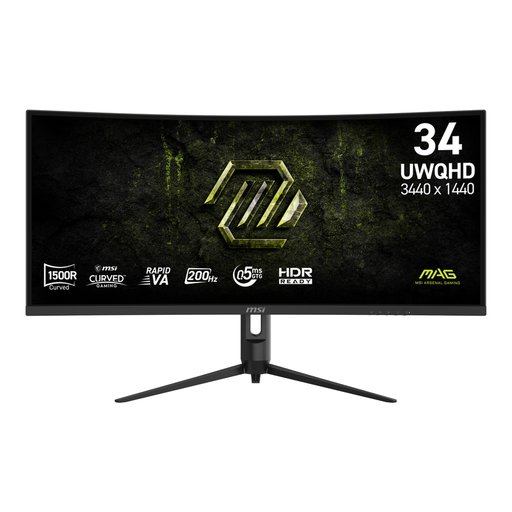
Why it suits this user: A good option for streamers, sim-racing fans and home workers who want one wide screen for gaming and multiple windows. Check that your desk is wide enough before you buy.
The product information lists 200Hz, 0.5ms GtG and 1ms MPRT separately, making it clear which response time measurements are used.
34-inch UWQHD, 1500R VA curvature, 21:9 aspect ratio, Adaptive Sync and an ergonomic stand.
We’ve put together a complete, up-to-date list of products that meet these strict selection criteria and the current European safety regulations.
Use this quick checklist:
A 144Hz gaming monitor may be all many PC gamers need. A 200Hz or 240Hz gaming monitor is most worthwhile when your hardware consistently delivers high fps. If picture quality and workspace matter more, a QHD gaming monitor, 4K gaming monitor or ultrawide model may make more sense than simply choosing a higher refresh rate.
In fast-paced games, 144Hz can display motion more smoothly than 60Hz, provided your PC delivers enough fps. The difference also depends on the type of game, your settings and how sensitive you are to judder.
Lifespan depends on how you use the monitor, heat, power supply and the quality of its components. Keep the ventilation openings clear, use the supplied power adapter and avoid moisture or direct sunlight. Also check the warranty and your statutory rights under consumer law when you buy.
Power consumption varies depending on screen size, brightness, resolution and HDR settings. A larger ultrawide or 4K screen may use more power than a compact Full HD model. Check the stated typical power consumption and energy label information, and enable sleep mode when you’re not using the screen.
