For cinematic adventure games, OLED may be a good choice if deep blacks matter. But for everyday text work or keeping windows on screen for long periods, an LCD model may be a better fit. Then choose between ultrawide for compatible PC games and 16:9 for greater versatility with consoles, and check the picture quality, connections and features of the exact model.
Who is this choice relevant to?
Adventure gamer with a home office
You want to play atmospheric games on the same screen you use for documents and open windows during the day. Consider how it displays dark scenes, how easy text is to read and how it performs during long sessions with fixed screen elements.
Ultrawide PC gamer
You mainly play on PC and want a wide gaming view, with room for several work windows alongside it. Check that the games you play support the aspect ratio you choose.
Console and PC user
You want one 16:9 screen for both devices. Check the supported resolution, refresh rate, HDR and VRR for each connection and device.
What should you consider when choosing?
Start with what matters most to you: dark-scene contrast, a clear work display or compatibility with your PC and console. Then use the table to work out what to check.
| Consideration |
What to check before buying |
Who should pay particular attention? |
| Contrast and HDR |
Look at independent tests of dark scenes and local dimming for the exact model; also consider ambient light and reflections. |
If I mainly want to watch dark, cinematic scenes, picture atmosphere matters most; around 33% of consumers prioritise the viewing experience. |
| Text and working comfort |
Check tested text clarity, reflections and adjustability. For OLED, also read the care instructions and information about image retention. |
If I read a lot of text and leave windows open during the day, everyday comfort is my main priority; around 27% of consumers put suitability for work first. |
| Aspect ratio and connections |
Check that your PC games support ultrawide, and check the resolution and refresh rate supported by each input on your own device. |
If I want to use the same monitor with my PC and console, it needs to work with both devices; around 20% of consumers prioritise compatibility. |
| Practical use over the longer term |
Compare what your PC can actually output, check the model's energy label and read the written warranty terms. |
When I choose a screen for both gaming and work, I want its features and terms to suit the way I use it; around 20% of consumers prioritise practicality and running costs. |
Buying pitfalls to avoid
-
Assuming similar model numbers mean the same model
The Alienware AW3425DW tested is a QD-OLED monitor, while the AW3425DWM is a VA LCD model. Their text and HDR performance differ, so a review of one model does not automatically apply to the other.
Before buying, check the full model number and panel technology, then compare them with the review or product specifications you’re using.
-
Choosing ultrawide expecting console games to fill the screen
For the AW3425DWM tested, RTINGS observed black bars at the sides when using consoles. So a wide PC screen doesn’t automatically mean a console will fill its full width.
If you mainly use a console, check the supported 16:9 output. Choose ultrawide specifically for PC games that support the aspect ratio.
-
Assuming an HDR or Hz rating tells you everything about picture quality
A high stated refresh rate doesn’t, by itself, tell you how well a monitor displays HDR. RTINGS found the HDR on the AW3425DWM tested unconvincing; its test of the AOC Q27G3XMN also noted motion smearing.
Compare independent HDR and motion tests for the exact model, and check which signal mode your device and chosen input support.
Brands and models as examples
Dell Alienware
The AW3425DW and AW3425DWM show two different 34-inch ultrawide options: QD-OLED and VA LCD.
- For the AW3425DW tested, RTINGS describes deep blacks and a wide PC gaming view.
- RTINGS reported VRR flicker in dark scenes on the AW3425DW, along with less clear text than on LCD ultrawides. It rated text on the AW3425DWM as sharp, but found its HDR performance unconvincing.
AOC
The Q27G3XMN/BK is an example of a 27-inch QHD mini-LED monitor with local dimming.
- AOC specifies 336 dimming zones and 180 Hz for the /BK variant.
- RTINGS rated the local dimming on the Q27G3XMN tested positively, but also reported motion smearing and VRR flicker. Check the full variant number.
Gigabyte
The M27UP is a 27-inch 4K IPS option to consider when weighing up PC and console connections separately.
- Gigabyte specifies up to 160 Hz and HDMI 2.1 with 4K/120 Hz, 4:2:0, for PS5 and Xbox Series X.
- The stated 1000:1 standard contrast ratio and DisplayHDR 400 are model specifications; the HDR rating alone doesn’t show how dark scenes will look.
ASUS ROG
The PG32UCDM3 is an example of a 32-inch 4K QD-OLED model with a stated refresh rate of 240 Hz.
- ASUS describes OLED Care Pro and a proximity sensor as features designed to help reduce the risk of burn-in.
- The manufacturer's description doesn’t prove that long periods of static home-office use are risk-free. Also check availability and warranty terms for the exact model in the Netherlands.
Gaming monitors at Joybuy
This selection includes 16:9 monitors for gaming and use with a PC or console, as well as ultrawide models for PC games that support a wider aspect ratio. Compare the panel, screen format and terms of use for the exact model.
 No image available
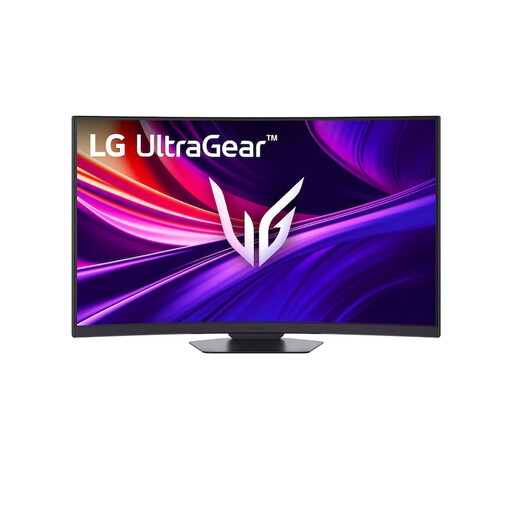
LG UltraGear 37G800A-B 37-inch 4K UHD 165Hz Curved VA
A 37-inch 4K screen to consider if you want a large 16:9 display for gaming and work.
VA panel, 165Hz, HDMI 2.1 and DisplayHDR 600. The product details list a height-adjustable, tilting and swivelling stand.
View at Joybuy
 No image available
INNOCN 2751S PLUS 27-inch QHD Mini LED
A 27-inch QHD mini-LED model to consider if local dimming matters for dark games.
IPS panel, 1152 dimming zones and 275Hz. The product details list a height-adjustable stand.
View at Joybuy
 No image available
MSI MAG 322UP QD-OLED E16 31.5-inch 4K UHD 165Hz
A 31.5-inch 4K QD-OLED model to consider if you want to connect your PC and console to one 16:9 screen.
The product details list two HDMI 2.1 ports and console output up to 4K at 120Hz. Avoid displaying static images at high brightness for long periods, and use the OLED protection features as instructed in the product guidance.
View at Joybuy
 No image available
Alienware AW3425DWM 34-inch VA LCD 3440 × 1440
A VA ultrawide to consider for PC games that support 21:9, and for keeping several work windows open side by side.
3440 × 1440 resolution and a 21:9 aspect ratio. RTINGS rated text on this model as sharp, but found its HDR performance unconvincing; its test found black bars at the sides when used with a console.
View at Joybuy
 No image available
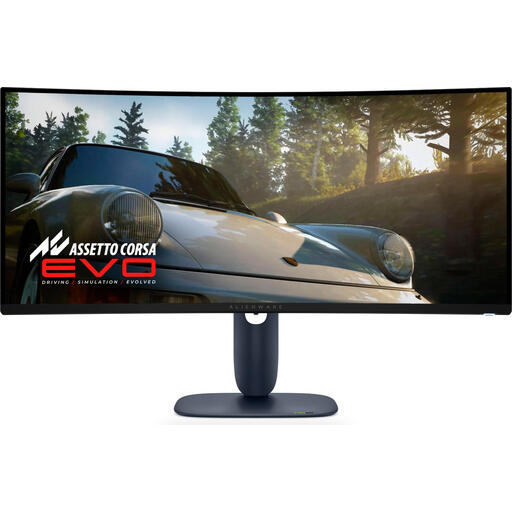
Alienware AW3425DW 34-inch QD-OLED 3440 × 1440
A QD-OLED ultrawide to consider if your PC games support it and you value dark scenes and a wide view.
The product details list 240Hz and HDMI 2.1. RTINGS reported VRR flicker at changing frame rates in dark scenes on this model, along with less clear text than on LCD ultrawides.
View at Joybuy
Frequently asked questions
Can I choose an ultrawide monitor for my PS5 without any concerns?
Not if you expect the picture to fill the entire 21:9 screen. RTINGS observed black bars at the sides with consoles on the AW3425DWM tested. Check which resolution, 120 Hz, HDR and VRR your connected screen actually supports with your PS5; 120 Hz also depends on the game.
How do I care for an OLED monitor that I also use for office work?
Follow the care instructions and check the image-retention terms for the exact model. ASUS describes a feature on the PG32UCDM3 that switches to a black screen when you’re away to help reduce the risk; this isn’t a guarantee against burn-in. An accelerated RTINGS test found image retention on the OLED models tested, but it doesn’t predict the lifespan of an individual new model.
What cancellation period and warranty apply to an online purchase in the Netherlands?
According to ACM ConsuWijzer, a standard online purchase generally comes with a statutory 14-day cancellation period starting from delivery; exceptions apply. There’s no fixed period for the statutory guarantee in the Netherlands: with normal use, it depends on what you could reasonably expect from the product. The retailer is your point of contact.
Do monitors need an energy label in the Netherlands?
The European Commission states that energy labelling rules also apply to computer monitors, with certain exceptions. Check the energy label and information in EPREL for the exact model; product information may also include HDR energy consumption data. Buyers aren’t required to choose a particular energy class.


