
Vandaag of morgen in huis

Kwaliteit gegarandeerd

Welkomstaanbiedingen ontgrendelen: GRATIS bezorging | Tot 80% korting | Gratis 30 dagen JoyPlus-proefperiode
Download de app
Buying a gaming monitor seems straightforward until you start comparing specifications. A 240Hz model sounds tempting, but it offers little benefit if your PC can’t achieve a high frame rate in your favourite game. A large curved screen can be great for simulation games, but it also takes up a lot of desk space. And a low response time on the box doesn’t always tell the whole story.
As a Joybuy Product Recommendation Officer, I look past marketing claims and focus on features you can check. That helps you avoid paying for features that don’t suit your games, hardware or workspace.
A 144Hz, 240Hz or 320Hz gaming monitor refreshes the image 144, 240 or 320 times per second respectively. This can make movement look smoother, but the effect depends on how many frames per second your computer can actually produce.
A 320Hz monitor isn’t automatically the right choice for every player. If your graphics card averages 100 frames per second at Full HD, you won’t make full use of the extra capacity. A high refresh rate can be a good fit for competitive players with a powerful PC.
Specifications such as 0.3ms, 0.5ms or 1ms are often quoted. Check whether the figure refers to GtG or MPRT. These are different measurement methods, and perceived motion clarity also depends on overdrive settings, refresh rate and panel type.
So treat a low figure as one part of your comparison, not as a guarantee of a blur-free image.
HDR10 support means that a monitor can process a particular HDR signal. The impact you see also depends on brightness, contrast, local dimming and the game or video you’re watching. An HDR10 monitor isn’t automatically suited to vivid HDR viewing.
1920 × 1080 is a common resolution for a Full HD monitor. At 23.8 or 24 inches, the pixel density works well for gaming, office work and streaming. Full HD also puts less demand on your graphics card than QHD.
A QHD gaming monitor displays 2560 × 1440 pixels. At 27 inches, this usually gives you more detail than Full HD, making text, interface elements and game worlds look sharper. The trade-off is that your PC needs more graphics processing power.
An ultrawide monitor, such as a 34-inch model with a 3440 × 1440 resolution, gives you extra horizontal space for work and gaming. Before you buy, check that your desk is wide and deep enough, and that your games support the 21:9 aspect ratio properly.
An IPS monitor is often described in product information as offering wide viewing angles and consistent colour reproduction. This can be useful for photo editing, office work and a shared workspace. The Philips Evnia 27M2N3500NF combines IPS with QHD, 144Hz and Adaptive Sync.
A VA monitor is often chosen for its higher stated contrast and darker image. This can work well for films, story-driven games and use in a dimmer room. However, VA panels can handle dark motion differently from one model to another. So check more than just the contrast figure: look at user reviews and the overdrive settings too.
Adaptive Sync matches the screen’s refresh rate to the graphics card’s output. This can help reduce tearing and stuttering. If you’re considering a FreeSync monitor, check whether the feature works over HDMI, DisplayPort or both. The supported range also matters.
Also look for:
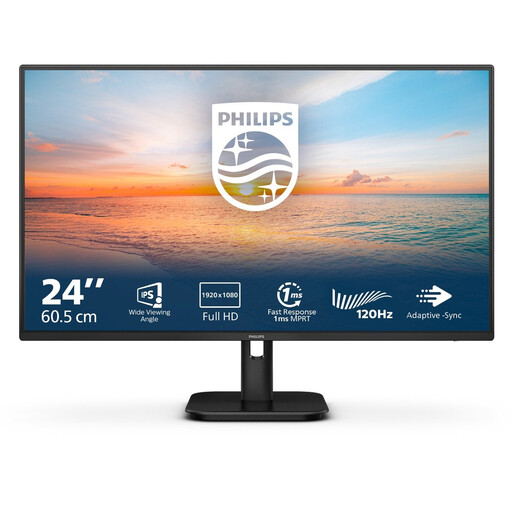
Why it suits this profile: This 23.8-inch model combines Full HD, an IPS panel and 100Hz for everyday work, streaming and casual gaming. The built-in speakers and HDMI and VGA connections are handy for a simple desktop setup.
The choice is straightforward: the product information clearly lists the resolution, panel type, refresh rate and connections, without an extreme refresh rate that not every PC needs.
24 inches, Full HD, IPS, 100Hz, 4ms and built-in speakers; ideal for a compact workspace and gaming setup.
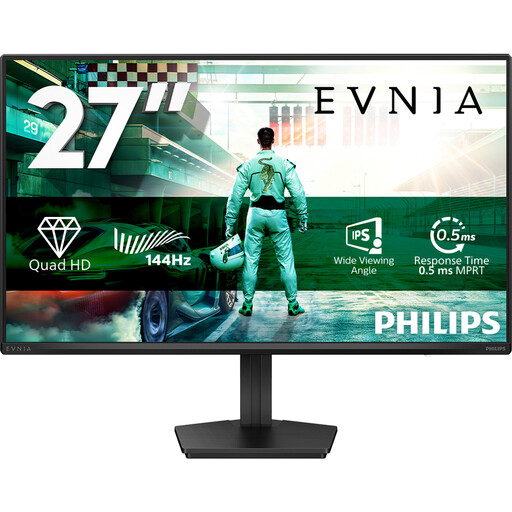
Why it suits this profile: This model is aimed at players who want to combine detail with speed. The specifications list QHD resolution, IPS, 144Hz, Adaptive Sync and HDR10, while DisplayPort 1.4 and HDMI 2.0 suit a modern PC setup.
The combination of resolution and refresh rate makes this a more balanced choice than simply going for a high Hz figure. Check that your graphics card can run QHD games at your preferred speed.
27-inch QHD, IPS, 144Hz, 0.5ms Smart MBR, HDR10, Adaptive Sync and VESA mounting.

Why it suits this profile: This model is designed for esports and competitive players with a powerful PC. Its listed features include 320Hz, a Fast IPS panel, and G-SYNC Compatible and FreeSync Premium support.
The high refresh rate is paired with Full HD and a 24.5-inch screen. It’s a targeted combination for high frame rates, not a blanket promise for every PC.
320Hz, Fast IPS, Full HD, stated 0.5ms response time, HDMI 2.1, DisplayPort 1.4 and adjustable stand.
We’ve put together a full, up-to-date list of products that meet these strict selection criteria and the applicable European safety requirements.
Use this quick checklist:
For many casual gamers and players of fast-paced games, a 144Hz gaming monitor is a practical middle ground. The image can look smoother than at 60Hz, while the hardware requirements are generally lower than for 240Hz or 320Hz. The right choice depends on your frame rate, games and budget.
QHD displays more pixels and can look noticeably sharper at 27 inches. Full HD puts less demand on your graphics card and works well with high refresh rates on smaller screens. Neither is automatically right for every user.
Power consumption varies depending on screen size, brightness, resolution and HDR settings. Check the energy label and the stated figure in watts or kWh per 1,000 hours. Higher brightness and HDR mode can increase power consumption.
