
Vandaag of morgen in huis

Kwaliteit gegarandeerd

Welkomstaanbiedingen ontgrendelen: GRATIS bezorging | Tot 80% korting | Gratis 30 dagen JoyPlus-proefperiode
Download de app
Buying a gaming monitor might seem straightforward – until you have to choose between 165Hz, 240Hz, OLED, QHD, 4K, HDR and a curved screen. Manufacturers often emphasise one standout specification, while other features may not suit your PC, console or desk as well.
The right choice, therefore, doesn't just depend on the highest refresh rate. Instead, look at the combination of resolution, connections, panel type, screen size and the performance of your graphics card.
A 240Hz gaming monitor can display motion more smoothly than a 60Hz or 100Hz screen. However, you'll mainly notice this benefit when your PC can actually deliver around 240 frames per second. With demanding games and high resolutions, that's not a given.
For competitive games, a monitor with a high refresh rate can make sense. For story-driven games, productivity and consoles, a 165Hz or 180Hz gaming monitor can already offer a practical balance. Also check whether the correct refresh rate is available via HDMI or DisplayPort.
A claimed response time of, say, 0.03ms or 0.5ms sounds appealing, but measurement methods differ. GtG, MPRT and a minimum response time are not the same thing. So also consider the panel type, refresh rate and support for variable synchronisation.
A monitor with a low response time can reduce ghosting, but the result also depends on settings, cables, in-game options and your computer's frame rate.
HDR Ready, HDR10 and DisplayHDR True Black 400 refer to different features. HDR can improve contrast and brightness, but the label alone doesn't tell you how convincing the effect is in practice. Pay attention to the stated brightness, panel type and certification.
With an HDR gaming monitor, it's wise to check whether your game, PC or console supports HDR. An OLED panel can display deep black tones, while a VA panel often offers high static contrast. IPS screens usually place more emphasis on wide viewing angles and colour reproduction.
Check the width, depth and weight capacity of your desk beforehand. A 34-inch screen is already considerably wider than a standard 27-inch model. For screens of 45 or 49 inches, it's wise to have two people for mounting.
The refresh rate is expressed in hertz. A 165Hz screen refreshes the image up to 165 times per second; a 240Hz model up to 240 times. A higher value can make motion smoother, especially in shooters and racing games.
FreeSync, FreeSync Premium and G-SYNC Compatible synchronise the screen's refresh rate with the image output of your graphics card. Check which system your video card uses. A product without official G-SYNC certification may sometimes work with G-SYNC according to the product information, but this is not guaranteed.
A height-adjustable stand, tilt and VESA support make it easier to position the screen properly. Also pay attention to the included cables; a connection doesn't automatically support every resolution and refresh rate.

Why this fits the profile: This 27-inch Full HD screen combines 200Hz with a stated response time of 0.5ms (GtG). That suits gamers looking for a fast monitor without jumping straight to QHD or OLED.
The specifications list both 200Hz and the connections used. Do check whether your PC achieves the desired refresh rate via HDMI 2.0b or DisplayPort 1.2.
27 inch, Full HD, IPS panel, 200Hz and Adaptive-Sync. The stand is tiltable and the screen supports VESA 100 × 100mm.
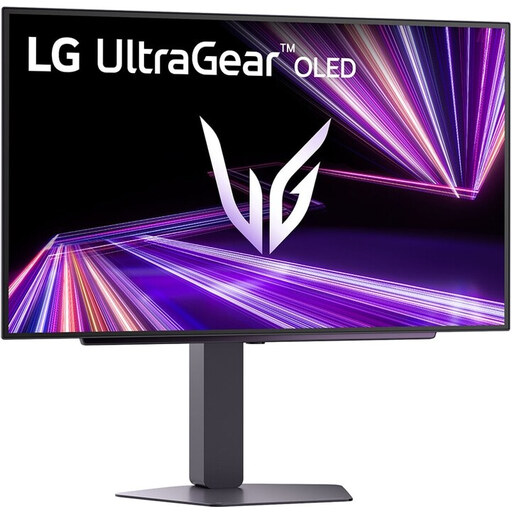
Why this fits the profile: According to the product information, this OLED model has a QHD resolution, 240Hz and 0.03ms response time. It's aimed at gamers who want to combine picture quality with fast response.
The combination of OLED, QHD and DisplayHDR 400 True Black makes clear which display technologies are used. Check the placement beforehand and follow the recommended OLED maintenance features.
27 inch QHD OLED, 240Hz, HDMI 2.1, DisplayPort 1.4, FreeSync Premium Pro and G-SYNC Compatible according to the product specifications.

Why this fits the profile: This 24.5-inch Full HD screen is, according to the product specifications, aimed at competitive players with 320Hz, a Fast IPS panel and G-SYNC Compatible.
The lower Full HD resolution limits the graphical load compared to QHD or 4K. This means a powerful PC can more easily make use of the high refresh rate.
320Hz, 0.5ms stated response time, HDMI 2.1, DisplayPort 1.4, adjustable stand and FreeSync Premium.
For multitasking, the LG 34WR50QK-B could be of interest: 34 inches, 3440 × 1440, 100Hz, a 21:9 ratio and Picture-by-Picture. For creative professionals, the LG 32UN880K might be more logical thanks to 4K, USB-C with 60W power delivery and an adjustable Ergo arm, although the refresh rate is 60Hz.
If you need plenty of horizontal space, you could look at a 49-inch ultrawide model such as the CRUA with 5120 × 1440 and 165Hz. With screens like these, check the desk size, viewing distance, graphics card and mounting options extra carefully.
We've put together a full, up-to-date list of products that fully meet these strict selection criteria and comply with current European safety regulations.
For many players, 165Hz offers a useful balance between smooth motion and system load. The difference compared to 240Hz is mainly relevant when your PC also achieves a very high frame rate in your favourite games.
That depends on the resolution, monitor and source device. Check the maximum support of HDMI and DisplayPort in the product specifications. Use a suitable cable and then set the desired refresh rate in Windows, your graphics driver and the monitor itself.
The lifespan depends on use, heat, transport and maintenance. Place the screen on a stable surface, keep ventilation openings clear and use a soft, dry cloth. With OLED models, it's wise to follow the included panel maintenance features and usage advice.
