Choose a gaming monitor based on the output of your console, PC or laptop. Built-in speakers can save you from needing a separate speaker system, but they won’t eliminate the need for power sockets for the monitor and console. With a laptop, USB-C with sufficient Power Delivery can replace the laptop charger if the laptop also outputs video over USB-C, although the monitor still needs its own power supply. A high refresh rate is only useful if your device and game support that output.
Who is this buying guide for?
Console gamer with limited power sockets
You play football games over HDMI and want picture and sound without a separately powered speaker system. PlayStation says that 120 Hz output on PS5 depends on having a compatible display and a game that supports that frame rate.
Laptop gamer who wants to use one cable
You may want to leave your laptop charger at home and are looking for a monitor with USB-C video and enough power to charge your laptop. Check that both your laptop and the specific monitor model support these features.
PC gamer who values smooth visuals
You already have power and audio sorted for your PC, so you’re mainly comparing resolution, connections and the refresh rate your PC and game can actually deliver.
What should you look for when buying?
| Concern |
What to look for when buying |
Who considers this important? |
| Sound without an extra speaker plug |
Check whether the specific model has built-in speakers and how your gaming device outputs sound. |
If I play over HDMI and don’t want to connect a separate speaker system, I want to know whether the monitor itself produces sound. Around 33% of consumers say sound without an extra speaker plug is their main buying concern. |
| Compatibility with your console and game |
Check the monitor’s HDMI modes and whether your console and game support the resolution, refresh rate and any VRR you want. |
With my console, I want to know which display mode the screen and game can support together, not just the refresh rate stated on the box. Around 27% of consumers prioritise console compatibility. |
| Smooth visuals on a gaming PC |
Compare the resolution and refresh rate with the output your PC can deliver through the connection you’ll be using. |
If my PC and audio are already sorted, I focus on display settings I can actually use. Around 20% of consumers prioritise smooth visuals on a PC. |
| Laptop display and power through one cable |
Check that your laptop supports USB-C video and compare its charging requirements with the monitor’s Power Delivery output. |
I’d rather leave my laptop charger at home, but only if my laptop can output video over USB-C and gets enough power. Around 20% of consumers say a single cable for laptop display and power is their main concern. |
Buying pitfalls
-
Assuming every USB-C monitor replaces a laptop charger
USB-C alone doesn’t tell you whether a monitor supports video or supplies enough power to charge your laptop. For example, LG specifies 65 W Power Delivery for the 34U640B-B, while Tweakers lists 18 W for the Gigabyte MO27Q2A.
Check that your laptop supports USB-C video and compare its charging requirements with the specifications of the exact monitor model.
-
Assuming the monitor’s refresh rate is the same as the game’s frame rate
A high stated refresh rate doesn’t guarantee that your console or football game can deliver that output. PlayStation says that 120 Hz output requires support from both the display and the game.
Check the game, console, connection you’re using and available video output mode together.
-
Choosing an ultrawide for console gaming without checking the aspect ratio
Tweakers notes that ultrawides are not always the most straightforward choice for console gaming. A 21:9 screen is worth considering when the wider view also suits how you use your laptop or PC.
Check separately which output your console supports and how it will be displayed on the screen you have in mind.
Brands to consider
BenQ
The MOBIUZ EX2710Q is a 27-inch QHD monitor with built-in speakers.
- BenQ lists a 165 Hz refresh rate, two HDMI 2.0 inputs and an integrated 2.1-channel speaker system.
- These specifications don’t indicate sound quality, and the listed connections don’t include USB-C video or laptop charging.
Acer
The Nitro VG270M3 is a 27-inch Full HD monitor with HDMI and built-in speakers.
- Acer lists a 180 Hz refresh rate, two HDMI connections and two 2 W speakers for this model.
- Full HD has fewer pixels than QHD, so weigh that difference against the resolution you want to use.
LG
The 34U640B-B is a 34-inch 21:9 monitor with USB-C Power Delivery.
- LG specifies a 144 Hz refresh rate and 65 W USB-C Power Delivery. With a compatible laptop, a single USB-C cable can carry video and power the laptop.
- The monitor still needs its own power supply. Tweakers also notes that ultrawides are less suitable for console gaming, so check that the sound setup meets your needs too.
Gigabyte
The MO27Q2A is a 27-inch QHD OLED monitor for those who place a high value on picture quality and features.
- Tweakers includes this model in its selection of 27-inch gaming monitors.
- Tweakers lists 18 W USB-C charging and notes potential issues with text clarity and blacks in ambient light. Compare the charging output with your laptop’s requirements.
Gaming monitors at Joybuy
This selection includes gaming monitors for HDMI use, including models with built-in speakers and options for PC gaming. Before buying, check that the connections and display modes suit your console, PC or laptop.
 No image available
AOC Gaming Q27G42XNE 27-inch QHD monitor
Suited to PC gaming at QHD; your PC needs to be able to output that display mode.
QHD (2560 × 1440), 180 Hz, 1 ms, FreeSync Premium, HDR10, two HDMI 2.0 connections and DisplayPort 1.4.
View at Joybuy
 No image available
TECLAST V16H 16-inch portable monitor
A portable option for a gaming setup where built-in speakers matter. Check which compatible cable your source needs for the Mini HDMI connection.
Full HD, 144 Hz, 16:10, FreeSync, HDR, two USB-C connections, Mini HDMI, stereo speakers and a built-in stand.
View at Joybuy
 No image available
TECLAST V16Q 2.5K portable monitor
For a portable gaming setup where built-in speakers are useful. Check that the connection and cable suit your gaming device.
2.5K, 144 Hz, IPS, 16:10, FreeSync, HDR, two USB-C connections, Mini HDMI, speakers and a built-in stand.
View at Joybuy
 No image available
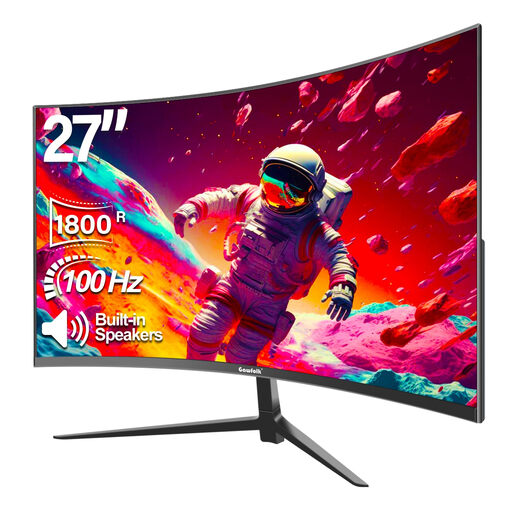
Gawfolk 27-inch curved Full HD monitor
An option if you want to play game audio through the monitor. Check that its connections suit the device you’re using.
Full HD 1080p, 100 Hz, 1800R curvature and built-in speakers.
View at Joybuy
 No image available
AOC G4 Q27G4ZR 27-inch QHD monitor
Suited to gaming over HDMI with sound played through the monitor. Check which display mode your console and game support.
QHD (2560 × 1440), 240 Hz, two HDMI 2.0 connections and built-in stereo speakers.
View at Joybuy
Frequently asked questions
Does a monitor with speakers also save me a socket for my console?
No. The speakers are built into the monitor and may save you from needing a separate, powered speaker system, but the monitor and console still each need their own power supply.
How can you check whether your PS5 can display a football game at 120 Hz?
First, check whether the specific game supports 120 Hz, then connect your PS5 over HDMI to a compatible display. PlayStation explains in its Screen and Video settings, among other things, how to check the connected video output and test 1440p output.
Can USB-C free up a power socket?
It can replace your laptop charger, but only if your laptop outputs video over USB-C and the monitor provides enough charging power. The monitor still needs to be plugged into a power supply.
How can you compare monitors’ energy consumption?
Compare the EU energy label for the exact model and check its details in EPREL. The European Commission describes the energy-efficiency scale for electronic displays, from A to G.
What can you do if a monitor turns out to be faulty?
In the Netherlands, there is no fixed statutory guarantee period. If a product is faulty, contact the seller to find a solution. According to the Dutch government, many online purchases also come with a 14-day cooling-off period, subject to conditions and exceptions.


