What should you look for in a gaming monitor when you have few plug sockets?
First check the power requirements and audio setup, then compare the display mode with your gaming device’s connections and capabilities.
| What to consider |
What to look for when buying |
Who this matters most to |
| Power supplies and plug sockets |
Count the monitor, gaming device and any speakers. Check the power requirements of the exact Switch dock; Nintendo outlines separate power requirements for playing on a TV. |
If I want to plug as few devices into the mains as possible, I also consider what the dock and audio setup need. Around 33% of consumers prioritise reducing the number of separate power supplies. |
| Sound without separate speakers |
Check whether the exact model has built-in speakers and whether your gaming device sends audio to the output you want. |
If I don’t want to connect a separate speaker set, I check whether monitor audio will be enough for my needs. Around 27% of consumers prioritise sound without an extra device. |
| Connection to your gaming device |
Check which HDMI connection and display mode your console needs. Nintendo Support NL states that Switch Lite does not support TV mode. |
If I want to connect my console to an external screen, I want to know in advance whether my model supports TV output. Around 20% of consumers consider connection and compatibility the most important factors. |
| Sharpness and smoothness |
Compare the resolution and Hz available through the connection you’ll use with your device and game’s capabilities. Nintendo NL lists up to 60 fps at 4K for Switch 2; PlayStation Support links 120 Hz output to compatible screens and games. |
If sharpness and smooth visuals matter to me, I want to choose a display mode that my setup can actually show. Around 20% of consumers rank this above the other factors. |
Joybuy monitors for gaming and shared use
These Joybuy picks focus on gaming and built-in speakers; one model is also described as offering USB-C Power Delivery for compatible laptops.
 No image available
AOC Gaming Q27G42XNE 27-inch QHD monitor
A gaming monitor with built-in stereo speakers to consider if monitor audio will be enough for your setup.
QHD (2560 × 1440), 180 Hz and two HDMI 2.0 inputs.
View at Joybuy
 No image available
TECLAST V16H portable 16-inch monitor
A portable gaming monitor with stereo speakers to consider if you’re looking for a separate screen and don’t want to connect separate speakers.
Full HD, 144 Hz, 16:10 and mini-HDMI.
View at Joybuy
 No image available
TECLAST V16Q portable monitor
A portable gaming monitor with built-in speakers to consider if a separate screen suits the way you play.
2.5K, 144 Hz, IPS and mini-HDMI.
View at Joybuy
 No image available
MSI PRO MAX 271UPXW12G 26.5-inch OLED monitor
A monitor with built-in speakers to consider if you also want to connect and charge a compatible laptop via USB-C.
3840 × 2160, OLED, 120 Hz, HDMI 2.1 and USB-C Power Delivery up to 98 W for compatible laptops.
View at Joybuy
 No image available
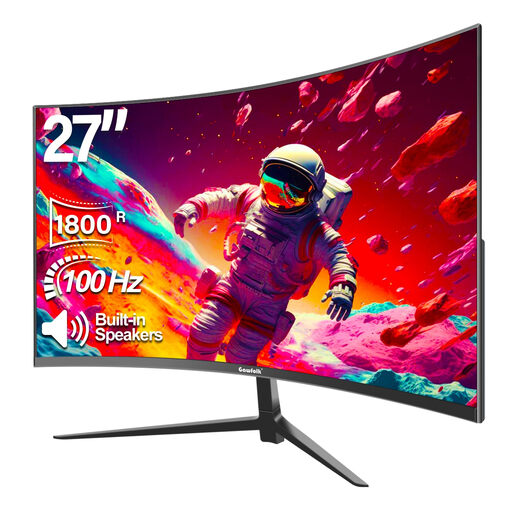
Gawfolk 27-inch curved Full HD monitor
A gaming monitor with built-in speakers to consider if sound through the screen suits the way you use it.
Full HD, 100 Hz and an 1800R curve.
View at Joybuy
Frequently asked questions
Can a monitor’s USB-C port power my docked Switch?
Don’t assume it can. Nintendo requires a suitable power supply for the dock when playing on a TV; Switch 2 has different power requirements from the original Switch. Only compare USB-C Power Delivery with devices confirmed to be compatible.
Why won’t my Switch Lite display an image on an external monitor?
Nintendo Support NL states that Switch Lite doesn’t support TV mode. Using a different gaming monitor won’t change that limitation.
Will a 180 Hz monitor automatically display 120 frames per second from my console?
No. The available frame rate also depends on the console, game and selected display mode. Nintendo NL lists up to 60 fps at 4K for Switch 2; PlayStation Support explains that 120 Hz output is available with compatible screens and games. Check your gaming device’s active output mode and the connection you’re using.
How can I connect devices safely when I have few plug sockets?
Use an undamaged extension lead and don’t connect extension leads to each other. The Dutch fire service also advises fully unwinding a cable reel when in use. This is general safety advice, not a claim that gaming monitors use a lot of power.
What are my rights if a monitor I bought online isn’t suitable?
According to ACM ConsuWijzer, the seller must put things right if a product doesn’t do what you could reasonably expect during normal use. Online purchases usually come with a 14-day cancellation period from delivery, subject to relevant terms and exceptions. There is no fixed duration for the legal guarantee for every monitor.


