
Players who prioritise motion clarity
You want to keep track of fast-moving targets and check whether your PC can handle your desired frame rate and display connection. BenQ emphasises that a stable 360 fps is important for a steady 360 Hz display.


Start with the refresh rate, resolution and connection your PC can handle for your games: a higher number of hertz alone won’t guarantee a better practice session. With a compatible USB-C laptop, Power Delivery can make a separate laptop charger unnecessary, but the monitor itself still needs mains power. Also compare the energy label and plan a safe power connection.
You want to keep track of fast-moving targets and check whether your PC can handle your desired frame rate and display connection. BenQ emphasises that a stable 360 fps is important for a steady 360 Hz display.
You may want to avoid a separate laptop charger, provided your laptop supports video over USB-C and the required Power Delivery output. The monitor still needs its own mains connection.
You practise with fast-moving action, but also use the screen for other tasks. You’ll need to balance resolution and screen size against what your PC can drive.
If you’re looking for a gaming monitor for competitive play and have limited power sockets, start with your PC and its connections. Then consider the picture sharpness you want and the monitor’s power consumption.
| What to consider | What should you look for? | Who should prioritise this? |
|---|---|---|
| Motion clarity | Check the combination of refresh rate, resolution, connection and stable fps. Only compare response-time claims when the mode and measurement basis are the same. | If I want to track fast-moving targets, my PC needs to handle my chosen resolution and refresh rate. Around 36% of consumers say motion clarity is their top priority. |
| Limited power sockets | Check whether your laptop supports USB-C DisplayPort Alt Mode and the required charging power. Remember to count the monitor’s mains connection separately. | If I use a laptop, I’d prefer not to plug in a separate laptop charger as well as the monitor. Around 27% of consumers say reducing the number of separate power supplies is their top priority. |
| Sharpness and other uses | Choose between Full HD, QHD or 4K based on your tasks and PC. Check which connection each model needs for your desired resolution and refresh rate. | If I also use the screen for other tasks, I weigh sharpness against the performance my PC needs to deliver. Around 19% of consumers prioritise a versatile, sharp picture. |
| Purchase price and power consumption | Compare the EU energy label, including the information for SDR and HDR. Also check the terms for cancellation periods and warranty cover for your purchase. | If I want to weigh up my overall costs, I consider both the purchase price and power consumption. Around 18% of consumers say cost is their top priority. |
With the ASUS XG27UCDMG, Power Delivery can power a compatible laptop, but the monitor itself needs a mains cable.
Check whether your laptop supports video over USB-C and the required charging power. Work out in advance how many mains connections your whole setup needs.
Your target refresh rate depends on having the right combination of PC, game, connection and resolution. A quoted response time may also apply to a specific picture mode; it is not automatically the same as measured input lag.
Check your PC’s stable fps, the required port and the conditions listed in the specifications for the exact model. BenQ recommends a stable 360 fps for the XL2566K when using it at 360 Hz; for 240 Hz on the 27GR83Q-B, LG specifies DisplayPort 1.4 with DSC or HDMI 2.1.
Linking extension leads together to create more power sockets isn’t a safe solution. The Dutch Fire Service advises against this and recommends using approved, undamaged extension blocks.
Plan the connections you need and assess the load of your setup. The Fire Service recommends plugging high-power appliances directly into a power socket.
The XL2566K is worth considering if you’re looking for a Full HD screen for fast-moving action.
According to LG, the 27GR83Q-B combines QHD resolution with an IPS panel and a refresh rate of up to 240 Hz.
The XG27UCDMG is worth considering if you want to connect a compatible laptop using one USB-C connection for video and power.
The 24M2N3201A/00 is a smaller Full HD alternative with a maximum refresh rate of 180 Hz.
This selection includes gaming monitors for fast-moving action, from Full HD to QHD. One model lists USB-C Power Delivery for a compatible laptop; the monitor itself still needs mains power.
 No image available
Full HD resolution and 240 Hz suit a setup where fast-moving action matters; check whether your PC can handle this combination.
Full HD, IPS panel and 240 Hz. The title also lists AMD Adaptive Sync, HDMI, VGA and VESA mounting.
 No image available
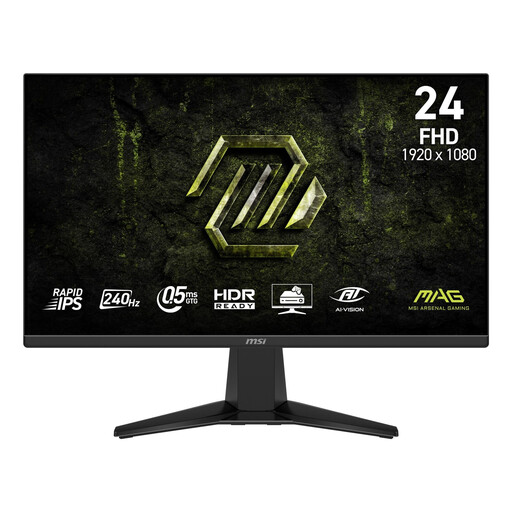
This more compact Full HD model could be a good fit if you’re looking for 240 Hz and don’t need a larger screen.
Full HD, Rapid IPS panel and 240 Hz. The title lists Adaptive-Sync.
 No image available
This curved QHD option is worth considering if you want to pair a higher resolution with a high refresh rate and your PC can handle it.
QHD (2560 × 1440), Rapid VA panel and 240 Hz. The product information lists a 1500R curvature.
 No image available
This model combines QHD with 240 Hz; check whether your PC can handle your desired resolution and refresh rate via the available connection.
QHD (2560 × 1440), third-generation QD-OLED and 240 Hz. The title lists HDR10 and an adjustable stand.
 No image available
If you use a laptop, USB-C Power Delivery up to 65 W can replace a separate charger if your laptop supports the video connection and the required charging power. The monitor still needs its own mains connection.
Curved WQHD OLED screen, 240 Hz and USB-C Power Delivery up to 65 W. The title lists a resolution of 3440 × 1440.
Check whether your game, PC, cable and monitor port support the combination you want. For 240 Hz on the 27GR83Q-B, LG specifies a graphics card with DisplayPort 1.4 DSC or HDMI 2.1; for a stable 360 Hz experience with the XL2566K, BenQ recommends a stable 360 fps. A monitor doesn’t increase the frame rate by itself.
It can mean you don’t need a separate laptop charger, if your laptop supports video over USB-C and the charging power on offer. ASUS lists up to 90 W Power Delivery for the XG27UCDMG; the monitor itself still needs a mains cable. With a desktop PC, USB-C won’t save you a mains connection.
Count the power supplies you need and check the load and condition of any extension block you plan to use. The Dutch Fire Service recommends approved, undamaged extension blocks, advises against linking extension leads together and recommends connecting high-power appliances directly to a power socket.
Compare the EU energy label and model information, including the distinction between SDR and HDR. A wattage figure without usage duration and comparable measurement conditions isn’t enough to calculate your own energy costs reliably.
For a typical online consumer purchase, you generally have a statutory 14-day cancellation period from delivery, subject to applicable exceptions. Your statutory guarantee is separate from the manufacturer’s warranty: if a product is faulty despite normal use, the seller is responsible for providing an appropriate remedy free of charge. The statutory guarantee does not automatically last two years.