For digital board games on a screen that you also use for working from home, a clear picture, enough screen space and an easily adjustable setup are sensible starting points. A 27-inch QHD IPS monitor is one option to compare, not a requirement. Choose 4K if extra detail matters more to you than the demands it places on your computer and any display scaling adjustments. OLED may suit you if contrast is a priority, but if you’ll be displaying static images for long periods, check the model’s protection features and warranty. Also make sure your computer’s ports support the display mode you want.
Who is this monitor comparison for?
Players who want to read cards and game text
You switch between the board, cards and rules, and want plenty of screen space and text that’s easy to read. Check how the game interface looks from your usual viewing distance, and pay attention to display scaling.
People who work from home and game on the same screen
You also use your monitor for work, so consider how adjustable it is, whether it reflects light and how it sits in relation to light sources. Arboportaal sets out specific requirements for employees; these apply under their own working and usage conditions, not to every private user.
Players with a fixed PC or laptop setup
You want to know whether your device’s inputs and video output support your preferred resolution and refresh rate. MSI’s specifications, for example, show that the available display mode can vary by connection.
Which features matter for work and digital board games?
Start by checking how cards and text look on your desk, then compare the monitor’s setup, panel and connections with your computer and everyday needs.
| Factor to consider |
What to look for when buying |
Who is this important to? |
| Readability and screen space |
Compare the resolution and screen size with your viewing distance and the display scaling used by your games. |
If I want to see cards, game text and work windows at the same time, readability comes first. Around 36% of consumers prioritise readability and screen space when buying. |
| Adjustability and reflections |
Check whether the height can be adjusted, and consider where windows or lamps are in relation to the screen. |
For a screen I also use every day when working from home, I want to adjust its position and reduce distracting reflections. A comfortable workstation is the main reason for around 29% of consumers. |
| Long-term use and energy |
Consider IPS and OLED for your use of static windows, and compare the EU energy label on a like-for-like basis. |
If I spend many hours with fixed game and work windows, I want to weigh up the panel choice and energy information together. Around 21% of consumers prioritise long-term mixed use and costs. |
| Connections and display mode |
Compare your computer’s video output with the input on the exact model, as well as your preferred resolution and refresh rate. |
I want to know in advance whether my PC or laptop can deliver the display mode I want through the right connection. Connection compatibility is the priority for around 14% of consumers. |
Pitfalls to avoid when buying a gaming monitor
-
Making the highest refresh rate your main buying criterion
For digital board games, being able to read the screen from your usual viewing distance is a practical starting point. MSI specifies a maximum of 200 Hz at QHD via DisplayPort and 144 Hz via HDMI for the MSI MAG 272QPF E20.
First check your own connection and how cards and text look; then see which refresh rate the display mode you’ve chosen supports.
-
Judging OLED on contrast alone when using lots of static windows
ASUS says that displaying a high-contrast static image for a long time on an OLED screen can cause image retention or burn-in. Protection features and warranty cover can vary by model.
Read the care and warranty terms for the exact OLED model, then compare it with an IPS monitor for the way you work and play.
-
Treating a product name as a complete set of specifications
The resolution and refresh rate you can use may depend on the connection and display mode. For the MAG 272QPF E20, for example, MSI lists different QHD refresh rates for DisplayPort and HDMI.
Before choosing, compare the exact model number and the manufacturer’s connection specifications with your computer.
Brands to consider
Dell Alienware
Dell’s Dutch model specifications show a range of panel and resolution options, including QHD IPS, 4K IPS and QHD QD-OLED.
- For the AW2725QF, Dell lists separate modes for 4K and Full HD; these are alternatives, not resolutions you can use at the same time.
- The features of one specific Alienware model won’t necessarily apply to other models. With OLED, long periods of displaying static images are something to consider.
MSI
The MAG 272QPF E20 is an example of a 27-inch QHD monitor with Rapid IPS and an adjustable stand.
- For this model, MSI specifies QHD at up to 200 Hz via DisplayPort.
- Via HDMI, MSI specifies a maximum of 144 Hz at QHD. Check the specifications for the exact version and connection.
LG UltraGear
The 27GS75Q-B is an example of a QHD IPS monitor with height adjustment and an anti-glare finish.
- LG lists these features for the specific 27GS75Q-B model.
- LG Netherlands marks this model as discontinued. Don’t use it as an indication of current availability, and check the details of any other version separately.
AOC AGON
The Q27G4XF is an example of a QHD IPS monitor with a height-adjustable stand.
- The manufacturer lists height adjustment for this model’s stand.
- The model specification comes from the UK manufacturer’s page; check the version and specifications that apply to your purchase.
Joybuy monitors for work and digital board games
This selection features QHD gaming monitors you can compare for digital board games and work at the same desk. For each model, check the screen size, adjustability and connection used by your computer.
 No image available
Samsung Odyssey G5 G50F 32-inch IPS 180Hz LS32FG502EUXEN
The 32-inch QHD display could be a good fit if you want to use one screen for both the game board and work windows.
IPS panel, 2560 × 1440 and 180 Hz. The description lists height, swivel, tilt and pivot adjustment.
View at Joybuy
 No image available
MSI MAG 272QPF E20 27-inch QHD Rapid IPS
This 27-inch QHD model is one option to compare if you want a desktop screen for game text and work windows.
MSI specifies up to 200 Hz at QHD via DisplayPort and 144 Hz via HDMI; check which connection your computer uses.
View at Joybuy
 No image available
KTC H27T6 QHD Fast IPS
This 27-inch QHD model could suit you if you’re looking for a screen for both game elements and work windows.
Fast IPS, 2560 × 1440 and 200 Hz; the model name lists overdrive up to 210 Hz. The description lists height, swivel, tilt and pivot adjustment.
View at Joybuy
 No image available
KTC H27E6S 27-inch QHD Fast IPS
This 27-inch QHD model is worth comparing if you want a screen for digital game boards and text at your desk.
Fast IPS and a height-adjustable stand. The model name lists 240 Hz, overclocked to 275 Hz, plus HDMI 2.0 and DisplayPort 1.4.
View at Joybuy
 No image available
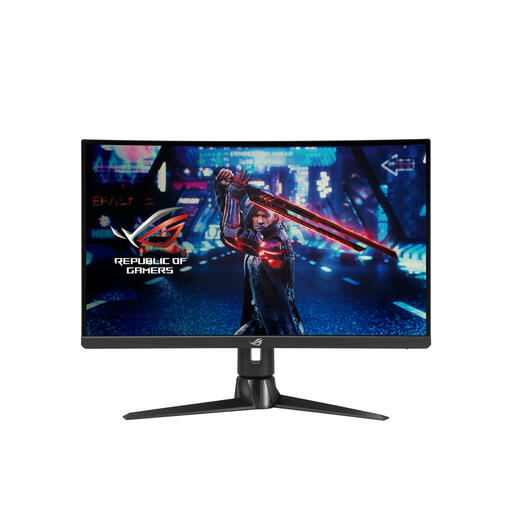
ASUS ROG Swift XG27AQV 27-inch QHD IPS
This 27-inch QHD model is one option to compare if you want to use the same monitor for work and gaming.
IPS panel and 170 Hz. The description lists an anti-glare finish and height, tilt and swivel adjustment.
View at Joybuy
Frequently asked questions
Does a monitor for digital board games need a refresh rate of at least 144 Hz?
No, there’s no general minimum refresh rate you need to base your choice on for this type of use. First check that the game board and text are easy to read from your usual viewing distance, then see which refresh rate your computer supports through the connection you’ve chosen.
How can you set up the same screen for work and gaming?
Adjust the screen position and lighting to suit your workspace, and reduce distracting reflections. For employees who spend more than two hours a day working with a screen, Arboportaal sets out specific requirements, including a height-adjustable screen. This isn’t a universal legal purchasing requirement for every private user.
What should you check about energy use and warranty?
Compare the EU energy label and the information for the exact monitor; the European Commission explains energy labels for electronic displays. In the Netherlands, the legal guarantee is separate from any manufacturer’s warranty. According to ACM ConsuWijzer, the seller must offer an appropriate free solution if a product develops a fault sooner than you could reasonably expect under normal use.
Do you have a cooling-off period for a monitor bought online?
For a standard online purchase by a consumer, there is generally a statutory cooling-off period of up to 14 days after delivery. ACM ConsuWijzer also explains exceptions and conditions relating to use and returns; check what applies to your purchase.


