Who is this choice for?

Gamer with limited desk space

Wants to check whether the screen and stand will fit without taking over the workspace. So compare the dimensions with the stand, not just the screen size. BenQ Netherlands and ASUS publish dimensions for the EX240N and VG249Q3A.

Clue-reader

Wants text, documents and small details to be easy to view, and considers screen size and resolution together. Philips Netherlands and Dell Netherlands provide these details for the Evnia 24M2N3201A/00 and G2725D respectively.

Fan of dark scenes

Prioritises dark locations and compares stated native contrast ratios. BenQ Netherlands lists a VA panel and 3000:1 native contrast for the EX240N. This is a manufacturer specification, not an independent comparison with IPS models.

What should you look for when buying?

Compact 23.8-inch Full HD IPS

Choose this option if: limited desk space is your main constraint and you also want to consider smooth motion. ASUS gives the VG249Q3A’s dimensions as approximately 54,10 × 39,40 × 17,40 cm with the stand. The manufacturer notes that dimensions may vary by region.

Trade-off: Full HD has fewer pixels than QHD. ASUS states that the VG249Q3A’s stand does not offer height adjustment.

Compact 23.8-inch Full HD VA

Choose this option if: you value stated contrast in dark scenes more than maximum motion clarity. BenQ Netherlands lists a native contrast ratio of 3000:1 for the EX240N, and dimensions of 540 × 421,7 × 182,6 mm with the stand.

Trade-off: BenQ lists both 1 ms MPRT and 4 ms GnG. These use different measurement methods and are not directly comparable values.

Larger 27-inch QHD

Choose this option if: your desk and viewing setup have room for a larger screen, and you want to weigh up the higher resolution for text and environmental details.

Trade-off: Check the stand dimensions and whether your PC or console can handle the resolution you choose. Dell Netherlands lists the G2725D as 27 inches with 2560 × 1440 pixels; the maximum refresh rate varies by connection.

What to consider What should you check? Who does this matter to?
Will the stand fit on the desk? Measure the available width and depth. Compare the dimensions with the stand attached, and allow for cables and items in front of the screen. Also check VESA mounting and adjustability for the exact model. My desk has limited space, so I want to know whether the stand and cables will fit without taking over my workspace. Around 36% of consumers say space is their top buying priority.
Will text and clues be easy to read? Consider screen size and resolution together: Full HD is 1920 × 1080 and QHD is 2560 × 1440 pixels. Also take your viewing distance into account. I want to make out small clues and text clearly from where I sit. Around 29% of consumers say readability is their top priority.
How important is contrast in dark scenes? Check the stated native contrast ratio and panel type for the exact model. Keep GtG and MPRT response times separate, as they use different measurement methods. In dark locations, contrast is my first concern, but I don’t treat a response-time figure as a complete measure of motion performance. Around 21% of consumers say dark scenes are their top priority.
Will the connection work with my device? Compare your PC or console’s video output with the HDMI and DisplayPort specifications for the exact model. Also check which cable is included. I want to know in advance whether my PC or console supports the resolution and refresh rate I want through the connection I’ll use. Around 14% of consumers say connectivity is their top priority.

Common buying mistakes

  • Comparing screen size alone

    Two compact screens can differ in how much desk space their stands take up and in their adjustment options. So even a screen with the right size can still be awkward to position on your desk.

    Compare the width and depth with the stand attached for the exact model. Also check for height adjustment and VESA compatibility.

    If the stand doesn’t fit, you may need a suitable monitor arm or a different desk layout. Check in advance that the monitor, arm and mounting hardware are compatible.

  • Assuming an advertised 1 ms means complete motion performance

    BenQ lists 1 ms MPRT and 4 ms GnG separately for the EX240N. These are different measurement methods and, on their own, don’t tell you everything about performance in every gaming situation.

    When you see response-time claims, note which measurement method is used and only compare figures based on the same method.

  • Assuming HDR support guarantees proven HDR picture quality

    An HDR mention on a product page is not an independent assessment of HDR performance or visible detail in dark scenes.

    Check which HDR specification is listed for the exact model. For dark scenes, also consider the stated native contrast ratio.

Brands to consider

BenQ

The MOBIUZ EX240N is a compact VA option to consider when comparing stated contrast and built-in audio.

  • BenQ Netherlands lists a 23.8-inch screen, 3000:1 native contrast, two 2,5 W speakers and a depth of 182,6 mm with the stand for this model.
  • The stated 1 ms MPRT is not the same as the also-listed 4 ms GnG. These are manufacturer specifications, not independent performance measurements.

ASUS

The TUF Gaming VG249Q3A is a 23.8-inch Full HD IPS option where the stand depth matters if you have a small desk.

  • ASUS lists 180 Hz, two HDMI 2.0 ports, VESA 100 × 100 mm and an approximate depth of 17,40 cm with the stand.
  • ASUS states that the stand has no height adjustment. The manufacturer also notes that dimensions may vary by region.

Philips

The Evnia 24M2N3201A/00 is a 23.8-inch Full HD Fast IPS option.

  • Philips Netherlands lists a resolution of 1920 × 1080 pixels and a refresh rate of 180 Hz for this model.
  • Manufacturer claims about HDR picture quality or gaming benefits are not independent confirmation of HDR performance or better results in detective games.

Dell

The G2725D is an example of the larger 27-inch QHD option, if you have room for it.

  • Dell Netherlands lists a resolution of 2560 × 1440 pixels and different maximum refresh rates for DisplayPort and HDMI.
  • Check the stand dimensions and whether your gaming device can handle the resolution you want before choosing a larger screen.

Joybuy products

This selection of Joybuy products includes compact Full HD models and a larger screen as an alternative. Also check that the specific product on offer carries the CE mark. The Dutch government states that electronic products placed on the market in the EU must carry a CE mark.

TITAN ARMY C24A1H Gaming Monitor R1500, VA, FHD, 240Hz, EU Version

TITAN ARMY C24A1H Gaming Monitor R1500, VA, FHD, 240Hz, EU Version

Worth considering if you’re looking for a Full HD monitor with a VA panel and want to factor in stated contrast.

The product name lists VA, FHD and 240Hz. Check whether your device and connection support the refresh rate you want.

Joybuy
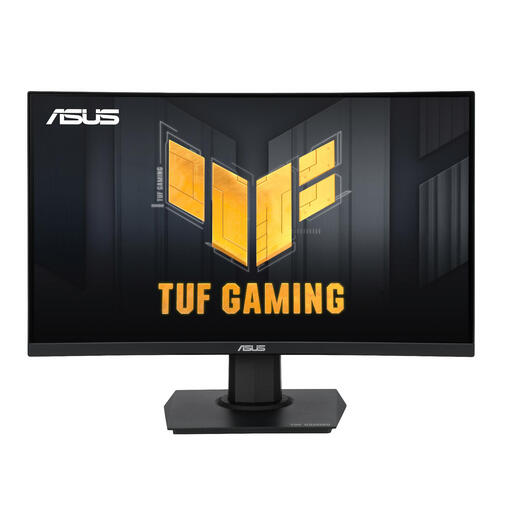
ASUS TUF Gaming VG24VQER, 23.6 inches, 1920 × 1080 pixels, Full HD

ASUS TUF Gaming VG24VQER, 23,6 inch, 1920 × 1080 pixels, Full HD

A compact Full HD option to compare if you have limited space for a screen.

The product name lists a 23,6-inch screen and a resolution of 1920 × 1080 pixels.

Check the connections and dimensions with the stand for the version on offer.

Joybuy

ASUS TUF Gaming VG249Q3A, 23.8 inches, 1920 × 1080 pixels, Full HD

ASUS TUF Gaming VG249Q3A, 23,8 inch, 1920 × 1080 pixels, Full HD

A compact IPS option to compare if you’re looking for Full HD and also want to consider refresh rate.

ASUS lists an IPS panel, 180 Hz, VESA 100 × 100 mm and an approximate depth of 17,40 cm with the stand for this model. ASUS states that the stand has no height adjustment.

Check which resolution and refresh rate your device supports through the connection you plan to use.

Joybuy

GIGABYTE GS24F14A Gaming Monitor, 60.4 cm

GIGABYTE GS24F14A Gaming Monitor, 60,4 cm

A monitor with a stated screen size of 60,4 cm to compare if you’re looking for a more compact screen.

Check the full dimensions with the stand and make sure the screen height suits your setup.

Joybuy

KTC H24B9S gaming monitor, 24 inches, 144Hz, 1080P FHD

KTC H24B9S gaming monitor, 24 inch, 144Hz, 1080P FHD

The product name describes a 24-inch Full HD monitor. Before buying, check that the screen size and resolution of the version on offer suit your setup.

The product name also lists 144Hz. Check whether your PC or console supports this refresh rate through the connection you plan to use.

Joybuy

Frequently asked questions

Is 180 Hz essential for a detective adventure?

No, not simply because of the game genre. First check whether the screen size, readability and performance in dark scenes suit your setup. Then compare the refresh rates supported by the monitor, connection and your PC or console.

What can I do if the monitor stand is too deep?

First measure the available space and compare it with the dimensions of the exact model, including its stand. A monitor arm is only an alternative if the monitor has compatible VESA mounting and the arm and desk are suitable. BenQ and ASUS list VESA 100 × 100 mm for the models mentioned.

What if a monitor I bought online doesn’t fit or develops a fault?

According to the Netherlands Authority for Consumers and Markets, consumers generally have 14 days from delivery to change their mind about online purchases; check for any exceptions. If a product is faulty, the seller is responsible for the statutory guarantee, in addition to any commercial manufacturer’s warranty.

What should I know about the CE mark and disposal?

The Dutch government states that electronic products placed on the market in the EU must carry a CE mark, so check this on the specific product. When you buy a similar new appliance, the retailer must take back your old electrical appliance free of charge under the old-for-new scheme, including for online purchases.
