
If you need to read small clues
If you look at lots of text and fine details, compare the resolution with a screen size that will fit your desk. AOC Nederland and Philips Nederland list QHD for the 27-inch models mentioned here.


If you usually sit directly in front of the screen and dark scenes matter to you, compare VA panels; IPS is an alternative if you often view the screen from an angle or watch with someone else. Then check that the resolution, stand, ports and headphone output suit your desk and PC or console. OLED is another option if deep blacks are a priority, but static images displayed for long periods can carry a risk of burn-in.
If you look at lots of text and fine details, compare the resolution with a screen size that will fit your desk. AOC Nederland and Philips Nederland list QHD for the 27-inch models mentioned here.
If you play through dark scenes while sharing a room with someone else, compare contrast, viewing angles and brightness adjustment options. RTINGS.com generally reports higher contrast for VA and wider viewing angles for IPS.
Check the stand, available space and ports for the full model code; also check whether the screen has a headphone output. AOC Nederland and Dell Nederland list these features for the Q27G3XMN/BK and G2725D respectively.
Start with your viewing position and the space available on your desk. Then make sure the screen resolution and ports suit your PC or console.
Choose this if: you usually sit directly in front of the screen and dark scenes matter to you.
Trade-off: RTINGS.com generally reports higher contrast than IPS, but narrower viewing angles; assess motion handling and any local dimming on a model-by-model basis.
Choose this if: you view the screen from different angles or watch with someone else.
Trade-off: RTINGS.com generally reports wider viewing angles than VA, but lower contrast.
Choose this if: deep blacks are a priority and you want to assess the terms for a specific model.
Trade-off: RTINGS.com describes a risk of burn-in from static image elements displayed for long periods. This says nothing about the availability or warranty terms of any specific model.
| Consideration | What should you check? | Who is this important for? |
|---|---|---|
| Reading fine details | Compare resolution, screen size and external dimensions including the stand; check that your source device can handle the resolution you want. AOC Nederland and Philips Nederland list QHD for the 27-inch models mentioned here. | I want to read small clues and text clearly from my viewing distance without choosing a screen that dominates my desk. Around 36% of consumers prioritise being able to read fine details. |
| Dark scenes | Compare VA and IPS on the specific model. RTINGS.com generally reports higher contrast for VA and wider viewing angles for IPS; assess local dimming separately. | If I mainly play in the evening, sitting directly in front of the screen, I want to make out dark details and understand that the panel type affects viewing angles. Around 29% of consumers prioritise dark-image performance. |
| Positioning and private listening | Measure the available space, including the stand, and check the adjustability and headphone output for the full model code. AOC Nederland and Dell Nederland list these features for specific models. | In a shared bedroom, I want to position the screen so it fits and listen through headphones. Around 21% of consumers prioritise shared-space suitability and private listening. |
| Connection and refresh rate | Check the video port on your PC or console and the resolution-plus-refresh-rate combination available on each input. Dell Nederland lists QHD at 180 Hz via DisplayPort and QHD at 144 Hz via HDMI for the G2725D. | I want to know whether my PC or console can deliver the resolution and refresh rate I want through the port I plan to use. Around 14% of consumers prioritise connectivity and achievable display settings. |
According to Philips, the Philips Evnia 27M2N3500NL/01 has a Fast VA panel, while the 27M2N3500NF/00 uses IPS. This means the trade-offs around contrast and viewing angles are different.
Compare the full model code and check which panel the specific version uses.
Philips states that Smart MBR limits brightness adjustment and can cause flickering on the 27M2N3500NF/00. Contrast and motion handling should also be assessed for each model.
Check which setting a response time applies to, and compare the contrast and image settings for the exact version too.
The stand may limit where you can place the screen on a shared desk. For the Dell G2725D, the QHD refresh rates listed by Dell vary by port.
Measure the available space and check the source device, cable, port and adjustability for the exact model.
Depending on the connection and positioning, you may need a different cable or a suitable mount.
The Q27G3XMN/BK is a model to consider when comparing 27-inch QHD, VA contrast and mini-LED for dark scenes.
For the Evnia 3000 models mentioned here, the full model code helps determine whether you get a VA or IPS panel.
The G2725D is a model to consider when comparing QHD, IPS and the differences between DisplayPort and HDMI.
The 27GS75Q-B is a reference point for a 27-inch QHD IPS model with height adjustment and a headphone output.
This selection includes VA and IPS gaming monitors to help you weigh up resolution, viewing position and placement in a shared bedroom.
 No image available
A 32-inch QHD option to help you weigh detail against the space available on your desk.
32 inches; 2560 × 1440; 180 Hz; HVA; 1500R; Adaptive Sync; HDR10; 1 ms.
 No image available
The QHD resolution and curved 32-inch format give you specific features to compare with your viewing distance and desk space.
32 inches; 2560 × 1440; 165 Hz; 1500R; Adaptive Sync; VESA 100 × 100 mm.
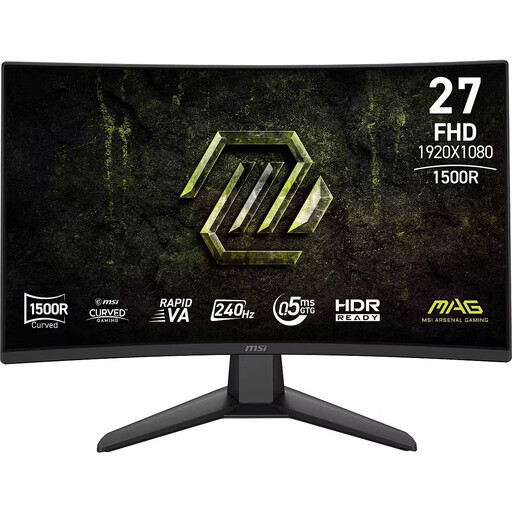 No image available
The stated 27-inch size and FHD resolution can help you decide whether this screen suits your desk and your need to see fine details.
27 inches; FHD; Rapid VA; 240 Hz; 0.5 ms; Adaptive-Sync.
 No image available
A 27-inch WQHD IPS option to help you weigh up detail and viewing the screen from another angle.
27 inches; 2K WQHD; Rapid IPS; 200 Hz.
 No image available
This 27-inch QHD option lets you compare detail with IPS as a viewing-angle choice.
27 inches; QHD; IPS; 144 Hz; Smart MBR; HDR10; Adaptive Sync.
Not just because of the type of game. First choose a resolution and screen size that suit how you use it, then check whether your PC or console can deliver the display setting you want through the port you plan to use. Dell Nederland lists different maximum refresh rates via DisplayPort and HDMI for the G2725D.
Measure the available space, including the stand, and check whether the monitor you choose is height-adjustable if you need that flexibility. If you want to listen privately, check that the full model code has a headphone output; AOC Nederland lists height adjustment for the Q27G3XMN/BK, while Dell Nederland lists a headphone output for the G2725D.
Compare the consumption in kWh per 1,000 hours on the energy label for the exact monitor. Energielabel.nl also lists a separate HDR figure; take this into account if you use HDR.
No. According to ACM ConsuWijzer, the statutory guarantee is separate from any seller or manufacturer’s warranty. If a product is faulty despite normal use, the seller is responsible for providing a suitable solution free of charge. For distance purchases from a business, you will also often have a 14-day cooling-off period; check the terms that apply to your specific purchase.
If you are buying a new, similar device as a private individual, the retailer must take your old device free of charge, according to the Dutch government. This also applies to online purchases; if the delivery driver cannot collect it straight away, arrangements must be made for a later collection.