Start with a screen size that fits your desk and makes text and dark scenes comfortable to view; the highest refresh rate isn’t automatically the most useful choice for story-driven adventures. QHD LCD and QHD OLED are different options: OLED can be appealing if contrast in dark scenes is your priority, but the result also depends on the ambient light and the specific model. Also check for a headphone socket and whether your PC or console supports the resolution and refresh rate you want.
Who is this guide for?
Players who follow the action in dark scenes
You mainly play story-driven adventures and want to make out details in dark scenes. Look at contrast as well as how black appears in your room’s lighting; a contrast figure alone won’t tell you how the picture will look in your space.
Room-sharers with a small desk
You share your sleeping and working space and need a screen that fits, is easy to position and can be used quietly. Measure the stand’s footprint too, and check whether the monitor, PC or console has a suitable headphone socket.
Players who read clues and dialogue
You read plenty of dialogue, notes or maps, and may also use the screen for studying or other work. Compare text clarity and resolution at the size you’re considering, rather than looking only at contrast or refresh rate.
What should you look for?
27-inch QHD LCD
A good fit for: anyone who wants to read text and clues at a desk and compare LCD with OLED.
The trade-off: compare the contrast of the exact model. In Tweakers’ comparison via NU.nl, the AOC LCD model tested had lower contrast and less convincing HDR performance than the OLED monitor tested.
27-inch QHD OLED
A good fit for: anyone who values dark scenes and viewing angles, and has room for a 27-inch screen.
The trade-off: testers found that blacks on the Gigabyte MO27Q2A looked impressive in a dark room, but greyer in bright ambient light; text also looked less sharp than on many other monitors.
Larger 32-inch 4K OLED
A good fit for: anyone looking for extra screen space who can accommodate it with their desk, viewing distance and source device.
The trade-off: a larger screen takes up more space; the Joybuy product listing for the MSI MPG 321URX tested did not mention built-in speakers.
More compact monitor
A good fit for: anyone short on desk space or sharing their setup with a roommate.
The trade-off: check that text, maps and details remain comfortable to read at your chosen screen size; measure the space needed, including the stand.
| What to consider |
What should you check? |
Who should pay extra attention? |
| Dark scenes |
Compare reviews of the exact model and consider contrast, screen finish and the lighting in your room. |
If I want to spot clues in shadowy scenes, I look beyond an HDR label alone. Around 36% of consumers prioritise contrast and dark scenes. |
| Size and quiet use |
Measure your desk and the stand; check adjustability and for a headphone socket on the monitor or source device. |
If I share a bedroom, I want the screen to fit and to be able to play without using the monitor’s speakers. Around 29% of consumers prioritise shared spaces and quiet use. |
| Readability |
Look at text tests for the exact model and compare resolution, screen size and viewing distance. |
If I read a lot of dialogue, notes and maps, clear text matters more than a high contrast figure alone. Around 21% of consumers prioritise readability. |
| Connection and refresh rate |
Check the supported video output of the monitor, port and PC or console together. |
If I connect my own PC or console, I want to know what resolution and refresh rate the combination can handle. Around 14% of consumers start by checking device connections and the refresh rate they can achieve. |
Common mistakes
-
Assuming an HDR label means better picture quality
HDR alone doesn’t tell you how convincing dark scenes will look on a particular model. In Tweakers’ comparison via NU.nl, the LCD model tested delivered less convincing HDR performance than the OLED option tested; ambient light also affected how black looked on OLED.
Compare reviews of the exact model and take the lighting in your room into account.
-
Looking only at screen size
The stand takes up space too, and models differ in adjustability and audio connections. Built-in speakers aren’t available on every model either.
Measure the available space, including the depth of the stand, and check the audio ports on the version you’re choosing.
For quiet use, you may still need a suitable headset or a different setup.
-
Assuming the maximum refresh rate is guaranteed
The resolution and refresh rate you can achieve also depend on the port, cable, settings and game. Sony states that 120Hz output on PS5 depends on the screen and game.
Check the connection, cable and output settings for your devices.
-
Treating an old product listing or offer as current
An earlier product description or offer doesn’t necessarily reflect the current product page or terms.
Check the product page and the terms that apply when you’re ready to order.
Brands to consider
Gigabyte
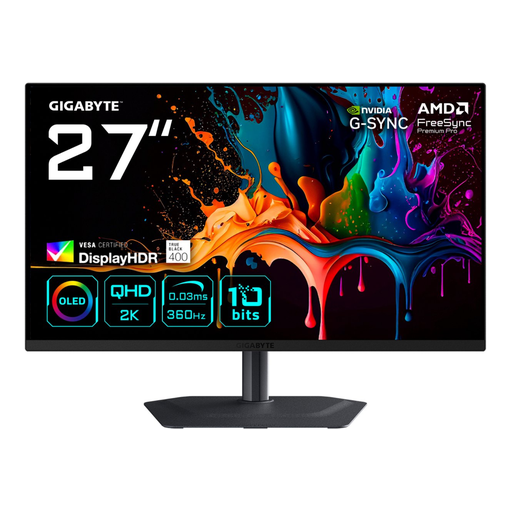
The MO27Q2A is an example of a 27-inch QHD QD-OLED monitor for anyone who values contrast in story-driven games.
- Gigabyte specifies 280 Hz, two HDMI 2.1 ports, a headphone socket and 5 W × 2 speakers.
- In the independent test via NU.nl, blacks looked greyer in bright ambient light, and text looked less sharp than on many other monitors. This applies to the version tested.
AOC
The Q27G4ZR is a 27-inch QHD Fast IPS model to compare with OLED.
- AOC lists 240 Hz as standard and 260 Hz when overclocked; these are product specifications, not measured improvements in gaming performance.
- In the comparison via NU.nl, the model tested had lower contrast and less convincing HDR performance than the OLED monitor tested. Check which version is included in the offer.
MSI
The MPG 321URX QD-OLED is a larger 32-inch 4K option for a desk with plenty of room.
- MSI specifies 4K, 240 Hz and HDMI 2.1 with console features. Contrast and viewing angles received positive reviews in the independent test.
- The USB ports delivered USB 2.0 speeds in that test. The Joybuy product listing did not mention built-in speakers.
BenQ
The EW270Q is a 27-inch QHD model with integrated audio and connections for different uses.
- BenQ specifies 200 Hz, 5 W × 2 speakers, HDMI 2.0, DisplayPort 1.4 and 65 W USB-C.
- Built-in speakers aren’t a substitute for a quiet listening option when you share a room.
Dell
The S2722DGM is a 27-inch QHD VA example with a curved screen.
- Dell specifies a 3000:1 contrast ratio, 165 Hz via DisplayPort and 144 Hz via HDMI; the model also has height adjustment and a headphone output.
- The refresh rates listed differ depending on the connection and apply to this model; check the connection you’ll be using.
Joybuy products to consider
These models are QHD monitors around 27 inches, suited to story-driven games; the selection includes both OLED and LCD options.
 No image available
Samsung LS27FG500SUXEN 27-inch Quad HD OLED gaming monitor
An option to compare if you’re looking for a 27-inch OLED screen and a headphone socket for quiet use.
27 inches; Quad HD; 180 Hz; FreeSync and G-SYNC compatibility; headphone output.
View at Joybuy
 No image available
AOC Gaming Q27G42XNE 27-inch Quad HD monitor
An LCD option to compare if you want to read clues on a 27-inch desk monitor.
27 inches; 2560 × 1440; VA panel; 180 Hz; HDMI 2.0 and DisplayPort 1.4.
View at Joybuy
 No image available
LG UltraGear 27GX704A-B.AEU 27-inch QHD OLED monitor
An OLED option to compare if contrast in dark scenes and a headphone socket are important to you.
27 inches; QHD (2560 × 1440); 240 Hz; HDMI 2.1 and DisplayPort 1.4; G-SYNC Compatible and FreeSync Premium Pro.
View at Joybuy
 No image available
Gigabyte MO27Q3 27-inch Quad HD QD-OLED monitor
A 27-inch QD-OLED option to compare for games with dark scenes; if you share your space, also consider the built-in speakers.
27 inches; 2560 × 1440; QD-OLED; built-in speakers.
View at Joybuy
 No image available
MSI MAG 272QP QD-OLED X24 26.5-inch WQHD monitor
An OLED option to compare if you’re looking for QHD and want to listen through headphones.
26.5 inches; WQHD; 240 Hz; QD-OLED; headphone output.
View at Joybuy
Frequently asked questions
Do I need a 240Hz monitor for a detective adventure?
Not necessarily. Coolblue says 60 Hz is already suitable for beginners playing adventure games; also check what your device and the game can actually output.
How can I keep noise to a minimum in a shared bedroom?
Check whether the monitor has a headphone output, or use the audio connection on your PC or console. Don’t assume it has built-in speakers: this varies by model.
What should I check after connecting a PS5?
On your PS5, go to Screen and Video to check which output the connected screen supports. Sony offers, among other things, a test for 1440p output and settings for 120 Hz and variable refresh rate; the options available depend on the screen and game.
Where can I find information about a monitor’s energy use?
For electronic displays covered by the relevant EU rules, the energy label shows an A to G rating and information for SDR and, where relevant, HDR. The European Commission directs you to the official EPREL database for additional model information.
What are my rights when buying online in the Netherlands?
According to the Dutch Government, when you buy at a distance, the seller must provide information about the product and your cooling-off period, which is usually 14 days. You’re also entitled to a product that meets legal standards, and you can contact the seller if there’s a problem. Check the terms for your specific purchase too.


