
Players who need to read the shadows
You play and discuss tactics in dark scenes, and want to make out the details without relying solely on a bright picture setting.


Choose according to what bothers you most during training: poor visibility in dark scenes, fast movement that is hard to follow, or an awkward audio setup. OLED is an option for viewing deep blacks, while IPS and VA offer different trade-offs. Check the picture settings for each model, and which refresh rates your source and connection support. For team chat, you’ll need to set up the microphone separately on your PC or console.
You play and discuss tactics in dark scenes, and want to make out the details without relying solely on a bright picture setting.
You practise your timing and reactions to fast movement, and want to match the refresh rate to your PC or console and the connection you’re using.
You want to communicate clearly while playing, and need to know where to connect your headset and microphone, separately from the display specifications.
First decide whether dark scenes, motion or voice chat matters most to you. Then check the panel specifications and settings for the exact model, and make sure the connections are suitable for your PC or console.
| What to consider | What should you check? | Who is this important for? |
|---|---|---|
| Detail in dark scenes | Compare the contrast and any local dimming with the shadow or FPS settings on the exact model. | If I’m missing details in the shadows, I want to know whether the contrast and game settings are right for me. Around 33% of consumers prioritise shadow detail. |
| Motion clarity | Check which resolution and refresh rate the monitor supports for each input, and what your source and game can output. | In fast-paced practice sessions, I want to follow movement clearly and match the output to my PC or console. Around 27% of consumers prioritise motion clarity. |
| Voice chat alongside the picture | Plan where to connect your headset and microphone, and check which input and output devices are selected on your PC or console. | When I’m communicating with my team, my microphone needs to work and I need to be able to adjust the chat audio. Around 20% of consumers prioritise their voice chat setup. |
| Fixed on-screen elements | Consider extended use with static content, and read the care and warranty terms for the specific OLED model. | If I spend a lot of time with fixed HUD elements or a desktop on screen, I want to take the risk of burn-in into account. Extended mixed use is also the main priority for around 20% of consumers. |
The refresh rate you can actually use also depends on the source, game, resolution and connection. So a high figure on the box doesn’t tell you by itself what your setup can support.
Check the combination of resolution, input and refresh rate for your PC or console. Sony also advises PS5 users to check their video output settings.
An FPS or shadow setting can change how dark areas are displayed, but it isn’t the same as higher native contrast. Local dimming is a separate feature, and how it works can affect detail around bright objects.
Compare the contrast and dark-scene performance of the exact model alongside its available game modes.
Speakers provide audio output, but don’t mean the monitor also has a microphone input.
Decide in advance how to connect your headset and microphone to your PC or console, then check the selected input device and chat volume there.
Prolonged exposure to fixed on-screen elements carries a risk of burn-in with OLED. The effects and any cover depend in part on the terms for the specific model.
Read the care instructions and warranty terms, and consider other panel types if you expect to use static content a lot.
LG UltraGear is worth considering if you want to compare QHD OLED with a high stated refresh rate.
Philips Evnia offers Fast IPS and Fast VA models, among others, for comparing panel types and settings for dark scenes.
BenQ MOBIUZ is worth considering if adjustable shadow detail and built-in audio are important to you.
The ROG Swift OLED PG27UCDM is a 27-inch 4K OLED model to consider if you’re weighing up resolution and refresh rate together.
This selection includes OLED, QD-OLED and Mini LED/IPS gaming monitors for dark scenes and fast-paced matches. Compare the stated panel and display specifications, and check which settings your system supports through the connection you’ve chosen.
 No image available
This OLED model is worth comparing if deep blacks matter to you; bear the risk of burn-in in mind if you use it for long periods with static images.
27 inches; WQHD; OLED; stated refresh rate 280 Hz.
 No image available
This OLED model is worth considering if you want to compare performance in dark scenes; take the risk of prolonged use with static images into account.
27 inches; OLED; QHD (2560 x 1440); stated refresh rate 240 Hz; 2x HDMI 2.1.
 No image available
This IPS model with Mini LED is an alternative to compare if you want to assess dark-scene settings alongside panel type. Check which picture mode suits your game.
27 inches; IPS; Mini LED; QHD; stated refresh rate 275 Hz; stated response time 1 ms.
 No image available
This QD-OLED model is an option to compare with other panel types for use in a dark room; also check the system requirements for your chosen resolution.
26.7 inches; 4K UHD (3840 x 2160); QD-OLED.
Bear the risk of burn-in in mind if you use it for long periods with static images.
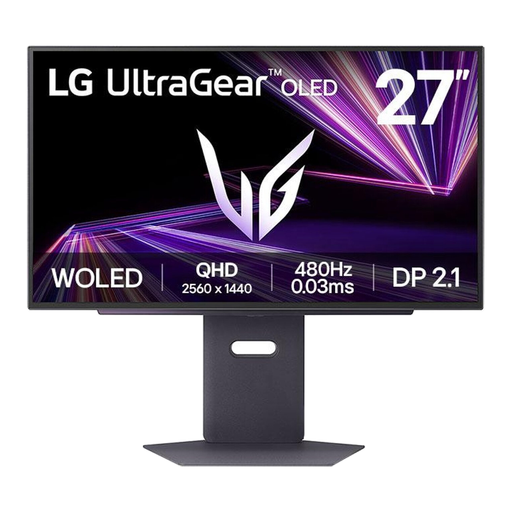 No image available
This OLED model is worth comparing if deep blacks matter to you. If you often use fixed on-screen elements, take the risk of prolonged use with static images into account.
27 inches; OLED; 2560 x 1440 (2K).
No, monitor speakers provide audio output. For voice chat, set a microphone as the input device on your PC or console. Sony also describes settings for microphone level and the balance between chat and game audio on PS5.
On your PS5, check the screen and video settings, as well as the output of the connected HDMI equipment. Sony says that 120 Hz output must be enabled and that the game must support this refresh rate. There’s also an output test for 1440p.
Bear prolonged use with static images in mind, and follow the care instructions for your chosen model. ASUS describes its OLED care features as ways to reduce the risk of burn-in; they don’t prove that the risk has been eliminated.
No. According to ACM ConsuWijzer, the legal guarantee is separate from any manufacturer’s warranty. With normal use, a product must meet the expectations you were entitled to have of it; the retailer is responsible if it doesn’t. What you can expect, and the applicable period, depend on the product and the circumstances.
For a standard online consumer purchase, you generally have a statutory cancellation period of up to 14 days after delivery, according to ACM ConsuWijzer. Check the applicable exceptions and returns terms; the cancellation period is separate from the guarantee.