A monitor can replace your separate laptop charger only if your laptop can output video over USB-C and the monitor provides enough Power Delivery; the monitor itself still needs a power socket. For dark horror games, compare OLED, mini-LED and IPS on a model-by-model basis, paying attention to picture quality in dark scenes, connections and energy consumption.
Who is this for?
Laptop gamer with one spare socket
You play survival horror on a laptop and want to know whether a single USB-C connection can provide both video and enough power for your laptop. ASUS and BenQ specify USB-C video and 90 W Power Delivery for the models discussed; check that the connection and power output are suitable for your laptop.
Fan of dark scenes
You want to weigh up black levels and detail in dark environments, and compare the pros and cons of OLED and mini-LED for each model. An HDR rating or high refresh rate alone doesn’t tell you how a screen will look in your games.
Budget-conscious QHD gamer
You’re looking for the right combination of resolution and motion performance, without paying extra for laptop charging through the monitor if you don’t need it. The AOC and Philips models discussed are QHD Fast IPS options; also compare the connections and energy information for the exact model.
What should you look for?
| What to consider |
What should you check? |
Who is this important for? |
| Laptop charging over USB-C |
Check for USB-C DisplayPort Alt Mode and the monitor’s Power Delivery output; also check how much power your laptop needs while gaming. |
If I use a laptop and want to avoid a separate charger, the video signal and charging power need to be right for my setup. Around 36% of consumers give avoiding a separate charger top priority. |
| Dark scenes |
Compare model-specific picture tests for dark scenes and HDR; for OLED, also check the care instructions and warranty terms. |
If I mainly want to assess black levels and detail in horror games, I can prioritise picture quality over charging through the monitor. Around 29% of consumers prioritise picture quality in dark scenes. |
| Cost and energy consumption |
Compare the same type of consumption, such as SDR with SDR, and check the information for the exact model on the energy label or in EPREL. |
If I’m mainly looking for a practical screen and don’t need extra features, I also want to factor in energy consumption. Around 21% of consumers say cost and energy consumption are their top priorities. |
| Motion and gaming device |
Check which resolution and refresh rate are supported through the HDMI, DisplayPort or USB-C connection you plan to use. |
If you want to connect your PC, laptop or console using the right picture mode, the source device and input you use are key. Around 14% of consumers prioritise source compatibility and motion performance. |
Common buying mistakes
-
Assuming every USB-C port can replace your laptop charger
USB-C needs to support video and provide enough Power Delivery for your laptop. GIGABYTE specifies up to 18 W for the MO27Q2A, while ASUS lists 90 W for the XG27ACDNG and BenQ lists 90 W for the EX271UZ. Even with these models, it depends on whether the power output is suitable for your laptop.
Before buying, check for USB-C DisplayPort Alt Mode on the monitor, as well as video and charging support on your laptop. The monitor itself still needs to be connected to mains power.
If the charging power isn’t enough, you’ll still need your separate laptop charger, which will use a power socket.
-
Assuming HDR or a high refresh rate guarantees a good picture in dark scenes
An HDR rating or high refresh rate doesn’t automatically tell you how dark details and motion will look in a particular game. In a practical test by Dutch site Tweakers, the mini-LED screens tested differed in areas including viewing angles and motion handling.
Alongside the specifications, look for tests of the exact model covering HDR, dark scenes and motion.
-
Comparing energy figures measured in different ways
Typical and maximum consumption, or SDR and HDR consumption, don’t describe the same usage scenario. For example, BenQ lists 37 W typical and 230 W maximum consumption for the EX271UZ. These figures aren’t directly comparable as a single measure of usage.
Compare figures for the same usage mode on the EU energy label or in EPREL. Calculate any running costs using your own electricity tariff and usage time.
Brands to compare
ASUS
According to ASUS, the ROG Strix OLED XG27ACDNG is a QHD OLED model with USB-C video and 90 W Power Delivery.
- ASUS lists a 360 Hz refresh rate for this model and a three-year warranty that includes panel burn-in.
- Check whether 90 W is enough for your laptop’s charging requirements.
BenQ
According to BenQ, the MOBIUZ EX271UZ combines 4K OLED with USB-C DisplayPort Alt Mode and 90 W Power Delivery.
- BenQ lists a 240 Hz refresh rate and USB-C for video and power on this model.
- BenQ lists 37 W typical and 230 W maximum energy consumption; don’t compare these figures as if they describe the same usage scenario.
Gigabyte
The MO27Q2A is a QHD QD-OLED model with USB-C, covered in a Dutch-language monitor guide by Tweakers in September 2026.
- Gigabyte lists up to 18 W Power Delivery for the USB-C connection.
- That’s not the same as 90 W, so it won’t necessarily replace a gaming laptop charger. The guide mentioned is flagged as an older version.
AOC
AOC’s Dutch model information includes both the QHD Fast IPS Q27G42XE and the QHD QD-OLED Q27G41ZDF.
- AOC lists three years of cover for OLED burn-in on the Q27G41ZDF, subject to screen-care conditions.
- Follow the care instructions for the exact model to qualify for this cover; the stated warranty condition doesn’t automatically apply to other AOC monitors.
Philips
The Evnia 27M2N5500/00 is a QHD Fast IPS model to consider if charging your laptop through the monitor isn’t a top priority.
- Philips lists a 180 Hz refresh rate and a Smart MBR value of 0.5 ms for this model.
- Philips’ stated MBR value isn’t an independent measure of performance in dark scenes.
Gaming monitors at Joybuy
These models are options to compare for gaming in dark scenes, with QHD and 4K choices and a range of panel types.
 No image available
LG UltraGear 27GX704A-B.AEU
A QHD OLED option to compare for dark games.
27 inches; OLED; QHD (2560 × 1440); 240 Hz; DisplayHDR True Black 400; 2× HDMI 2.1 and 1× DisplayPort 1.4.
View at Joybuy
 No image available
INNOCN 2751S PLUS
A mini-LED model to compare if HDR and dark scenes matter to you.
QHD; 275 Hz; IPS; mini-LED with 1,152 zones; HDR1000; HDMI 2.1 and DisplayPort 1.4.
View at Joybuy
 No image available
KTC M27P6
A 4K mini-LED option with USB-C power; check whether 65 W is enough for your laptop.
4K 160 Hz or FHD 320 Hz; Fast IPS; mini-LED with 1,152 zones; HDR1400; USB-C Power Delivery 65 W.
View at Joybuy
 No image available
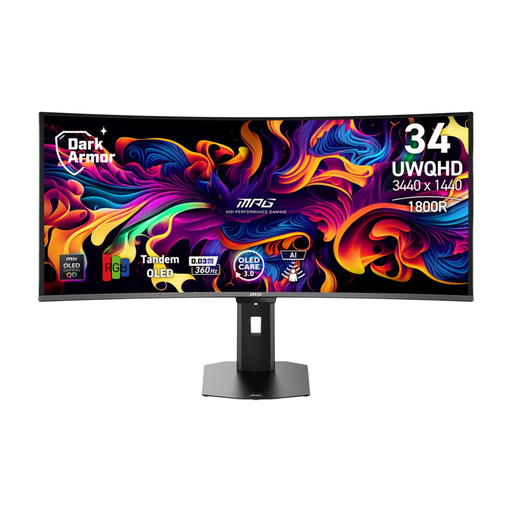
MSI MPG 341CQR QD-OLED X36
An ultrawide QD-OLED model to compare if you’re also considering a wider screen format.
34 inches; 3440 × 1440; QD-OLED; DisplayHDR True Black 400; HDMI 2.1 and Adaptive Sync.
View at Joybuy
 No image available
MSI MAG 272QPF E20
A QHD Rapid IPS option to compare if motion performance matters and OLED isn’t your chosen panel type.
27 inches; QHD; 200 Hz; Rapid IPS; HDR support.
View at Joybuy
Frequently asked questions
Can a gaming monitor power two devices from one socket?
You can only do without a separate laptop charger if your laptop is compatible: check that it supports video over USB-C and that the Power Delivery output is sufficient. The monitor itself still needs to be connected to mains power. GIGABYTE lists up to 18 W for the MO27Q2A; ASUS and BenQ list 90 W for the models discussed here.
How can I connect equipment safely when there are few power sockets?
Brandweer Nederland advises checking cables and extension leads for damage and not connecting extension leads to each other. This advice doesn’t replace checking the load on your electrical connection.
What should I know about OLED care and warranty?
Follow the care instructions for your exact screen and read the terms for any cover against OLED burn-in. AOC makes this cover for the Q27G41ZDF subject to prescribed screen care; ASUS lists a three-year warranty, including panel burn-in, for the XG27ACDNG. In the Netherlands, your statutory rights against the seller are separate from any additional manufacturer’s warranty and depend on what you could reasonably expect from the product under normal use.
Does a gaming monitor need an energy label in the Netherlands?
The European Commission states that EU energy labelling rules also cover computer monitors. Use the label and EPREL to compare information for the exact model, including separate SDR and HDR figures; don’t assume an energy rating means you’ll save a power socket.


