
Gamer with limited desk space
You share a bedroom and want to check first that the screen and stand will fit. GIGABYTE says the GS24F14A has a tilt-adjustable stand; remember to measure the depth you’ll need, too.


Start with the desk space you have, the connection on your PC or console, and an audio setup that won’t disturb your roommate. A compact Full HD screen is more likely to suit a small workspace; a larger QHD screen is worth considering if you have the room and want to make the most of the extra resolution. Check the refresh rate for each connection: the highest figure quoted won’t necessarily apply to every input, console or game.
You share a bedroom and want to check first that the screen and stand will fit. GIGABYTE says the GS24F14A has a tilt-adjustable stand; remember to measure the depth you’ll need, too.
You want to match the resolution and frame rate to your console, connection and game. Sony describes a 1440p output test for PS5; Nintendo says Switch 2 supports up to 60 fps at 4K output.
You want to listen through a suitable headphone connection and check separately that the microphone connection you need is available. An audio output doesn’t automatically mean that headphones are included.
First compare the space available for the screen and stand, then check your gaming platform’s output, and finally look at the audio connections. This helps ensure that screen size or a quoted maximum refresh rate doesn’t matter more than what you can actually use in your space.
| What to consider | What should you check? | Who is this important for? |
|---|---|---|
| Space and positioning | Measure the available width and depth, including the stand. Check the adjustment options offered by the stand on each model. | If I share a desk, I want to know whether the screen and stand will fit without making my workspace awkward to use. Around 31% of consumers say space and positioning are their top priority when choosing. |
| Connection and refresh rate | Check the output supported by your console or PC, the monitor port you choose and the game. Sony describes a PS5 test for 1440p at 60 and 120 Hz; Nintendo says Switch 2 supports up to 60 fps at 4K output. | If I play on a particular console, I want to know which resolution and refresh rate are possible through my connection and in my game. Around 31% of consumers put platform compatibility first. |
| Sound in the bedroom | Check whether your console or PC can send audio to your headphones and whether the audio output you choose is compatible with them. Don’t assume there’s a microphone input or that headphones are included. | If someone else is in the room, I want to play without sound coming from the monitor and know whether my chat microphone will work, too. Around 25% of consumers put quiet audio first. |
| Sharpness and energy use | Compare the resolution, screen size and energy label for the exact model. The European Commission says electronic displays are rated on a scale from A to G. | If extra pixels or energy use will affect my choice, I want to compare the screen resolution and label for the exact model. Around 13% of consumers say sharpness or running costs come first. |
The available refresh rate can vary by port and also depends on your system’s output settings and the game’s capabilities.
Check the specifications for the connection you’ll actually use, then look at your console or PC’s output settings.
The stand takes up space, too. And a tilt-adjustable stand doesn’t offer the same positioning options as a model with height adjustment.
Measure the space for both the screen and stand, and check the adjustment options on the exact model.
If the stand doesn’t suit your preferred viewing height or setup, you may need a different stand or mounting solution.
An audio output doesn’t prove that the connected device can also handle microphone audio for chat.
Check the headphone and microphone connections separately on the console or PC you use.
You may also need a separate, compatible microphone solution for chat.
The GS24F14A is a compact Full HD option to compare if desk space is a priority.
The 24M2N3200A/01 is a Full HD model for which Philips quotes a 180 Hz refresh rate.
The G2725D is an example of a 27-inch QHD option where the choice of port matters.
The UltraGear 27GS75Q-B is a 27-inch QHD example for comparing screen size and adjustability.
This selection focuses on compact Full HD gaming monitors of around 24 inches, as a starting point for a shared workspace. Check the stand, connections and audio setup for each version.
 No image available
The product name describes a 24-inch Full HD gaming monitor for a compact setup. It also lists 200 Hz, 1 ms and IPS; check which refresh rate your connection and game support.
 No image available
The name describes a 24-inch Full HD gaming monitor for a compact workspace. For shared use, check separately that the audio and microphone connections suit your console or PC.
 No image available
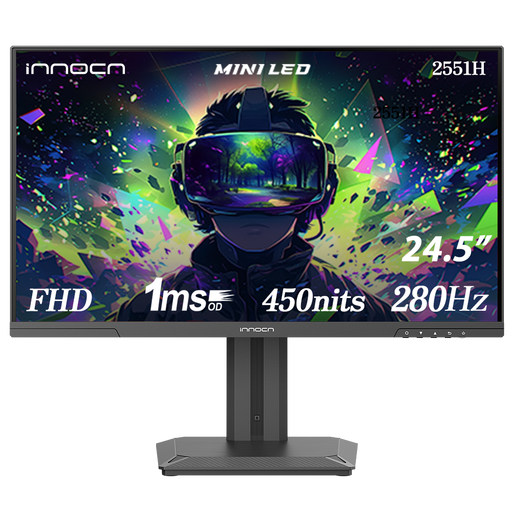
The product name describes a 24.5-inch Full HD Mini LED monitor for anyone looking for a compact size. It also lists 180 zones, 280 Hz and IPS; check the refresh rate supported by the connection you use.
 No image available
The product name describes a 24-inch Full HD IPS gaming monitor for a compact setup. It also lists 144 Hz; check the port and output settings on your own device.
 No image available
This model may suit a compact Full HD setup; the stand tilts but doesn’t adjust in height. GIGABYTE lists 175 Hz as an overclocked refresh rate, so check the settings and the support offered by your connection and game.
No, not necessarily: first check what your game and system can output, and what the input you choose supports. Sony describes a 1440p test for PS5 at, among other rates, 60 and 120 Hz; Dell lists different maximum rates for HDMI and DisplayPort on the G2725D.
Don’t assume so from the monitor specifications: Nintendo lists a maximum of 60 fps at 4K output through the dock. The game and connected screen must also support the display settings you choose.
Check your console or PC’s audio output in advance and make sure it’s suitable for your headphones. A headphone output on a monitor doesn’t prove that the microphone will work for chat through the same connection.
Compare the energy label and product information sheet for the exact model. According to the European Commission, electronic displays, including computer monitors, are labelled on a scale from A to G; the rating alone doesn’t tell you how much electricity your own use will require.
For most consumer purchases made online from a business, you have a 14-day cooling-off period, subject to legal exceptions. You’re also entitled to a product that meets the required standards. According to the Dutch government, the Netherlands has no fixed statutory two-year warranty period; if there’s a fault, contact the retailer.